

From Novice to Expert: Adaptive Risk Management for Liquidity Strategies
 2 214
2 214
 1
1

Successfully identifying liquidity zones and detecting liquidity flips with MQL5 can provide traders with a powerful structural edge in the market. These zones often highlight areas where institutional activity is concentrated, offering precise and logical entry points. Yet traders who adopt liquidity-based strategies quickly encounter a frustrating reality: their analysis is often correct—but their trades still fail.
You mark a clean demand zone. Price returns precisely into it. The structure is intact, the logic is sound, and the entry feels justified. Then price pushes slightly deeper, takes out your stop, and only afterward moves in the anticipated direction. The setup was not wrong—the risk handling around it was.
This failure repeats in different forms. Breakouts that appear decisive turn into liquidity grabs. Previously respected zones collapse or flip. Lower-timeframe confirmations are overridden by higher-timeframe pressure. Over time, a clear pattern emerges: precision in identifying liquidity does not protect you from how price behaves around it.
At its core, the problem is not the strategy—it is the lack of structure in managing uncertainty:
- Stop losses are placed mechanically, without accounting for liquidity sweeps.
- Position sizes remain fixed, despite changing volatility and context.
- Flipped zones are traded with the same confidence as fresh zones.
- No distinction is made between genuine reactions and engineered manipulation.
The result is an unstable equity curve, where small but repeated losses erode confidence—even when the underlying trading idea remains valid.
To overcome this, risk management must be treated as an engineered component of the strategy, not an afterthought. This requires shifting from static rules to a behavior-aware framework—one that adapts to how liquidity actually operates in the market.
In this article, we build that framework through four integrated layers:
- Pre-Trade Filtering—Evaluating zone quality before committing risk by assessing impulse strength, base structure, and higher-timeframe alignment.
- Adaptive Stop Placement—Moving beyond fixed stops to context-aware positioning that accounts for liquidity sweeps and structural invalidation.
- Dynamic Position Sizing—Adjusting exposure based on setup quality, reducing risk on weaker or flipped zones.
- Post-Entry Management—Actively managing trades through partial exits, break-even adjustments, and time-based controls.
By structuring risk in this way, liquidity trading becomes a testable and optimizable system rather than a discretionary process. Instead of asking whether a setup is “perfect,” the focus shifts to how well risk is controlled under real market conditions.
By the end of this discussion, you will have developed an adaptive MQL5 Expert Advisor capable of handling zone flips, placing strategic pending orders, and integrating robust risk management directly into execution.
Contents
- Introduction
- Concept
- Implementation
- Optimization and Edge Cases
- Testing and Results
- Conclusion
- Key Lessons
- Attachments
Introduction
Having established that the primary weakness in liquidity trading is not zone identification but risk handling, the next step is to formalize how risk is controlled in a consistent and testable manner.
In practice, most traders operate without a defined risk process. Decisions such as stop placement, position sizing, and trade filtering are made on a case-by-case basis—often influenced by recent outcomes or perceived setup quality. This introduces variability that cannot be measured, reproduced, or systematically improved.
The challenge, therefore, is not to add more confirmation to entries, but to standardize how risk is applied across all trades. This requires a shift from discretionary decision-making to a rule-based framework—one that produces the same outcome under the same conditions.
To achieve this, risk management must satisfy a set of core engineering requirements:
| Requirement | Purpose |
|---|---|
| Reproducibility | Ensure identical inputs produce identical trade decisions, enabling reliable testing and validation. |
| Consistency | Apply the same risk rules regardless of market conditions or recent performance. |
| Adaptability | Dynamically adjust exposure based on volatility, zone structure, and contextual strength without manual intervention. |
| Scalability | Support simultaneous management of multiple zones and symbols without increasing system complexity. |
| Execution Efficiency | Perform all calculations in real time without introducing latency or execution errors. |
Meeting these requirements transforms risk management from a subjective overlay into a core system component that can be measured, tested, and optimized. This is essential for any strategy intended to operate reliably under live market conditions.
The objective is to integrate risk control into the trading logic so that entries, risk per trade, and exits follow predefined rules rather than discretion.
Concept
To operationalize this approach, we introduce the AdaptiveLiquidityLifecycleTrader—an Expert Advisor designed to embed risk management into the full lifecycle of a liquidity trade.
Rather than treating risk as a separate layer, the system evaluates and applies it at each stage of execution:
- Zone Qualification: Zones are filtered based on structural validity and proportional size, eliminating conditions that introduce excessive or undefined risk.
- Position Sizing Engine: Trade volume is calculated dynamically from a fixed risk percentage and the actual stop distance, ensuring uniform exposure across all setups.
- Protective Stop Logic: Stop levels are positioned beyond expected liquidity interaction zones, incorporating buffers that account for normal price behavior.
- Context-Aware Risk Adjustment: Reduced exposure is applied to zones that have already been tested or structurally violated, reflecting their lower reliability.
This structure ensures that every trade is evaluated on where price is likely to react, and on how much risk that reaction justifies. As a result, execution becomes consistent, measurable, and suitable for systematic testing.
In the next section, we translate this concept into a concrete implementation, defining the inputs, calculations, and logic required to enforce these rules within an MQL5 Expert Advisor.
Implementation
With the risk framework defined, the next step is to translate these rules into a deterministic system. The objective is not to introduce new ideas, but to enforce the existing logic in a way that is consistent, testable, and independent of trader discretion.
The AdaptiveLiquidityLifecycleTrader Expert Advisor implements this by structuring the trading process into clearly separated components. Each responsibility—zone identification, risk evaluation, order execution, and lifecycle management—is handled independently, ensuring that behavior remains predictable under all market conditions.
This separation is critical. By isolating higher-timeframe zone detection from execution logic, and execution logic from risk calculation, the system avoids the common pitfalls of tightly coupled strategies where small changes introduce unintended side effects. Instead, each component can be verified, optimized, and extended without breaking the overall workflow.
From an operational perspective, every trade follows the same sequence:
- A zone is detected based on higher-timeframe structure.
- The zone is validated against predefined risk constraints.
- Position size and protective levels are calculated from account risk.
- An order is placed only if all conditions are satisfied.
- The zone is continuously monitored for expiry or structural change.
This ensures that risk is not applied after a trade decision, but embedded directly into the decision process itself. No trade can exist outside the defined constraints.
The implementation below walks through each component and shows how the rules are enforced in code. It focuses on how each function maintains consistent risk behavior across trades.
Step 1: EA Framework and Input Parameters
Every MQL5 Expert Advisor begins with property directives and input parameters. The inputs are grouped into sections: zone detection, visuals, risk management, entries, reversal patterns, zone flipping, and EA behavior. The EA exposes several risk-related inputs: RiskPercent, StopBufferFactor, MinZoneHeightPoints, MaxZoneHeightPoints, UseATRNormalization, ATRPeriod, and FlipRiskPercent. These give the trader complete control over how much risk is taken and under what conditions a trade is allowed. For instance, RiskPercent sets the base risk per trade, while FlipRiskPercent provides a lower risk level for zones that have already been violated (flipped), acknowledging that such setups are statistically less reliable. The inclusion of ATR normalization helps filter out zones that are too small relative to recent volatility, ensuring only meaningful levels are traded.//+------------------------------------------------------------------+ //| AdaptiveLiquidityLifecycleTrader.mq5 | //| Copyright 2026, Clemence Benjamin | //| https://www.mql5.com | //+------------------------------------------------------------------+ #property copyright "Clemence Benjamin" #property version "1.21" #property strict #include <Trade/Trade.mqh> CTrade trade; //+------------------------------------------------------------------+ //| Input parameters | //+------------------------------------------------------------------+ //--- Zone detection (higher timeframe) input ENUM_TIMEFRAMES ZoneTimeframe = PERIOD_H1; // Timeframe for zone detection input int LookbackBars = 500; // Number of HTF bars to scan input double RatioMultiplier = 3.0; // Impulse-to-base ratio input int ExtendBars = 50; // How many HTF bars to extend zone to the right //--- Visual (optional) input color DemandZoneColor = clrLimeGreen; input color SupplyZoneColor = clrTomato; input uchar ZoneOpacity = 40; // 0-255 transparency input bool FillRectangles = true; //--- Risk management input double RiskPercent = 1.0; // % of account balance per trade input double StopBufferFactor = 0.2; // Stop buffer = zoneHeight * StopBufferFactor input double MinZoneHeightPoints = 10; // Minimum zone height in points input double MaxZoneHeightPoints = 100; // Maximum zone height in points input bool UseATRNormalization = true; // Filter weak zones (zoneHeight < 0.5*ATR) input int ATRPeriod = 14; //--- Entry settings input bool AllowBuy = true; input bool AllowSell = true; input int MaxSpreadPoints = 30; // Max allowed spread input double RiskReward = 2.0; // TP = SL * RiskReward input int PendingExpiryHours = 48; // Pending order lifetime (hours) //--- Reversal patterns (for flipped zones) input bool UseEngulfing = true; input bool UsePinBar = true; input bool UseInsideBreak = true; //--- Zone flipping input bool EnableZoneFlipping = true; input double ViolationMultiplier = 1.5; // Impulsive bar must be >= zoneHeight * ViolationMultiplier //--- Position sizing for flipped zones input double FlipRiskPercent = 0.5; // Reduced risk for flipped entries //--- EA behavior input ulong MagicNumber = 777333;
Step 2: Zone Structure and Global Variables
The LiquidityZone structure stores all data needed for a single zone, including its price boundaries (high and low), creation time, and expiry. The triggered flag prevents placing multiple orders for the same zone—a critical safeguard when the EA re‑evaluates zones on new bars. The flipped flag indicates that the zone has already been violated (i.e., the price broke through it with an impulsive move) and its role has changed; such zones are traded with reduced risk. The dynamic array zones[] holds all currently active zones, allowing easy iteration for expiry checks, flipping, and entry opportunities. We also declare handles for ATR (used for filtering weak zones) and variables to track the last update times for the higher timeframe and the current bar, ensuring that zone detection and management only occur when necessary.//+------------------------------------------------------------------+ //| Global variables | //+------------------------------------------------------------------+ struct LiquidityZone { double high; // zone top double low; // zone bottom datetime start_time; // bar time when formed datetime expiry_time; // start + ExtendBars * HTF period bool demand; // true = demand, false = supply bool triggered; // true if pending order placed bool flipped; // has been flipped ulong orderTicket; // ticket of pending order (0 if none) }; LiquidityZone zones[]; // dynamic array of active zones datetime lastHtfUpdateTime = 0; datetime lastBarTime = 0; double point; // point value (adjusted for 5/3 digits) int atrHandle = INVALID_HANDLE; // handle for ATR indicator
Step 3: Utility Functions—Period Conversion, Zone Drawing, Order Cancellation
These helper functions keep the main logic clean and maintainable. GetPeriodSeconds() converts an MQL5 timeframe enumeration to seconds, which is essential for calculating zone expiry times consistently across different chart periods. DeleteAllZones() removes all drawn rectangles when the EA is removed, preventing chart clutter. DrawZone() creates a filled rectangle with user‑defined opacity and places it behind price action so that candles remain visible. The rectangle's name incorporates the start and expiry times, making it easy to identify and delete later. CancelZoneOrder() safely deletes a pending order associated with a zone and resets the zone's orderTicket field, maintaining integrity in the zone array.//+------------------------------------------------------------------+ //| Returns period in seconds | //+------------------------------------------------------------------+ int GetPeriodSeconds(ENUM_TIMEFRAMES tf) { switch(tf) { case PERIOD_M1: return(60); case PERIOD_M5: return(300); case PERIOD_M15: return(900); case PERIOD_M30: return(1800); case PERIOD_H1: return(3600); case PERIOD_H4: return(14400); case PERIOD_D1: return(86400); case PERIOD_W1: return(604800); case PERIOD_MN1: return(2592000); default: return(3600); } } //+------------------------------------------------------------------+ //| Deletes all drawn zone rectangles | //+------------------------------------------------------------------+ void DeleteAllZones() { for(int i = ObjectsTotal(0, 0, -1) - 1; i >= 0; i--) { string name = ObjectName(0, i); if(StringFind(name, "LiqZone_") == 0) ObjectDelete(0, name); } ChartRedraw(); } //+------------------------------------------------------------------+ //| Draws a liquidity zone rectangle on chart | //+------------------------------------------------------------------+ void DrawZone(datetime start_time, datetime expiry_time, double price_top, double price_bottom, bool isDemand) { string obj_name = "LiqZone_" + IntegerToString(start_time) + "_" + IntegerToString(expiry_time); if(ObjectFind(0, obj_name) >= 0) ObjectDelete(0, obj_name); color zone_color = isDemand ? DemandZoneColor : SupplyZoneColor; if(ObjectCreate(0, obj_name, OBJ_RECTANGLE, 0, start_time, price_top, expiry_time, price_bottom)) { ObjectSetInteger(0, obj_name, OBJPROP_COLOR, zone_color); ObjectSetInteger(0, obj_name, OBJPROP_STYLE, STYLE_SOLID); ObjectSetInteger(0, obj_name, OBJPROP_WIDTH, 1); ObjectSetInteger(0, obj_name, OBJPROP_FILL, FillRectangles); ObjectSetInteger(0, obj_name, OBJPROP_BACK, true); ObjectSetInteger(0, obj_name, OBJPROP_SELECTABLE, false); if(FillRectangles) { color fill_clr = (color)ColorToARGB(zone_color, ZoneOpacity); ObjectSetInteger(0, obj_name, OBJPROP_BGCOLOR, fill_clr); } } } //+------------------------------------------------------------------+ //| Cancels pending order associated with a zone | //+------------------------------------------------------------------+ void CancelZoneOrder(int idx) { if(idx < 0 || idx >= ArraySize(zones)) return; if(zones[idx].orderTicket != 0) { trade.OrderDelete(zones[idx].orderTicket); zones[idx].orderTicket = 0; } }
Step 4: Risk‑Aware Order Placement—PlaceZonePendingOrders()
This function runs when a new zone is created or flipped. It applies risk filters before placing a pending limit order. First, it checks that the zone's height falls within the user‑defined MinZoneHeightPoints and MaxZoneHeightPoints. If UseATRNormalization is enabled, the zone height is compared against half the current ATR value; zones that are too small relative to recent volatility are considered weak and skipped.
The function then verifies that the trade direction is allowed (AllowBuy/AllowSell) and that the current spread is acceptable. Only after these checks does it compute the stop distance (using GetStopDistance(), which adds a buffer to the zone edge) and the position size via ComputeLotSize(). Crucially, the risk percentage used—RiskPercent for fresh zones or FlipRiskPercent for flipped ones—is passed to the lot‑sizing routine, ensuring that flipped zones are traded with reduced exposure. The final step places a limit order with an expiry and stores its ticket in the zone structure.
//+------------------------------------------------------------------+
//| Places pending order at zone boundary                            |
//+------------------------------------------------------------------+
void PlaceZonePendingOrders(int idx)
  {
   if(idx < 0 || idx >= ArraySize(zones))
      return;
   if(zones[idx].triggered)
      return;

   double zoneHeight = zones[idx].high - zones[idx].low;

//--- Filter by min/max zone height
   double minHeight = MinZoneHeightPoints * point;
   double maxHeight = MaxZoneHeightPoints * point;
   if(zoneHeight < minHeight || zoneHeight > maxHeight)
      return;

//--- ATR filter
   if(UseATRNormalization)
     {
      double atr = GetATR(1);
      if(atr > 0 && zoneHeight < 0.5 * atr)
         return;
     }

   bool isBuy = zones[idx].demand;

   if(isBuy && !AllowBuy)
      return;
   if(!isBuy && !AllowSell)
      return;

   double bid = SymbolInfoDouble(_Symbol, SYMBOL_BID);
   double ask = SymbolInfoDouble(_Symbol, SYMBOL_ASK);
   double entryPrice = isBuy ? zones[idx].low : zones[idx].high;
   entryPrice = NormalizeDouble(entryPrice, _Digits);
   double stopLoss = NormalizeDouble(GetStopDistance(zones[idx], isBuy), _Digits);
   double stopDist = MathAbs(entryPrice - stopLoss);
   double tp = isBuy ? entryPrice + stopDist * RiskReward : entryPrice - stopDist * RiskReward;
   tp = NormalizeDouble(tp, _Digits);
   datetime expiry = TimeCurrent() + PendingExpiryHours * 3600;

//--- Ensure limit order is on correct side of current price
   if(isBuy && entryPrice >= ask)
      return;
   if(!isBuy && entryPrice <= bid)
      return;

   double lot = ComputeLotSize(stopDist, zones[idx].flipped ? FlipRiskPercent : RiskPercent);
   if(lot <= 0)
      return;

   trade.SetExpertMagicNumber(MagicNumber);
   bool success = false;
   if(isBuy)
      success = trade.BuyLimit(lot, entryPrice, _Symbol, stopLoss, tp, ORDER_TIME_SPECIFIED, expiry, "LiqZone_Pending");
   else
      success = trade.SellLimit(lot, entryPrice, _Symbol, stopLoss, tp, ORDER_TIME_SPECIFIED, expiry, "LiqZone_Pending");

   if(success)
     {
      zones[idx].triggered = true;
      ulong ticket = trade.ResultOrder();
      if(ticket != 0)
         zones[idx].orderTicket = ticket;
      else
         zones[idx].orderTicket = 1;
     }
  }
Step 5: Higher Timeframe Zone Detection—UpdateZones()
This function runs when a new higher-timeframe bar appears. It copies OHLC and time data for the selected ZoneTimeframe and then sets the arrays as series (newest first) to simplify indexing. The core scanning logic looks for a "base‑impulse" pattern: two consecutive bullish (or bearish) bars where the second bar's range is at least RatioMultiplier times larger than the first bar's range. The first bar becomes the base (the zone), and the second bar is the impulsive move that confirms the area as a valid supply/demand zone. When such a pattern is found, a new LiquidityZone is created, added to the dynamic array, drawn on the chart, and immediately passed to PlaceZonePendingOrders() for risk‑checked order placement. The use of a higher timeframe (e.g., H1 or H4) ensures that zones reflect significant institutional activity and are less susceptible to market noise.
//+------------------------------------------------------------------+
//| Scans higher timeframe for new supply/demand zones               |
//+------------------------------------------------------------------+
void UpdateZones()
  {
//--- Copy HTF data
   double htf_open[], htf_close[], htf_high[], htf_low[];
   datetime htf_time[];
   int htf_bars = CopyOpen(Symbol(), ZoneTimeframe, 0, LookbackBars, htf_open);
   if(htf_bars <= 0) return;
   CopyClose(Symbol(), ZoneTimeframe, 0, LookbackBars, htf_close);
   CopyHigh(Symbol(), ZoneTimeframe, 0, LookbackBars, htf_high);
   CopyLow(Symbol(), ZoneTimeframe, 0, LookbackBars, htf_low);
   CopyTime(Symbol(), ZoneTimeframe, 0, LookbackBars, htf_time);

   ArraySetAsSeries(htf_open, true);
   ArraySetAsSeries(htf_close, true);
   ArraySetAsSeries(htf_high, true);
   ArraySetAsSeries(htf_low, true);
   ArraySetAsSeries(htf_time, true);

   int htfPeriodSec = GetPeriodSeconds(ZoneTimeframe);

   for(int i = 2; i < htf_bars - 2; i++)
     {
      int base_idx = i + 2;
      int impulse_idx = i + 1;
      if(base_idx >= htf_bars) continue;

      double base_range = htf_high[base_idx] - htf_low[base_idx];
      double impulse_range = htf_high[impulse_idx] - htf_low[impulse_idx];
      if(base_range <= 0) continue;

      // Demand zone
      if(htf_open[base_idx] < htf_close[base_idx] &&
         htf_open[impulse_idx] < htf_close[impulse_idx] &&
         impulse_range >= base_range * RatioMultiplier)
        {
         // Avoid duplicates
         bool exists = false;
         for(int j = 0; j < ArraySize(zones); j++)
            if(zones[j].start_time == htf_time[base_idx]) { exists = true; break; }

         if(!exists)
           {
            LiquidityZone z;
            z.high = htf_high[base_idx];
            z.low  = htf_low[base_idx];
            z.start_time = htf_time[base_idx];
            z.expiry_time = z.start_time + ExtendBars * htfPeriodSec;
            z.demand = true;
            z.triggered = false;
            z.flipped = false;
            z.orderTicket = 0;

            int size = ArraySize(zones);
            ArrayResize(zones, size + 1);
            zones[size] = z;

            DrawZone(z.start_time, z.expiry_time, z.high, z.low, true);
            PlaceZonePendingOrders(size);
           }
        }

      // Supply zone (similar, with demand = false)
      if(htf_open[base_idx] > htf_close[base_idx] &&
         htf_open[impulse_idx] > htf_close[impulse_idx] &&
         impulse_range >= base_range * RatioMultiplier)
        {
         // ... (same structure, z.demand = false)
        }
     }
  }
For brevity, the full supply zone code is identical to demand, but with demand = false. The complete EA code at the end includes both.
Step 6: Zone Expiry and Cleanup—RemoveExpiredZones()
This function runs on every tick (but only when a new bar appears, thanks to the IsNewBar() guard). It iterates through all active zones and compares the current time to each zone's expiry_time. If a zone has expired, the function cancels any pending order associated with it, deletes the rectangle from the chart, and removes the zone from the dynamic array. This cleanup is essential for keeping the EA's state lightweight and ensuring that old zones do not inadvertently trigger trades or clutter the visual interface. The expiry mechanism also enforces a time limit on each zone, reflecting the idea that supply/demand levels lose relevance over time.//+------------------------------------------------------------------+ //| Removes zones that have expired and their pending orders | //+------------------------------------------------------------------+ void RemoveExpiredZones() { datetime current_time = TimeCurrent(); for(int i = ArraySize(zones) - 1; i >= 0; i--) { if(current_time > zones[i].expiry_time) { CancelZoneOrder(i); string obj_name = "LiqZone_" + IntegerToString(zones[i].start_time) + "_" + IntegerToString(zones[i].expiry_time); ObjectDelete(0, obj_name); for(int j = i; j < ArraySize(zones) - 1; j++) zones[j] = zones[j+1]; ArrayResize(zones, ArraySize(zones) - 1); } } }
Step 7: Zone Flipping and Risk Reduction—CheckFlipConditions() and FlipZone()
When price violates a zone with an impulsive move (i.e., the latest completed bar's range is ≥ zoneHeight * ViolationMultiplier and the bar closes beyond the zone's opposite boundary), the zone's role is flipped. This mechanism adapts to market dynamics: a breached supply zone that fails to hold may become a demand zone after a sharp reversal. FlipZone() updates the zone's demand property, resets its expiry (extending its life), and calls PlaceZonePendingOrders() again—this time using FlipRiskPercent because the zone is now flagged as flipped. By reducing the risk percentage for flipped zones, the EA acknowledges that these setups are inherently more uncertain and should be traded with caution. The CheckFlipConditions() function runs on every new bar and scans all active zones to detect such violations.//+------------------------------------------------------------------+ //| Flips a zone's role (demand<->supply) after violation | //+------------------------------------------------------------------+ void FlipZone(int idx, bool newDemand, datetime violation_time) { if(idx < 0 || idx >= ArraySize(zones)) return; CancelZoneOrder(idx); string obj_name = "LiqZone_" + IntegerToString(zones[idx].start_time) + "_" + IntegerToString(zones[idx].expiry_time); ObjectDelete(0, obj_name); zones[idx].demand = newDemand; zones[idx].expiry_time = violation_time + ExtendBars * GetPeriodSeconds(ZoneTimeframe); zones[idx].triggered = false; zones[idx].flipped = true; zones[idx].orderTicket = 0; DrawZone(zones[idx].start_time, zones[idx].expiry_time, zones[idx].high, zones[idx].low, newDemand); PlaceZonePendingOrders(idx); } //+------------------------------------------------------------------+ //| Checks for impulsive price action that violates a zone | //+------------------------------------------------------------------+ void CheckFlipConditions() { if(!EnableZoneFlipping) return; double high1 = iHigh(Symbol(), PERIOD_CURRENT, 1); double low1 = iLow(Symbol(), PERIOD_CURRENT, 1); double close1 = iClose(Symbol(), PERIOD_CURRENT, 1); double open1 = iOpen(Symbol(), PERIOD_CURRENT, 1); double range1 = high1 - low1; for(int i = 0; i < ArraySize(zones); i++) { if(TimeCurrent() > zones[i].expiry_time) continue; double zoneHeight = zones[i].high - zones[i].low; if(zoneHeight <= 0) continue; if(!zones[i].demand && close1 > zones[i].high && close1 > open1 && range1 >= zoneHeight * ViolationMultiplier) { FlipZone(i, true, TimeCurrent()); break; } else if(zones[i].demand && close1 < zones[i].low && close1 < open1 && range1 >= zoneHeight * ViolationMultiplier) { FlipZone(i, false, TimeCurrent()); break; } } }
Step 8: Entry for Flipped Zones—PlaceFlippedZoneEntry()
Unlike fresh zones that are traded via limit orders at the zone boundary, flipped zones are traded as market orders only when price pulls back into the zone and a reversal pattern appears. This conservative approach waits for confirmation that the flipped zone is indeed acting as new support/resistance. The function checks if the current close price lies inside the zone and then verifies the presence of a reversal pattern (e.g., bullish engulfing, pin bar, or inside bar breakout) using the modular pattern detection functions. Once confirmed, it calculates the stop loss (placed beyond the opposite zone edge, plus a buffer), the take profit (based on the risk‑reward ratio), and the position size using ComputeLotSize() with FlipRiskPercent. This ensures that even the reduced‑risk flipped trades are sized consistently with the account's overall risk management rules.//+------------------------------------------------------------------+ //| Places market entry for flipped zone on pullback confirmation | //+------------------------------------------------------------------+ void PlaceFlippedZoneEntry(int idx) { if(idx < 0 || idx >= ArraySize(zones)) return; if(!zones[idx].flipped || zones[idx].triggered) return; bool isBuy = zones[idx].demand; double currentClose = iClose(_Symbol, PERIOD_CURRENT, 1); if(isBuy && currentClose >= zones[idx].low && currentClose <= zones[idx].high) { if(DemandReversal(1)) { double stopLoss = zones[idx].low - (zones[idx].high - zones[idx].low) * StopBufferFactor; double takeProfit = currentClose + (currentClose - stopLoss) * RiskReward; double stopDistance = MathAbs(currentClose - stopLoss); double lot = ComputeLotSize(stopDistance, FlipRiskPercent); if(lot > 0) { trade.SetExpertMagicNumber(MagicNumber); trade.Buy(lot, _Symbol, 0, stopLoss, takeProfit, "LiqZone_Flipped"); zones[idx].triggered = true; } } } else if(!isBuy && currentClose >= zones[idx].low && currentClose <= zones[idx].high) { if(SupplyReversal(1)) { // ... similarly for sell } } }
Step 9: Reversal Pattern Detection and Position Sizing Helpers
The EA includes modular pattern detection functions (BullishEngulfing, BearishPinBar, etc.) that can be toggled on/off via input parameters. These functions analyze the most recent candle(s) to identify high‑probability reversal signals that increase the likelihood of a successful trade when entering from a flipped zone. The critical ComputeLotSize() function uses the account balance, the chosen risk percentage (either RiskPercent or FlipRiskPercent), the stop distance in points, and the symbol's tick value to calculate the exact lot size that risks the desired percentage of the account. This is the core of risk‑based position sizing: it ensures that every trade, regardless of the stop distance, carries a consistent risk level relative to the account equity. The function also respects minimum and maximum lot constraints, normalizing the final lot size to two decimal places for compatibility with most brokers.//+------------------------------------------------------------------+ //| Calculates lot size based on risk percent and stop distance | //+------------------------------------------------------------------+ double ComputeLotSize(double stopDistance, double riskPercent) { double accountBalance = AccountInfoDouble(ACCOUNT_BALANCE); double riskAmount = accountBalance * (riskPercent / 100.0); double tickValue = SymbolInfoDouble(_Symbol, SYMBOL_TRADE_TICK_VALUE); double tickSize = SymbolInfoDouble(_Symbol, SYMBOL_TRADE_TICK_SIZE); double pointsPerStop = stopDistance / tickSize; double riskPerLot = pointsPerStop * tickValue; if(riskPerLot <= 0) return(0); double lot = riskAmount / riskPerLot; double minLot = SymbolInfoDouble(_Symbol, SYMBOL_VOLUME_MIN); double maxLot = SymbolInfoDouble(_Symbol, SYMBOL_VOLUME_MAX); lot = MathMax(minLot, MathMin(maxLot, lot)); return(NormalizeDouble(lot, 2)); }
Step 10: Main EA Flow—OnTick()
The tick function runs on every price change but only performs its core logic when a new bar has formed (IsNewBar()), which prevents redundant calculations. It first checks that the current spread is within the user‑defined limit (MaxSpreadPoints), ensuring that trades are not executed during unfavorable market conditions. Then, if a new higher‑timeframe bar has appeared, it calls UpdateZones() to scan for new supply/demand zones. Next, it removes any expired zones and checks for flip conditions on the current bar. Finally, it iterates through all active zones, looking for flipped zones that have not yet been triggered, and attempts to enter a market trade via PlaceFlippedZoneEntry(). This clean, sequential flow separates the different responsibilities (zone detection, maintenance, flip detection, and entry) and makes the overall risk management transparent and easy to follow.//+------------------------------------------------------------------+ //| Expert tick function | //+------------------------------------------------------------------+ void OnTick() { if(!IsNewBar()) return; if(SymbolInfoInteger(_Symbol, SYMBOL_SPREAD) > MaxSpreadPoints) return; datetime latestHtfTime = iTime(Symbol(), ZoneTimeframe, 0); if(latestHtfTime != lastHtfUpdateTime) { UpdateZones(); lastHtfUpdateTime = latestHtfTime; } RemoveExpiredZones(); CheckFlipConditions(); for(int i = 0; i < ArraySize(zones); i++) if(zones[i].flipped && !zones[i].triggered) PlaceFlippedZoneEntry(i); }
Optimization and Edge Cases
Robust trading systems are defined by how they perform under ideal conditions, and by how they behave when assumptions break. This section outlines the key edge cases encountered during execution and the safeguards implemented to ensure the system remains stable, predictable, and risk-controlled.
| Edge Case | Safeguard |
|---|---|
| Zone height too small/large | Filtered out before order placement |
| Zone height < 0.5 × ATR | Rejected if UseATRNormalization enabled |
| Spread exceeds limit | No order placed |
| Pending order expires | Automatically cancelled and zone removed |
| Violation with insufficient impulse | Flip condition not triggered |
| Stop distance calculation error | Lot size returns 0, no order placed |
Efficiency achieved:
- OnTick only processes on new bars (via IsNewBar())
- HTF zones only updated when a new HTF bar appears
- Expired zones removed in a single backward loop
- No redundant order placements due to triggered flag
Safeguards in place:
- Magic number separates EA trades from manual trades
- Pending orders have a finite lifetime
- Flipped zones use reduced risk
- Position size is clamped between min and max lot
Practical Usage
Setup steps:
Compile and attach the EA to any M5–M15 chart.
Configure inputs:
- Set ZoneTimeframe (recommended: H1).
- Adjust RiskPercent (1–2% recommended).
- Set FlipRiskPercent (0.5–1% recommended).
- Adjust zone height filters based on instrument volatility.
- Enable auto-trading.
- Higher‑timeframe zones are drawn as semi‑transparent rectangles.
- Buy limit orders are placed at demand zone lows, and sell limits at supply zone highs.
- Each order has a stop loss, a buffer below/above the zone, and a take profit at RiskReward × stop distance.
- Zones expire after ExtendBars bars on the HTF.
- When a zone is violated impulsively, it flips roles and is redrawn.
- Flipped zones trigger market entries on pullbacks with reversal patterns, using reduced risk.
Eliminated:
- Guessing position size—the EA calculates it precisely.
- Debating whether to take a marginal zone—filters automatically reject low‑quality zones.
- Over‑trading flipped zones—risk is automatically halved.
- Zone detection from a higher timeframe.
- Risk‑adjusted position sizing.
- Stop and take-profit placement.
- Zone expiry and cleanup.
- Flip detection and reduced-risk re‑entry.
Testing and Results
To evaluate the robustness of the risk management framework, the Expert Advisor was tested using the MetaTrader 5 Strategy Tester under visual mode. This allowed for step-by-step observation of how zones are formed, validated, and executed under live-like market conditions.
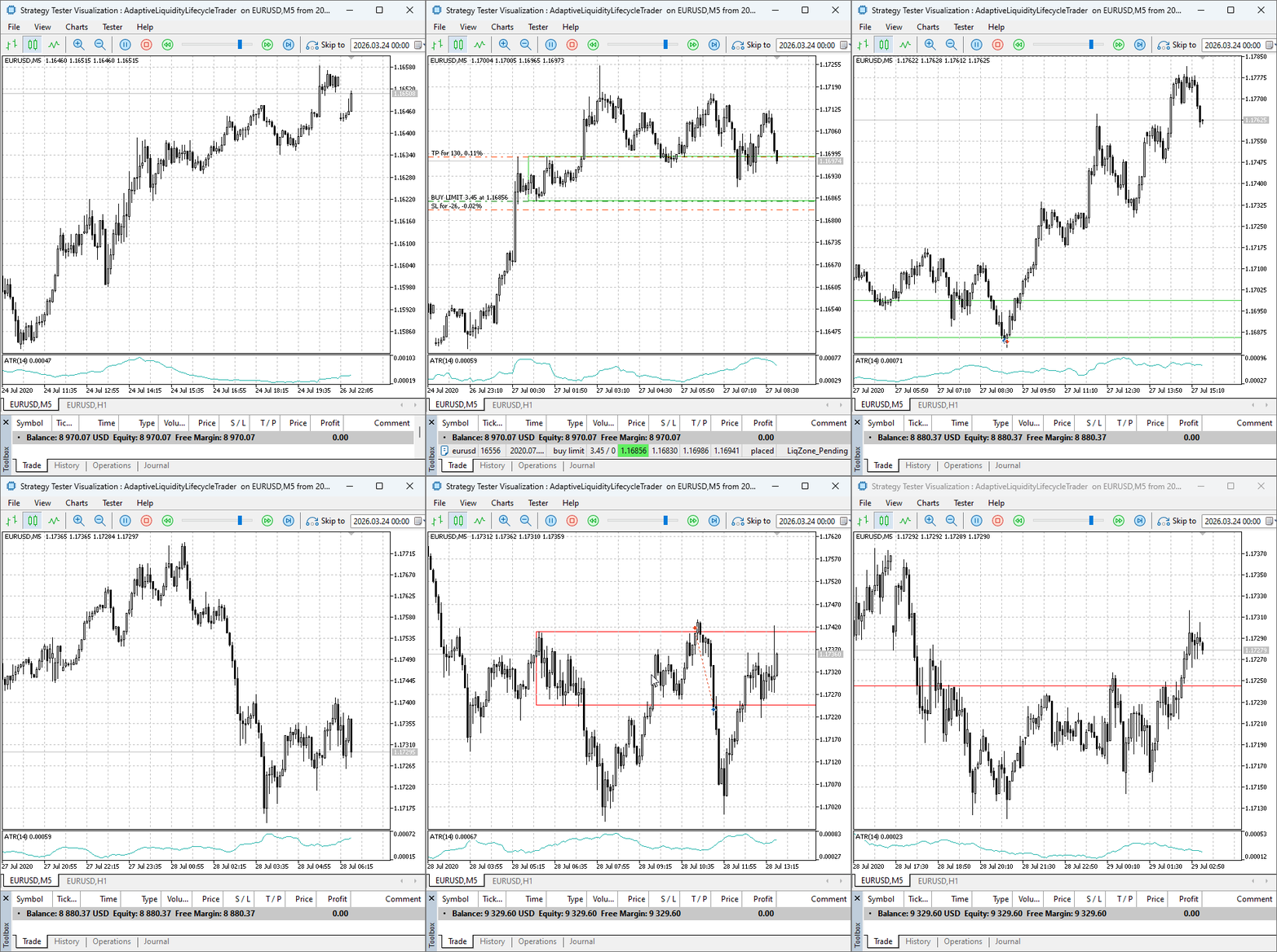
Fig. 1. Strategy Tester visualization of the AdaptiveLiquidityLifecycleTrader with integrated risk management
Fig. 1 illustrates a representative trade sequence. A demand zone is first identified on the H1 timeframe, after which price retraces into the zone on the M5 chart. Upon validation, the EA places a pending limit order aligned with the zone boundary. The stop loss is positioned beyond the zone using a configurable buffer, while the take profit is derived from the predefined risk-to-reward ratio.
All trade parameters—including entry level, stop placement, and position size—are calculated systematically based on the configured inputs. This ensures that each trade maintains consistent risk exposure regardless of variations in zone size or market volatility.
It is important to note that system behavior can be further refined through input optimization. Parameters such as zone height filters, ATR normalization, and risk percentages can be adjusted in the Strategy Tester to evaluate performance under different market conditions before deployment on a live chart.
Conclusion
In this discussion, you gained a complete, deployable Expert Advisor that transforms a conceptually strong liquidity strategy into a practically robust system. The EA no longer requires you to manually calculate position sizes, filter zones by quality, or decide how much risk to take on flipped zones. All of this is automated and consistent.
Now, you can:
- Deploy a liquidity‑zone trading system with full confidence that risk is controlled on every trade.
- Scale across multiple instruments without additional manual overhead.
- Trust that zone quality filters will reject noise and adapt to changing volatility.
- Trade flipped zones with reduced exposure, acknowledging their higher uncertainty.
- Reproduce results across different market conditions without changing behavior.
Risk management is not a separate step after finding a trade; it must be woven into the very fabric of the trading logic. In this EA, every decision reflects a risk‑aware mindset—from filtering zones by height and ATR, to placing stops with a buffer, to calculating position size based on account risk, to reducing exposure on flipped zones.
The code is open for you to study and extend—perhaps add a maximum daily loss limit, a trailing stop based on ATR, or a correlation filter to avoid overexposure on correlated symbols.
In liquidity trading, zones define where to trade, while risk management defines whether to trade and how much to risk.
Key Lessons
| Key Lesson | Description |
|---|---|
| Zone Height Filter: | Using `MinZoneHeightPoints` and `MaxZoneHeightPoints` eliminates zones that are too small (noise) or too large (excessive risk), improving trade quality. |
| ATR Normalization: | Comparing zone height to current ATR ensures trades only occur when the zone is meaningful relative to recent volatility, adapting to changing market conditions. |
| Stop Buffer Factor: | Placing stops with a buffer (a percentage of zone height) gives price room to breathe, reducing the chance of being stopped out by a normal retest. |
| Risk‑Based Position Sizing: | Calculating lot size so that each trade risks a fixed percentage of account balance standardizes risk across trades with different stop distances. |
| Spread Filter: | Only trading when the spread is within a limit protects against entering during illiquid, high‑cost periods. |
| Flipped Zone Risk Reduction: | Using a lower risk percentage for flipped zones acknowledges the higher uncertainty after a zone has been violated, preserving capital when the odds are less favorable. |
| Expiry Management: | Giving pending orders a finite life and removing expired zones keeps the system clean and prevents orders from becoming irrelevant. |
| Modular Pattern Functions: | Separating reversal patterns into individual functions (e.g., "BullishEngulfing") and combining them in "DemandReversal" makes the code easy to modify and extend. |
Attachments
| File Name | Type | Version | Description |
|---|---|---|---|
| AdaptiveLiquidityLifecycleTrader.mq5 | Expert Advisor | 1.21 | Complete EA with integrated risk management for liquidity‑zone trading, including zone detection, dynamic position sizing, flip handling, and volatility filters. |
Warning: All rights to these materials are reserved by MetaQuotes Ltd. Copying or reprinting of these materials in whole or in part is prohibited.
This article was written by a user of the site and reflects their personal views. MetaQuotes Ltd is not responsible for the accuracy of the information presented, nor for any consequences resulting from the use of the solutions, strategies or recommendations described.

 Market Simulation (Part 17): Sockets (XI)
 Price Action Analysis Toolkit Development (Part 65): Building an MQL5 System to Monitor and Analyze Manually Drawn Fibonacci Levels
 From Basic to Intermediate: Struct (VII)
 Coral Reefs Optimization (CRO)

- Free trading apps
- Over 8,000 signals for copying
- Economic news for exploring financial markets
You agree to website policy and terms of use
Sir please I want to know more about trading because am a beginner and I want to acquire some skills