2016.06.07
2016.06.07
Published article "Self-optimization of EA: Evolutionary and genetic algorithms".

This article covers the main principles set fourth in evolutionary algorithms, their variety and features. We will conduct an experiment with a simple Expert Advisor used as an example to show how our trading system benefits from optimization. We will consider software programs that implement genetic, evolutionary and other types of optimization, and provide examples of application when optimizing a predictor set and parameters of the trading system.
2016.06.06
The most downloaded free products:




2016.06.06
Bestsellers in the Market:





2016.06.06
2016.06.06
The most popular forum topics:
- FOREX - Trends, forecasts and implications 2016 156 new comments
- Programming 75 new comments
- Interesting and Humour 38 new comments
2016.06.06
New publications in CodeBase
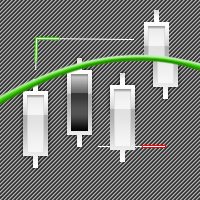
- Candle Strength Indicator that shows candle strength.
- Higher Timeframe Indicator that shows higher timeframe candle on current timeframe.
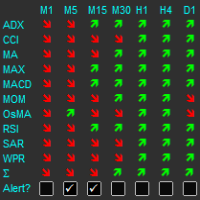
- Graphically display current trend for all time frames in one simple panel This is a graphical indicator based on slope-direction-trend indicator that has been published under several other forms.
2016.06.05
Bestsellers in the Market:



2016.06.05
Most downloaded source codes this week
- Trading Volume Indicator Trading Volume indicator shows the volume of buying and selling trades on the current bar or on average of specific number of last bars as you want . Both volumes are shown simultaneously with green and red colors for buying and selling trading volumes respectively.
- Swing Point Highs and Lows This indicator helps to determine swing point highs and swing point lows.
- Graphically display current trend for all time frames in one simple panel This is a graphical indicator based on slope-direction-trend indicator that has been published under several other forms.
2016.06.05
Most read articles this week

Graphical Interfaces V: The Combobox Control (Chapter 3)
In the first two chapters of the fifth part of the series, we developed classes for creating a scrollbar and a view list. In this chapter, we will speak about creating a class for the combobox control. This is also a compound control containing, among others, elements considered in the previous chapters of the fifth part.

Universal Expert Advisor: Pending Orders and Hedging Support (Part 5)
This article provides further description of the CStrategy trading engine. By popular demand of users, we have added pending order support functions to the trading engine. Also, the latest version of the MetaTrader 5 now supports accounts with the hedging option. The same support has been added to CStrategy. The article provides a detailed description of algorithms for the use of pending orders, as well as of CStrategy operation principles on accounts with the hedging option enabled.

The calculator of signals operates directly from the MetaTrader 5 terminal, which is a serious advantage, since the terminal provides a preliminary selection and sorts out signals. This way, users can see in the terminal only the signals that ensure a maximum compatibility with their trading accounts.
2016.06.04
The most popular forum topics:
- FOREX - Trends, forecasts and implications 2016 52 new comments
- Trading against the crowd - is there an interested programmer in working together 50 new comments
- Interesting and Humour 26 new comments
2016.06.04
2016.06.04
Bestsellers in the Market:



2016.06.03
Bestsellers in the Market:

2016.06.03
2016.06.02
The most downloaded free products:
2016.06.02
The most popular forum topics:
- Not the Grail, just a regular one - Bablokos!!! 58 new comments
- FOREX - Trends, forecasts and implications 2016 57 new comments
- Interesting and Humour 28 new comments
2016.06.02
Bestsellers in the Market:



2016.06.02
2016.06.01
Bestsellers in the Market:




2016.06.01
2016.06.01
Published article "Graphical Interfaces VI: the Checkbox Control, the Edit Control and their Mixed Types (Chapter 1)".

This article is the beginning of the sixth part of the series dedicated to the development of the library for creating graphical interfaces in the MetaTrader terminals. In the first chapter, we are going to discuss the checkbox control, the edit control and their mixed types.
2016.05.31
2016.05.31
The most popular forum topics:
- Interesting and Humour 154 new comments
- FOREX - Trends, forecasts and implications 2016 37 new comments
- Elite indicators :) 26 new comments
2016.05.31
Most downloaded source codes this month
- HA Arrows Buy and Sell Arrows based on Heiken Ashi candles.
- MACD EA The EA was created similarly to EA that won the first place in the championship.
- Renko Live Charts v4.13 Trade using Renko Boxes in MetaTrader 4.
2016.05.31
Most read articles this month
Graphical Interfaces V: The Combobox Control (Chapter 3)
In the first two chapters of the fifth part of the series, we developed classes for creating a scrollbar and a view list. In this chapter, we will speak about creating a class for the combobox control. This is also a compound control containing, among others, elements considered in the previous chapters of the fifth part.

Applying fuzzy logic in trading by means of MQL4
The article deals with examples of applying fuzzy set theory in trading by means of MQL4. The use of FuzzyNet library for MQL4 in the development of an indicator and an Expert Advisor is described as well.

Self-organizing feature maps (Kohonen maps) - revisiting the subject
This article describes techniques of operating with Kohonen maps. The subject will be of interest to both market researchers with basic level of programing in MQL4 and MQL5 and experienced programmers that face difficulties with connecting Kohonen maps to their projects.
2016.05.31
Bestsellers in the Market:

2016.05.31
Published article "Universal Expert Advisor: Pending Orders and Hedging Support (Part 5)".
This article provides further description of the CStrategy trading engine. By popular demand of users, we have added pending order support functions to the trading engine. Also, the latest version of the MetaTrader 5 now supports accounts with the hedging option. The same support has been added to CStrategy. The article provides a detailed description of algorithms for the use of pending orders, as well as of CStrategy operation principles on accounts with the hedging option enabled.
2016.05.30
Bestsellers in the Market:
2016.05.30
New publications in CodeBase
- Pips to Point Conversion Factor This is a conversion factor. It is used to detect whether broker is 4 or 5 digits. As MetaTrader 4 calculates everything using point basis, coder can use this function to convert pips to point for machine reading.
- Full Information Show full information: price, symbol, timeframe, date, time, spread, swap, stop out level, your name...
- RSI 2 TimeFrames The RSI indicator has the ability to display a single window of RSI values of another timeframe defined by the user.
- Trading Volume Indicator Trading Volume indicator shows the volume of buying and selling trades on the current bar or on average of specific number of last bars as you want . Both volumes are shown simultaneously with green and red colors for buying and selling trading volumes respectively.
- Swing Point Highs and Lows This indicator helps to determine swing point highs and swing point lows.
2016.05.29
Most downloaded source codes this week
- AK47_A1 Simple EA, but such efficiency for the year 2007!
- Tipu Renko Live Tipu Renko Live is a modified version of Renko Charts that can be plotted on a normal time frame.
- Renko Live Charts v4.13 Trade using Renko Boxes in MetaTrader 4.
2016.05.29
Most read articles this week
Graphical Interfaces V: The Combobox Control (Chapter 3)
In the first two chapters of the fifth part of the series, we developed classes for creating a scrollbar and a view list. In this chapter, we will speak about creating a class for the combobox control. This is also a compound control containing, among others, elements considered in the previous chapters of the fifth part.
Self-organizing feature maps (Kohonen maps) - revisiting the subject
This article describes techniques of operating with Kohonen maps. The subject will be of interest to both market researchers with basic level of programing in MQL4 and MQL5 and experienced programmers that face difficulties with connecting Kohonen maps to their projects.
The calculator of signals operates directly from the MetaTrader 5 terminal, which is a serious advantage, since the terminal provides a preliminary selection and sorts out signals. This way, users can see in the terminal only the signals that ensure a maximum compatibility with their trading accounts.
2016.05.29
Bestsellers in the Market:

2016.05.29
The most downloaded free products:
2016.05.29
2016.05.28
2016.05.28
The most popular forum topics:
- Trading against the crowd - is there an interested programmer in working together 44 new comments
- Deadlock 36 new comments
- Machine learning in trading: theory, models, practice and algo-trading 36 new comments
2016.05.28
Bestsellers in the Market:



2016.05.27
Bestsellers in the Market:

2016.05.27
2016.05.27
Published article "How to create an indicator of non-standard charts for MetaTrader Market".

Through offline charts, programming in MQL4, and reasonable willingness, you can get a variety of chart types: "Point & Figure", "Renko", "Kagi", "Range bars", equivolume charts, etc. In this article, we will show how this can be achieved without using DLL, and therefore such "two-for-one" indicators can be published and purchased from the Market.
2016.05.26
The most popular forum topics:
- What 4 factors do you think the price depends on? 72 new comments
- Deadlock 50 new comments
- Not the Grail, just a regular one - Bablokos!!! 47 new comments
2016.05.26
2016.05.26
Bestsellers in the Market: