

Engineering a Self-Healing Expert Advisor in MQL5 (Part 4): Trade-State Reconciliation and Safe Mode Recovery
 1 443
1 443
 0
0

Introduction
A self-healing Expert Advisor can restore its trade state after a terminal restart, but successful recovery depends on one important requirement: the broker-side position, the runtime trade state, and the SQLite recovery record must all describe the same trade.
In practice, this consistency cannot always be guaranteed. A broker-side position may still exist after its recovery record has been deleted, or a recovery record may remain active after the position has been closed manually. In either case, the Expert Advisor can no longer verify that its virtual stop-loss, virtual take-profit, breakeven state, or trailing progression is still valid. Continuing automated trade management under these conditions may apply incorrect protection or leave the trade exposed.
To manage these situations safely, the Expert Advisor must verify that all recovery components remain synchronized before performing any trade-management action. In this article, we will implement trade-state reconciliation and Safe-Mode recovery. We will introduce a single validation function that compares the broker-side position, the runtime state, and the SQLite recovery record, integrate this validation into both startup recovery and periodic runtime checks, and automatically suspend trade management whenever recovery integrity can no longer be verified.
When Recovery State Becomes Invalid
The recovery system relies on two sources of information:
- The broker-side position;
- and the recovery state stored in SQLite.
Under normal conditions, both should describe the same trade. Problems arise when they no longer agree. For example:
- Trade manually closed;
- broker position disappears;
- SQLite still shows ACTIVE.
In this case, the recovery record no longer reflects the actual state of the trade. The opposite situation can also occur:
- Broker position exists;
- SQLite record missing.
Without the corresponding recovery record, the Expert Advisor cannot reconstruct the virtual protection state required to continue management safely.
Before recovery can continue, the EA must confirm that both sources remain synchronized. This verification process, known as trade-state reconciliation, forms the foundation of the defensive recovery mechanisms developed in this article.
Preparing the Project
This article builds directly on the completed source code from Part 3. Download the "SelfHealingExpertPart3.mq5" source file attached to this article and use it as the starting point for the implementations that follow. The features developed in this article will be added directly to the existing recovery architecture.
Verifying Recovery State
Trade-state reconciliation begins with a simple validation step. Before continuing trade management, the Expert Advisor should verify that the managed position and its recovery state remain synchronized. Add the following function below RecoverTradeState:
//+------------------------------------------------------------------+
//| Validates whether the recovery state remains consistent.         |
//+------------------------------------------------------------------+
bool ValidateTradeState()
  {
//--- locate managed broker position
   ulong ticket = 0;
   bool brokerPositionExists = FindManagedPosition(ticket);
//--- check whether recovery state exists in runtime memory
   bool runtimeStateExists = g_hasTradeState;
//--- check whether recovery state exists in SQLite
   bool databaseStateExists = false;
   if(runtimeStateExists)
      databaseStateExists = TradeStateExists(g_tradeState.ticket);
//--- broker position exists, but recovery state is missing
   if(brokerPositionExists &&
      (!runtimeStateExists || !databaseStateExists))
     {
      Print("Trade-state validation failed. Broker position exists but recovery state is missing.");
      return(false);
     }
//--- recovery state exists, but broker position is missing
   if(runtimeStateExists && !brokerPositionExists)
     {
      Print("Trade-state validation failed. Recovery state exists but broker position is missing.");
      return(false);
     }
//--- recovery state appears consistent
   return(true);
  }
The purpose of this function is not to recover missing information. Its responsibility is much simpler. It answers a single question: Can the current recovery state still be trusted?
If the broker position, runtime state, and SQLite recovery record remain synchronized, the function returns true, and the Expert Advisor can continue normal operation.
If the function detects that one side of the recovery architecture no longer agrees with the others, it returns false, indicating that the recovery state can no longer be trusted.
In the next section, we will build the defensive response mechanism responsible for handling these situations automatically through Safe Mode recovery.
Handling Incomplete Recovery
Recovery is only successful when the Expert Advisor can restore both the broker-side position and its corresponding recovery state. If a managed position exists but the recovery record cannot be loaded, the EA no longer has enough information to continue automated trade management safely.
Consider the following situation:
- Broker-side position exists.
- SQLite recovery record is missing.
Without the recovery record, the Expert Advisor cannot determine the current virtual stop-loss, virtual take-profit, breakeven status, or trailing progression. Continuing trade management under these conditions would require the EA to make assumptions about information it can no longer verify.
To prevent this, update the existing RecoverTradeState function as follows:
//+------------------------------------------------------------------+
//| Recovers the active trade state from SQLite after EA restart.    |
//+------------------------------------------------------------------+
bool RecoverTradeState()
  {
//--- initialize managed position ticket
   ulong ticket = 0;
//--- check whether a managed broker position exists
   if(!FindManagedPosition(ticket))
     {
      //--- no active position requires recovery
      Print("Recovery completed. No managed open position was found.");
      g_hasTradeState = false;
      return(true);
     }
//--- load saved trade state for the managed position
   if(!LoadTradeState(ticket, g_tradeState))
     {
      //--- saved state is missing while broker position exists
      PrintFormat("Recovery failed. Managed position exists, but no active saved state was found. Ticket: %I64u",
                  ticket);
      g_hasTradeState = false;
      g_eaState       = EA_STATE_SAFE_MODE;
      return(false);
     }
//--- activate recovered runtime trade state
   g_hasTradeState = true;
//--- print restored protection levels
   PrintFormat("Recovery completed. Trade state restored. Ticket: %I64u",
               g_tradeState.ticket);
   PrintFormat("Recovered virtual SL: %.5f | Recovered virtual TP: %.5f",
               g_tradeState.virtualSL,
               g_tradeState.virtualTP);
//--- recovery completed successfully
   return(true);
  }
The important change is that recovery now succeeds only when the corresponding SQLite record can be restored. If a managed broker position exists but the recovery record is missing, the function clears the runtime trade state, sets the EA state to EA_STATE_SAFE_MODE, and reports the recovery failure.
Safe-Mode is a controlled operating state rather than a runtime error. The Expert Advisor continues running, but it suspends virtual protection, breakeven management, trailing management, and all other automated trade-management actions until a valid recovery state becomes available again. This prevents the EA from modifying a trade whose protection state can no longer be verified.
At this stage, incomplete recovery no longer results in uncertain behavior. Instead, it produces a deterministic outcome: the Expert Advisor enters Safe-Mode and waits for a valid recovery state before automated management can continue.
Integrating Reconciliation into Runtime Management
The ValidateTradeState function has now been added to the Expert Advisor. The next step is to call it during normal runtime so that reconciliation is not limited to startup recovery only.
The timer event is the best place for this check because it already runs periodically while the EA is attached to the chart. Before executing normal trade management, the EA can first confirm that the broker position, runtime state, and SQLite recovery record are still synchronized.
Update the existing OnTimer function as follows:
//+------------------------------------------------------------------+
//| Timer function                                                   |
//+------------------------------------------------------------------+
void OnTimer()
  {
//--- validate recovery-state consistency
   if(!ValidateTradeState())
     {
      Print("Recovery-state inconsistency detected. Entering Safe Mode.");

      g_hasTradeState = false;
      g_eaState       = EA_STATE_SAFE_MODE;

      return;
     }

//--- manage active virtual protection at fixed intervals
   ManageActiveTrade();
  }
With this update, every timer cycle begins with a reconciliation check. If ValidateTradeState returns true, the EA continues normal runtime management through ManageActiveTrade.
If the validation fails, the EA clears the active runtime tracking flag, switches to EA_STATE_SAFE_MODE, and exits the timer event immediately. This prevents virtual protection, breakeven, trailing, and persistence updates from running while the recovery state is inconsistent.
Testing Recovery, Reconciliation and Safe Mode
At this stage, the recovery architecture can detect synchronization failures and automatically transition into Safe Mode when recovery integrity can no longer be guaranteed.
To verify that the implementation behaves as expected, we will perform two practical tests. The first test demonstrates Safe Mode activation when the recovery record is missing. The second test verifies that runtime reconciliation correctly detects changes to the broker-side position.
Demonstration 1: Testing Missing Recovery Record
This test intentionally creates a recovery inconsistency where the broker-side position still exists, but the corresponding SQLite recovery record has been removed.
To reproduce this scenario safely and consistently, we will use a small helper script that intentionally removes the active recovery record from SQLite.
The purpose of this script is not to modify broker-side positions. Instead, it creates a controlled recovery inconsistency by deleting the saved recovery state while leaving the managed broker position untouched.
This allows us to simulate the following condition:
- Broker position exists
- SQLite recovery record missing
which is one of the primary failure scenarios that the reconciliation system introduced in this article is designed to detect.
Create a new script named "DeleteRecoveryRecord.mq5" and add the following code:
//+------------------------------------------------------------------+
//|                                      DeleteRecoveryRecord.mq5    |
//|            Copyright 2026, MetaQuotes Ltd. Developer: Chacha Ian |
//|                          https://www.mql5.com/en/users/chachaian |
//+------------------------------------------------------------------+
#property copyright "Copyright 2026, MetaQuotes Ltd. Developer is Chacha Ian"
#property link      "https://www.mql5.com/en/users/chachaian"
#property version   "1.00"
#property script_show_inputs

//+------------------------------------------------------------------+
//| Database configuration                                           |
//+------------------------------------------------------------------+
#define DATABASE_FILE_NAME "self_healing_trade_manager.sqlite"

//+------------------------------------------------------------------+
//| Script program start function                                    |
//+------------------------------------------------------------------+
void OnStart()
  {
//--- open the existing SQLite database file
   int database = DatabaseOpen(DATABASE_FILE_NAME,
                               DATABASE_OPEN_READWRITE);

   if(database == INVALID_HANDLE)
     {
      PrintFormat("Failed to open recovery database. Error: %d", GetLastError());
      return;
     }

//--- delete all active recovery records
   string query = "DELETE FROM trade_states WHERE state='ACTIVE';";

   if(!DatabaseExecute(database, query))
     {
      PrintFormat("Failed to delete active recovery records. Error: %d", GetLastError());
      DatabaseClose(database);
      return;
     }

//--- close SQLite database connection
   DatabaseClose(database);

   Print("All ACTIVE recovery records have been deleted successfully.");
  }
//+------------------------------------------------------------------+
The script opens the SQLite database used by the recovery architecture and executes a simple SQL query that removes every record marked as ACTIVE.
Because the script only modifies the database, any broker-side positions remain completely unaffected. This makes it ideal for testing recovery-state reconciliation because it allows us to remove the saved recovery information without interfering with the actual trade.
After compiling the script, we can use it to create a missing recovery record scenario and observe how the Expert Advisor responds when recovery integrity can no longer be verified.
Begin by attaching the Expert Advisor to a chart and allowing it to open a test trade. Verify that the trade-state record has been saved successfully. Next, detach the Expert Advisor from the chart or close the terminal while leaving the broker-side position open.
After the EA is no longer running, execute the helper script. The script removes the active recovery record from SQLite while leaving the broker-side position unchanged. Once the script completes, reattach the Expert Advisor to the chart.
During startup recovery, the EA will locate the managed broker position successfully. However, the recovery record can no longer be loaded from SQLite. As a result, the following recovery failure message should appear in the Experts log:
Recovery failed. Managed position exists, but no active saved state was found.
The Expert Advisor should then transition into EA_STATE_SAFE_MODE and stop normal runtime management.
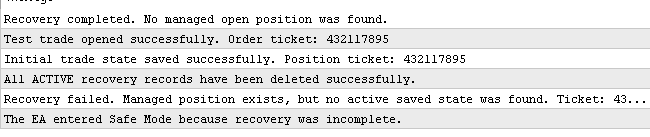
This confirms that the recovery architecture correctly detects incomplete recovery conditions and prevents automated management from continuing with missing protection information.
Demonstration 2: Testing Missing Broker Position
The second test verifies how the Expert Advisor responds when the broker-side position disappears while runtime recovery information still exists.
Attach the Expert Advisor to a chart and allow it to open a test trade. Confirm that the recovery state has been saved successfully. Then manually close the position from the MetaTrader Terminal.
Wait for the next timer cycle to execute. The reconciliation check should detect that the runtime trade state still exists, but the broker-side position can no longer be found.
At this point, the Expert Advisor should stop normal trade management and enter EA_STATE_SAFE_MODE. This confirms that the EA does not continue virtual stop loss, breakeven, or trailing management when the broker-side position is missing.

This test confirms that runtime reconciliation is active during normal execution. The Expert Advisor checks whether the broker position still matches the stored recovery state and suspends automated management when that condition is no longer true.
Together, these tests validate the two primary defensive behaviors introduced in this article:
- Detection of a broker position with a missing recovery record;
- Detection of a runtime recovery state with a missing broker position.
In both cases, the Expert Advisor responds by stopping automated trade management instead of continuing with invalid recovery assumptions.
Conclusion
In this article, we transformed recovery validation from an assumption into an enforced runtime rule. Before continuing automated trade management, the Expert Advisor now verifies that the broker-side position, the runtime trade state, and the SQLite recovery record all remain synchronized. When this verification fails, the EA enters EA_STATE_SAFE_MODE instead of attempting to continue with incomplete recovery information.
The completed implementation provides the following functionality:
- ValidateTradeState verifies that the broker-side position, runtime state, and SQLite recovery record remain consistent before trade management continues.
- RecoverTradeState now requires a valid recovery record whenever a managed broker position exists. If the record cannot be restored, the EA enters EA_STATE_SAFE_MODE.
- OnTimer performs reconciliation during normal operation, allowing synchronization failures to be detected after startup as well as during runtime.
- Safe-Mode suspends virtual stop-loss, virtual take-profit, breakeven management, and trailing management whenever recovery integrity cannot be verified.
- Deterministic recovery behavior is provided for two critical scenarios:
- The broker-side position exists, but the recovery record is missing;
- The recovery record exists, but the broker-side position no longer exists.
The implementation was verified using two practical demonstrations. The first simulated a missing recovery record by deleting the active SQLite entry while leaving the broker-side position open. The second manually closed the broker-side position while the recovery record remained active. In both cases, the Expert Advisor detected the inconsistency and responded in a controlled and predictable manner.
With trade-state reconciliation and Safe-Mode recovery now implemented, the recovery architecture no longer relies on the assumption that previously saved information is always correct. Instead, it continuously validates its recovery state and safely suspends automated management whenever that state can no longer be trusted.
Attachments
| File Name | Description |
|---|---|
| SelfHealingExpertPart3.mq5 | Completed source code from Part 3. Use this file as the starting point for the Part 4 implementation. |
| SelfHealingExpertPart4.mq5 | Completed Part 4 source code with trade-state reconciliation and Safe Mode recovery. |
| DeleteRecoveryRecord.mq5 | Helper script used to delete active SQLite recovery records during testing, allowing Safe Mode behavior to be demonstrated. |
Warning: All rights to these materials are reserved by MetaQuotes Ltd. Copying or reprinting of these materials in whole or in part is prohibited.
This article was written by a user of the site and reflects their personal views. MetaQuotes Ltd is not responsible for the accuracy of the information presented, nor for any consequences resulting from the use of the solutions, strategies or recommendations described.

 Feature Engineering for ML (Part 8): Entropy Features in MQL5
 Persistent Key-Value Store in MQL5: Using Flat Files as a Lightweight Database for EA State
 Measuring What Matters (Part 1) : Portfolio Risk Decomposition in MQL5
 Risk Manager for Trading Robots (Part I): Risk Control Include File for Expert Advisors

- Free trading apps
- Over 8,000 signals for copying
- Economic news for exploring financial markets
You agree to website policy and terms of use