 MetaTrader 5
 エキスパート
 インディケータ
 ライブラリ
ライブラリ
 ユーティリティ
 ウィジェット
 ルール
ルール
YouTubeにあるマーケットチュートリアルビデオをご覧ください
ロボットや指標を購入する
仮想ホスティングで
EAを実行
EAを実行
ロボットや指標を購入前にテストする
マーケットで収入を得る
販売のためにプロダクトをプレゼンテーションする方法
MetaTrader 5のためのエキスパートアドバイザーとインディケータ - 135
 自動売買ロボットとインジケータを使用して、外国為替取引の収益性を高めます。 自動売買ロボットを使用すると、取引の開始と終了を自動化でき、インジケータは市場の行動をより正確に予測するのに役立ちます。
このページには、MetaTrader5アプリケーションのカタログが掲載されています。
自動売買ロボットとインジケータを使用して、外国為替取引の収益性を高めます。 自動売買ロボットを使用すると、取引の開始と終了を自動化でき、インジケータは市場の行動をより正確に予測するのに役立ちます。
このページには、MetaTrader5アプリケーションのカタログが掲載されています。 
History Pre-loader — MT5 History Pre-loader is a utility script for traders who want to prepare and inspect MetaTrader price history before running a Strategy Tester, reviewing an older market period or using tools that depend on a deeper historical range. The script works from the symbol of the chart where it is attached . Open a chart for the exact broker symbol you want to prepare, attach the script, select the target oldest date and let the terminal request the available history. What the sc
FREE

Breakout Bands — Adaptive Scalping & Breakout Retest Indicator Identify Potential Scalping Entries Around Adaptive Volatility Bands Breakout Bands is a specialized intraday scalping indicator designed exclusively for M1-M5 charts . The indicator creates an adaptive band structure around a smoothed 89-period EMA reference , with the band distance derived from the market's ATR-based volatility range . Rather than simply following price, Breakout Bands is designed to help traders identify situatio
FREE

Volume Color paints your candles by volume strength, so you can instantly see which price moves are backed by real participation — and which are just noise. No indicator window, no clutter. Just your normal chart, with candles color-coded right where you look. HOW IT WORKS Every candle is compared to the average volume of the last N bars and colored accordingly: - BRIGHT candle = high volume — strong participation, likely institutional activity. These moves matter. - NORMAL candle = average v
FREE
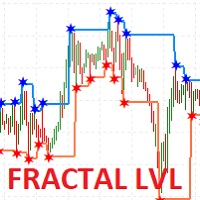
I present the well-known Fractal indicator.
Levels have been added to this indicator.
At the extreme points, you can see the continuation of the price line, which changes when the values of the Fractal indicator change.
The indicator is easy to use. The basic Fractal settings have been saved.
FractalLevels Parameters:
LeftBars - the number of bars on the left
RightBars - the number of bars on the right
FREE

PHOENIX MEASURED BOX DASHBOARD, engineered specifically for Phoenix Au Trading to provide "No dreams, just the tools" for high-precision institutional-style trading. 1. THE INDICATOR DEFINITION The Phoenix Measured Box is a multi-dimensional analysis tool designed for SMC (Smart Money Concepts) and ICT-style traders. It combines time-segmented price action with real-time volume metrics and automated target projections. Key Components: 15m Range Boxes: Automatically identifies and boxes every 15
FREE

MT5 Time Zone Highlighter A simple and practical MetaTrader 5 tool designed to visually highlight up to three customizable trading time zones directly on the chart. Key Features: • Supports up to 3 independent time zones. • Set the start and end time for each zone according to your MT5 broker/server time. • Choose different colors for each time zone. • Adjustable transparency for better chart visibility. • Works directly on the MT5 chart without opening additional windows. • Helps traders quickl
FREE

Assets can behave based on repetitive patterns on specific times of the day, for example at the opens and closes of the sessions. Daily Vertical Lines helps us draw vertical lines at any given time of the day as many days as required, as simple as sliding a vertical line. This free version only draws vertical lines, while the paid version (to be published) collects and presents technical and statistical information regarding the price behavior at that time of the day.
FREE
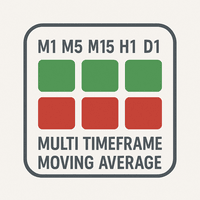
The "MultiTF Moving Average Panel" indicator is more of a helping tool than an indicator, it serves to help know the trend direction for the current currency pair of all timeframes in one place. It is best used with other indicators and signals, to help filter the signals according the trend based on multiple timeframes.
Indicator inputs : - Moving Average period : Default is set to 34. - Moving Average method : The method of calculation of the Moving Average. Default is set to Exponent
FREE
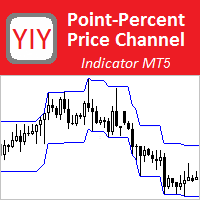
The Point-Percent Price Channel (PPPC or PP Price Channel) indicator is designed to display on the chart a channel whose width is specified both as a percentage of the current price and in points. Its appearance is presented on slide 1. When the market moves up, the upper border of the channel is built at the price of High candles. In this case, the lower boundary follows the upper one at a strictly specified distance. When the price touches the lower border of the channe
FREE

Trade Copier Master and Follower in 1 is a local expert advisor for copying trades between master and follower accounts on different terminals on the same device. It supports master/follower modes, configurable symbol mapping for different brokers, multiple money management options, risk-based sizing, stop loss/take profit copying, partial close copying, and deviation handling. The follower can close positions independently, invert trades, and adjust symbols with prefixes, suffixes, or explicit
FREE
CLICK HERE TO JOIN OUR WHATSAPP GROUP.
This trading indicator Automatically identifies and plots contract blocks, which are essential zones marked by significant levels of support and resistance. This powerful tool provides traders with a clear and intuitive visualization of critical market points where prices are likely to bounce or reverse. The contract blocks, represented by distinct colored rectangles, highlight support zones (at the bottom) and resistance zones (at the top), enabling trad
FREE

Free Global Stop Loss and Take Profit Setter with Break Even
Free one click Stop Loss and Take Profit tool for manual trading. Apply a fixed SL and TP to every open position on the symbol, or move them all to break even, with a single button. It only modifies Stop Loss and Take Profit levels — it never opens or closes a trade. Set your SL and TP distance in points, click once, and every position on the current symbol is protected. The break even button moves stops to entry (or a configurable num
FREE

Market Sessions HUD Pro turns any chart into a clear, professional session map. See exactly which market is open, how far it has moved, when the next one opens — plus elegant session zones with a fully configurable opening range. Built to look great on any broker and any timeframe, with real Daylight Saving handling so your sessions are always on time. Real-time HUD panel Active session name in its own color, with a live server clock Session progress bar (% elapsed) and countdown to the next
FREE

DeMarker Advanced Indicator for MetaTrader 5 The DeMarker (DeM) indicator, created by legendary trader Tom DeMark, is a powerful oscillator designed to measure the demand for an asset by comparing recent price highs and lows. It excels at identifying potential trend exhaustion and imminent market turning points. The DeMarker Advanced Indicator for MetaTrader 5 takes this classic tool and supercharges it. While the standard DeM indicator is often difficult to read due to erratic movements, thi
FREE

This EA was made for educational purposes. Find the full overview of how it was made in the YouTube video. The EA is inspired by Larry Connors double 7s strategy. It's been slightly altered using machine learning. Use on real money at your own risk, as always. How to use: Add to D1 chart for SP500 IMPORTANT: Go to inputs and change name of 'subchart' to the name your broker uses for SP500. What this strategy does It buys short-term dips in a steady, calm uptrend , then sells after a bounce. E
FREE

Candle Timeout is a simple indicator that displays the time a candlestick changes and is also available to display the spread range on market charts. This indicator is designed to help calculate the time a candle changes, both the Open and Close. It also provides a counter for the ASK and BID price ranges, or the spread, displayed in points (pts). Subscribe the MQL5 channel for other interesting information : (Automatic) Forex Tools Join new Public Group to Expressing Opinions and Sharing:
FREE
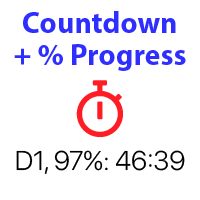
バー閉店までのカウントダウンタイマー、+ 進捗状況 %: #1 多機能ユーティリティ : 66+ 機能を含むこのツール | 質問があればご連絡ください | MT4 バージョン インジケーターの設定で、以下を構成できます: 計算用の時間枠; true / false: 高位時間枠オプション(現在使用中の次のもの:M15->M30、H4->D1...) 位置:
1 = 左下隅;
2 = 右下隅;
3 = 左上隅;
4 = 右上隅; フォントサイズ; 色; フォントスタイル; #1 多機能ユーティリティ : 66+ 機能を含むこのツール | 質問があればご連絡ください | MT4 バージョン #1 多機能ユーティリティ : 66+ 機能を含むこのツール | 質問があればご連絡ください | MT4 バージョン
FREE

โครงสร้างตลาด ZigZag (ความลึก 30) – คําอธิบาย + การตั้งค่า อินดิเคเตอร์นี้ใช้หาโครงสร้างตลาดแบบ: HH (Higher High) = ยอดสูงขึ้น → แนวโน้มขึ้น HL (Higher Low) = ยกฐาน → แนวโน้มยังขึ้น LH (Lower High) = ยอดต่ําลง → แนวโน้มลง LL (Lower Low) = ทําโลว์ใหม่ → แนวโน้มลงชัด ใช้ร่วมกับ ZigZag เพื่อ "คัดเฉพาะสวิงใหญ่" ไม่มั่ว หลักการทำงาน ZigZag จะหา "จุดกลับตัว" ตามค่า Depth เอาจุดเหล่านั้นมาเปรียบเทียบ: สูงกว่าเดิม → HH ต่ํากว่าเดิม → LH โลว์สูงขึ้น → HL โลว์ต่ําลง → LL แสดง label + เส้นแนวนอน
FREE

SMC Order Blocks + FVG — Professional Smart Money Concept Indicator
Unlock institutional trading insights with this professional-grade Smart Money Concept indicator. Automatically detect Order Blocks and Fair Value Gaps used by banks and hedge funds.
KEY FEATURES:
ORDER BLOCKS DETECTION • Automatic bullish and bearish Order Block identification • Based on price action and impulse strength analysis • Real-time mitigation tracking • Customizable imp

Timeframes: M1–M5 Symbol: XAUUSD (Gold)
XAU FastFlip Pro is a professional Expert Advisor designed for scalping and intraday trading on Gold (XAUUSD). It combines breakout logic, trend confirmation and volatility filters to adapt to changing market conditions. The system was created for traders who want both safety and efficiency in short-term trading.
Key Features: Breakout entries with EMA trend filter Spike filter (ATR-based pseudo news detection) ATR-based Stop Loss & Take Pro

この製品は、ブローカーサーバーのタイムゾーンに基づいて15か国の取引セッションを表示するように設計されており、希望の設定に基づいたさまざまな表示モードにより、チャートの混雑を防ぎ、ユーザーの希望の時間でセッションを設定することが可能です。
外国為替市場に太陽が沈むことはありませんが、そのリズムは独特の取引セッションのビートに合わせて踊ります。これらのセッション、それらの重複、およびその独特の雰囲気を理解することは、市場に逆らうのではなく、市場とともに動きたい外国為替トレーダーにとって非常に重要です。
Tokyo China London Canada New York Moscow Saudi Arabia ... USDJPY *** *
***
AUDJPY ***
NZDUSD *
***
EURAUD
**
GBPUSD
***
***
EURCHF
***
USDCHF
*
***
GBPJPY *** ***

Level Assistant is an expert assistant for manually setting support and resistance levels.
Traders often form their own levels. If there are many charts of different periods, the level will be multiplied by all charts.
When placing a horizontal line on a chart, the Assistant suggests converting this line into a level. At the same time, he himself will determine the color and thickness of the line, depending on the period of the instrument and where it is relative to the price. Mark the level
FREE

Heikin Ashi Candlestick Indicator for MT5 This custom Heikin Ashi indicator provides a smooth visual representation of market trends by filtering out short-term noise, making it easier to identify potential reversals and trend continuations. Unlike regular candlesticks, Heikin Ashi candles are calculated using averages, resulting in more stable and readable chart patterns. Key Features: Clear and smoothed visualization of price action. Compatible with all timeframes and instruments. Lightwe

Trading Reportは軽量かつ非常に実用的なビジュアルインジケーターで、アカウントとトレードの主要情報をリアルタイムで表示します — すべてがエレガントで完全にドラッグ可能なミニマリストパネルに集約されています。 主な機能 ティック毎に更新(オープンポジションと浮動損益がリアルタイム) 現在ポジション詳細(BUY/SELL+ロット+エントリー価格+浮動損益(緑/赤カラー)) 当日損益と残高変動(自動着色:緑=利益 | 赤=損失 | 白=ゼロ) 完全統計:Balance、Equity、総トレード数、勝ち/負け、勝率(%)、PF、最良/最悪トレード 「Report」ボタンクリックで表示/完全非表示切り替え ボタンをドラッグして好きな場所へ移動可能
FREE

ADR, AWR & AMR Indicator: Comprehensive Trading Guide Try "Average Daily Range Scalper":
https://www.mql5.com/en/market/product/154469 Core Concepts ADR (Average Daily Range) Definition : The average distance between daily high and low prices over a specified lookback period (typically 14-20 days) Purpose : Measures daily volatility expectations, identifies range-bound versus trending days, sets realistic intraday profit targets Key Insight : Markets tend to respect their average volatility - d
FREE

Limited Launch Offer – Save Up To 84% Genomex AI is launching with a special early adopter pricing campaign for a limited number of buyers. Once each launch tier is sold out, the price automatically increases and will never return to the previous level. First 3 Buyers – Only $39 Next 3 Buyers – Only $49 Next 6 Buyers – Only $59 Regular Launch Price – $149 Future Retail Price – $249 This introductory offer is available only during the official launch period. Once a pricing tier is sold out,

Pro ADX Histogram: Visual Momentum & Trend Strength Indicator Elevate your technical analysis with ADX Histogram, an innovative MetaTrader 5 tool that transforms the classic Average Directional Index (ADX) into an intuitive, visual powerhouse. This indicator combines trend strength and momentum direction into a single, easy-to-read histogram, allowing you to assess market conditions and spot potential trading opportunities faster and with greater clarity. Trading Idea & Core Logic The indicator
FREE

Secura Reversal EA – Catch market reversals with precision!
RSI + Volume + ATR-based money management, with built-in Break-Even protection.
Safe, smart, and ready-to-trade out of the box. Recommended for forex major pairs. contact me for set files Secura Reversal is an Expert Advisor designed to identify potential reversal points in the market using a combination of RSI, Volume, and ATR filters. It provides flexible money management, including fixed lot or risk-based lot sizing, and includes
FREE

The Universal 52 EAs will combine 52 entry and exit strategies mentioned in the Book "Entry and Exit Confessions of a Champion Trader" by Kevin J. Davey. I will code one by one and update new versions every time I complete and test each strategy. Furthermore, I also provide my test result and characteristics of each strategy so that you can understand them and know how a strategy is suitable for each market.
Updated as at 28 July 2024: - Entry #1: Go with the flow If the current bar close is l
FREE
Технический индикатор Trend Moving Average позволяет определить глобальное направление рынка. Данный технический индикатор создан для того, чтобы определить «линию наименьшего сопротивления» рынка и понять в какую сторону направлен тренд. Помимо классического использования МА, индикатор позволяет понять направленность рынка на основе динамики его значений. Так, если значение индикатора демонстрируют переход с нисходящего значения в восходящее (и наоборот) - это является дополнительным торговым с
FREE
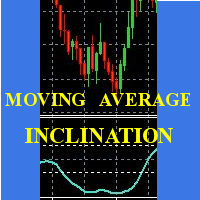
Scalp using the behavior of a short moving average, the indicator gives the slope and identifies the "hyper" moments.
Operational advice:
Use M1 chart. Period 20 : open buy after two rising lows; sell after two max downhill; avoid countertrend openings; when the line goes flat put a stop at the opening price. Avoid actions in low volatility timeslots. When the curve that draws the min / max is very flat, it is better to postpone at least 15'.
Period 50 : matches the trend, when it is at
FREE

Full Automated Trading panel . it works on any trading instruments: Forex, Stocks, Futures, Indices, CFD, Bonds, Cryptocurrencies; interface minimization function; flexibility of use;
Join my channel and check video of it ===> https://t.me/Ash_TheTrader/4986
Features :
Auto SL and TP Auto Close partial Auto Trailing Session Time Alert Time of trading Alert Profit and Percentage and etc.
FREE

SSACD - Singular Spectrum Average Convergence/Divergence This is an analogue of the MACD indicator based on the Caterpillar-SSA ( Singular Spectrum Analysis ) method. Limited version of the SSACD Forecast indicator. Limitations include the set of parameters and their range.
Specificity of the method The Caterpillar-SSA is an effective method to handle non-stationary time series with unknown internal structure. The method allows to find the previously unknown periodicities of the series and make
FREE

AutoPilot Trading Service for MetaTrader 5 is an advanced application designed to enhance the MT5 platform by automating and optimizing both manual and algorithmic trading activities. By integrating seamlessly into the (recommended but not mandatory) <terminal_directory>\MQL5\Services directory, this service not only supports the automation of trading strategies but also improves the execution of trades, whether they are initiated manually or through Expert Advisors (EAs). The AutoPilot Trading
FREE

Fibonacci Trend Indicator for MT5 Unlock the power of Fibonacci analysis on your MetaTrader 5 charts!
Our Fibonacci Trend Indicator automatically plots dynamic support and resistance levels so you can spot trends, reversals, and breakout opportunities at a glance. Features & Advantages Automatic Fibonacci Levels
Instantly displays seven key Fibonacci retracement levels based on the highest and lowest prices from your chosen lookback period — no manual work required. Dynamic Trend Adaptatio
FREE

1. The principle of InequationEurUsdChf4 intelligent trading system: The three currency hedge unbalanced arbitrage is the extension and continuation of the triangle arbitrage. As a common arbitrage method, triangle arbitrage has been used by many investors in foreign exchange trading. Triangle arbitrage is based on cross exchange rates, which is the basis of triangle arbitrage. The so-called cross exchange rate refers to the price of a non-US dollar currency expressed by another non-US dollar
FREE
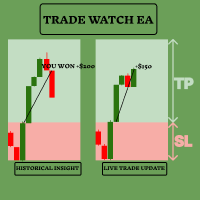
TradeWatch EAで取引戦略を強化しましょう TradeWatch EAは、リアルタイムの情報と取引コントロールを提供する強力なツールで、取引プロセスを簡素化し、リスク管理を改善します。 主な特徴: 取引の視覚化: グラフ上にストップロスとテイクプロフィットのレベルを直接表示します。 視覚的な表示により、迅速な意思決定とより良いリスク管理が可能です。 ポジションインデックス: ポジションインデックス番号を設定することで特定のポジションを監視できます(インデックスは0から始まります)。 複数の取引を同時に扱う際に非常に便利な機能です。 包括的な取引概要: すべての取引および履歴データを単一のグラフで表示します。 詳細な取引情報への簡単なアクセスにより、過去のパフォーマンスの分析と将来の戦略計画が容易になります。 リアルタイムの利益と損失の追跡: 取引の利益や損失に関する即時のフィードバックを提供します。 利益を最大化し、損失を最小化するためのタイムリーな意思決定をサポートします。 ユーザーフレンドリーなインターフェース: シンプルで直感的なデザインにより、すべての経験レベルのトレ
FREE

GoldScalp Pro - ゴールド(XAUUSD)取引EA 主な特徴 GoldScalp Pro は XAUUSD(金) の取引に最適化されたEAで、以下の技術を採用しています: EMA(10/140)の組み合わせ - トレンドを正確に判定 RSI(3期間) - 偽信号をフィルタリング フィボナッチレベル - 最適なエントリーポイントを特定 自動リスク/リワード計算 主な利点 安全な戦略 (マーチンゲール、平均化、グリッド不使用)
適応型リスク管理 固定ストップロス付き
汎用性 - 全時間軸(M1-H4)に対応
即戦力設定 すぐに取引開始可能 ️ EAパラメータ 1. リスク管理 パラメータ デフォルト値 説明 RiskPercent 5.0 1トレードあたりの最大リスク(残高%) UseFixedLot true 固定ロットサイズ FixedLotSize 0.01 ロットサイズ($500口座推奨) 2. インジケーター設定 パラメータ デフォルト値 説明 EMA_Fast_Period 10 短

PFA Simulator – Portfolio Simulation Expert Advisor
Introduction The PFA Simulator is a MQL5 Expert Advisor and the final step of the Portfolio Analyzer (PFA) system — a portfolio analysis toolkit included with any compatible Expert Advisors from this profile. The PFA system allows traders to build, merge, and simulate multi-asset, multi-strategy portfolios entirely within the MT5 Strategy Tester — with no external tools required.
The three-step PFA workflow: PFA Exporter (built into the EA)
FREE

デュアルラインシグナル、二重レベルシステム、マルチタイムフレームサポート、カスタマイズ可能なビジュアルシグナル、高度に設定可能なアラートシステムを備えた高度なTSI(トゥルーストレングスインデックス)。
フリーランスプログラミングサービス、アップデート、その他のTrueTL製品は私の MQL5プロフィール でご利用いただけます。
フィードバックとレビューをお待ちしております!
True Strength Index (TSI)とは? True Strength Index (TSI) は、William Blauによって開発されたモメンタムオシレーターです。価格モメンタム(現在の終値と前の終値の差)に二重指数平滑化を適用することで、市場ノイズを効果的に除去し、基礎となるトレンド方向を明らかにします。 TSIは-100から+100の間で振動し、TSIメインラインとシグナルライン(TSIの移動平均)の2本のラインで構成されます。正の値は強気モメンタム、負の値は弱気モメンタムを示します。2本のライン間のクロスオーバーおよびHigh/Lowレベルを通る動きが主要なトレードシグナルです。
FREE

The "Smart Partial TP & Daily Loss Limit Manager" is a versatile and powerful MQL5 indicator designed to help traders manage their trades more effectively. It combines two essential features that improve trading discipline and profitability: partial take-profit (TP) closing based on risk-reward ratios and a fixed daily loss limit to protect your capital. Key Features: Partial Take-Profit (TP) Close: This feature allows traders to set a percentage for partial TP closure (e.g., 50%). Once the pric
FREE

Este indicador identifica y dibuja automáticamente Fair Value Gaps (FVG) en el gráfico, permitiendo al trader detectar zonas de desequilibrio institucional donde el precio tiende a reaccionar. Está diseñado con un enfoque Multi-Timeframe (MTF) , lo que permite analizar ineficiencias tanto en el timeframe actual como en uno superior, mejorando la precisión en entradas y contexto de mercado. ️ ¿Cómo funciona? El indicador analiza secuencias de 3 velas consecutivas para detectar desequilibrios:
FREE

SI Connectは、FX VolumeやSIEAの取引システムを利用するために、当社のサーバーへの接続を確立するユーティリティです。
SI Connectを使用するために端末を準備する技術的な手順 Web リクエストを許可し、[ Terminal Options ] -> [Subcategory Expert Advisors ] で許可された URL のリストに https://stein.investments を挿入してください。 ターミナルごとに1つのEAインスタンスを実行する必要がありますが、当社のデータセンターから最新のデータを取得するため、バックグラウンドで常に実行する必要があります。
ご質問がある場合は、プライベートメッセージを送信してください。
FREE

Institutional Risk Manager (JJ Manager v5.0) Deja de suspender tus pruebas de fondeo por errores matemáticos. Este EA es un Asistente de Ejecución Profesional diseñado específicamente para traders que operan con reglas de Drawdown estrictas (FTMO, Funding Pips, Tradeify, Apex, etc.). CARACTERÍSTICAS PRINCIPALES: Cálculo de Riesgo en Dólares ($): Olvídate de calcular lotes manualmente. Tú decides cuánto dinero arriesgar (ej: $50) y el EA calcula el volumen exacto automáticamente basándos
FREE

DS Quarterly Price Levels Quarterly Theory Price Level Indicator for MetaTrader 5 DS Quarterly Price Levels is a MetaTrader 5 indicator designed to display structured price levels based on Quarterly Theory concepts. The indicator divides price ranges into defined segments and displays key reference levels including quarterly boundaries, midpoint areas, premium zones, and discount zones. It is designed to help traders analyse price location within a defined range and provide additional structure
FREE

Indicator that uses ATR and standard deviation to calculate the current trend. It has the top and bottom line. The top line is shown when it is high, and the bottom line when it is low. The indicator does not draw a trend line or show the trend for the day, or for a certain period. It has the function of indicating the current trend, and may indicate a reversal.
use it with caution and at your own risk.
FREE

VPOB Smart Order Block Alert MT5
VPOB Smart Order Block Alert MT5 is an Order Block detection and alert system designed for MetaTrader 5.
The system automatically analyzes price structure, detects Bullish and Bearish Order Blocks, evaluates Volume Profile information and POC, and provides a Quality Score to help traders identify important price zones.
MAIN FEATURES
• Automatic Bullish Order Block detection • Automatic Bearish Order Block detection • Volume Profile analysis • Point of Contro
FREE
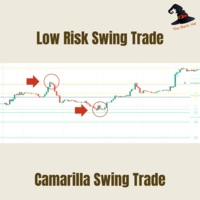
Camarilla Swing Trade Indicator is an Indicator. Support and resistance points are calculated from the High Low Close of the previous TF Week's price.
What are Camarilla Pivot Points?
1.Camarilla Pivot Points is a modified version of the classic Pivot Point. 2.Camarilla Pivot Points was launched in 1989 by Nick Scott, a successful bond trader. 3.The basic idea behind Camarilla Pivot Points is that price tends to revert to its mean until it doesn't. 4.Camarilla Pivot Points is a mathematical pr
FREE
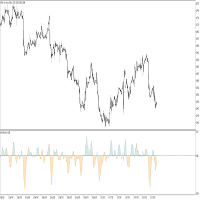
This indicator idea comes from Tushar Chande called Qstick.
Technical indicators quantify trend direction and strength in different ways.
One way is to use the difference between close and open for each bar and to sum it up over a period of time.
The formual is:
Qstick (period ) = Average ((close-open ), period )
In this indicator, we can choose how to calculate body by two famous chart types. The first and default indicator settings are based on Heiken Ashi chart, and the second is based
FREE

Double Correlation indicator (free) plots two windowed correlations in a separate window. the size of window is taken as input before the two symbols to correlate to. Two symbols are taken as an input parameters as well as period length. and the two correlations are computed with the currently shown symbol ex: input GBPJPY and AUDNZD. current symbol EURUSD then the following will be computed corr(EURUSD,GBPJPY) and corr(EURUSD,AUDNZD) The indicator can be useful to run a multi-symbol pair trad
FREE

This bot uses two CCI indicators one slow and the other fast. Then there is a moving average to determine the trend (if price is above moving average then its an up trend ). If a signal is to be produced in the opposite direction of the current open trade then it closes and reverses the type of trade. An ATR indicator is used for better stop loss and take profit placement. There is a trailing stop function. This robot can be used in the H1 timeframe , other time frames should work though you wil
FREE

Классический индикатор фракталов является запаздывающим, т.к. для подтверждения образования фрактала необходимо ждать 2 бара. Если этого избежать, то индикатор будет перерисовывающим, т.е. при обновлении максимума/минимума в течении 2-х баров фрактал будет менять своё положение на более позднее. В данном продукте максимально нивелированы оба этих недостатка, при этом совмещены достоинства обоих подходов! Индикатор показывает фрактал сразу в момент его образования, а в случае его обновления показ
FREE
MT4 Version A versatile tool
You do not need any other tools with this tool.
You can enable or disable all indicators.
Their values are adjustable.
In the first line you will see a summary of your account status.
p: The amount of your profit or loss
BP: The amount of your daily profit based on the balance
EP: Equity daily earnings
WP: Your weekly profit
MP: Your monthly profit
The next line shows each of the time frames you selected.
Chikou: The Chikou process
KT: The trend of the K and T li
FREE

The Cybernetic Cycle Oscillator for MetaTrader 5 is an indicator designed to reduce the lag inherent in traditional indicators. This MT5 version is a direct adaptation of the classic CyberCyclesOscillator found on the Thinkorswim platform, whose mathematical logic is based on John Ehlers' developments presented in his book Cybernetic Analysis for Stocks and Futures . Mathematical Foundations and Code Structure Unlike conventional oscillators, which tend to react late to trend changes because the
FREE

Market Scanner EA – Smart Multi-Asset Trading Scanner Market Scanner EA is a powerful, real-time decision-support trading tool designed for serious traders who want clarity bias before entering any trade. This EA scans multiple instruments simultaneously and delivers clear directional bias, momentum strength, and session-based performance — all in one clean dashboard. No noise. No guesswork. Just actionable market insight . MY OTHER EA and INDICATOR TREND BASED (MULTI SYMBOL) Solo Le
FREE

Forex 17 – Bollinger Bands Pure Sound Alert No Plots は、価格がボリンジャーバンドの上限または下限を明確に突破した際に、音によるアラートを発するインジケーターです。上方向と下方向のブレイクアウトには異なるサウンドが割り当てられており、潜在的な買われ過ぎ・売られ過ぎの状況を直感的に把握することができます。 本バージョンは描画を行わない設計となっており、チャート上には一切の視覚的要素を表示しません。そのため、チャートを常にクリーンな状態に保ちたいトレーダーや、価格そのものに集中したいユーザーに適しています。 ボリンジャーバンドの期間、偏差設定、アラートの発生間隔などを細かく調整でき、異なる時間足や取引スタイルに柔軟に対応可能です。音のみで状態を把握できるため、複数チャートの監視やバックグラウンドでの使用にも適しています。 AI の支援により翻訳されました。
FREE

AurumPrime EA
Version: 1.2
Updated: —
Activations: 10 Limited-Time Offer
After purchase, send a private message to receive:
Installation guide
Recommended setup
Risk templates for varying volatility Launch Discount Active
Price increases by $50 every 10 sales.
How I Operate Plug-and-play simplicity
Multi-timeframe awareness (M15–H1)
Adaptive volatility logic
24/5 precision monitoring I do not trade often.
I trade correctly. Minimum Requirements
Broker: ECN / RAW spre
FREE

Professional Drawdown Monitoring & Risk Alert System Drawdown Sentinel is free a specialized utility designed for traders who need real-time monitoring of their account exposure and drawdown levels. This version focuses on providing instant awareness , allowing you to stay informed about your risk status without the need for automated intervention. It is essential for all traders who use commercial 'risky' EAs that may not have been thoroughly tested or which use dangerous martingale or grid
FREE
Se procuras um robô rápido, agressivo e de alta frequência , o Best Scalper 5min TF é uma das melhores opções. Projetado para timeframes ultra curtos (M5 – 5 minutos) , ele entra e sai de operações rapidamente, capitalizando nos pequenos movimentos do mercado. Este robô combina filtros de volatilidade, padrões de candles e suporte/resistência dinâmica para identificar as melhores oportunidades. Ele é otimizado para pares de moedas e índices altamente voláteis , como US100 e GOLD , onde os peque
FREE

Watch Osw: シンプルで効果的なローソク足タイマー MetaTrader用の軽量インジケーターで、現在のローソク足が閉じるまでの残り時間をチャート上に直接表示します。これは、トレーダーがテクニカル分析に余計な負担をかけることなく、新しいバーが形成されるまでの時間を常に視覚化できるように設計された、基本的かつ機能的なユーティリティツールです。
パラメーターガイド(入力メニュー) Watch Color: チャート上のタイマーテキストに割り当てられる色。 Text size: 画面上の時間数字のフォントサイズ。 Text Font: 時間表示のフォントの種類。 Candle End Alarm: 新しいローソク足の通知アラートの有効/無効 (True/False) を切り替えます。 Sound: 期間変更時の音声通知に使用するサウンドファイル名 (.wav)。
視覚的な解釈と機能 インジケーターは、現在のBid価格に動的に追従する残り時間のテキストを表示します。タイマーの形式は、開いているチャートの時間枠に応じて自動的に調整されます:
秒: 1分足 (M1) で表示されます
FREE

Trade Manager – BreakEven and Global Stop Loss with one click
This Expert Advisor (EA) is designed to help traders manage their positions faster and more efficiently. It comes with two main features, accessible through on-chart buttons:
BreakEven function:
Instantly moves all open trades to the entry price with a single click.
Option to add a configurable margin (e.g., +2 pips) to cover spreads or commissions.
Global Stop Loss function:
Instantly applies the same stop loss level to
FREE

テーマスイッチャー - 取引ターミナルをカスタマイズ 概要 テーマスイッチャー は、MetaTrader 5 のチャートの配色を素早く変更できるインタラクティブなパネルです。快適でパーソナライズされた視覚環境を求めるトレーダーのために設計されたこのインジケーターは、ブランド、映画、プロフェッショナルなデザインにインスパイアされた様々なテーマスタイルを提供します。 使用方法 パネルを開く : インジケーターをチャートに追加するだけで、異なるテーマのボタンが表示されたウィンドウが現れます。 テーマを選択 : 利用可能なスタイルをクリックすると、チャートが瞬時に変更されます。 閉じて完了 : 好みのテーマを選択したら、 X をクリックしてパネルを閉じ、快適で自分のスタイルに合った視覚環境でテクニカル分析を続けます。 利用可能なスタイル AMD : ゲーマーやテクノロジーの美学にインスパイアされた、鮮やかなコントラスト。 Batman (バットマン) : ダークでエレガントなデザインで、豪華さと洗練された雰囲気が漂います。 Bloomberg Dark (ブルームバーグダーク) : プロのトレ
FREE

Presentation OPR Median Pro is an indicator designed for traders who use the breakout of the Open Price Range (OPR) strategy.
It automatically identifies the market’s opening range and draws: The upper and lower boundaries of the OPR, The median of the range, And extends these levels throughout your trading session. ️ Main Features
Automatic detection of the OPR (customizable time range)
Clear and precise drawing of the boundaries and median
Automatic extension of lines throughout
FREE
The Trendline Automatic indicator is an advanced technical analysis tool specifically designed to assist traders in identifying critical levels in the financial markets through the automatic drawing of support and resistance trendlines on price charts. With its automatic capabilities, this indicator saves traders time and effort in analyzing price movements, allowing them to focus on making better trading decisions. Key Features : Automatic Drawing of Trendlines : This indicator allows traders t
FREE
TrendFollowMT is a fully automated trading system which is using large time frame to determine the trend and use small time frame to find the entry point. Once the trend changed to opposite side, the system will wait for another entry point to recover with bigger lot size. Moreover, the target profit will be moved up when more position had been opened. The aim is to cover the cost of waiting time and risk.
Free version will only trade on buy signal and locked the initial Lot size (0.01). Paid v
FREE

本EAは**M1(1分足)**専用に設計されており、指定された期間( cSeconds )内で価格が一定の変動幅( MinPriceShot )を超えた場合に注文を開きます。 EAは**固定ロット(FixedLotSize) または 自動ロット計算(LotsOptimized())**のいずれかを使用します。 ポジションが開かれた後、EAは以下の方法で管理します:
テイクプロフィット(Take Profit) – 利益を確保。
ストップロス(Stop Loss) – 損失を制限。
トレーリングストップ(Trailing Stop) – 利益を守るための自動ストップ移動。 さらに、直近の利益や現在の口座残高などの統計情報をチャート上に表示します。 リスク管理と安全性 危険な手法(マーチンゲール、ナンピン、グリッドトレードなど)を使用しません。
スプレッドやブローカーの手数料に非常に敏感です。
スプレッドの狭い通貨ペア(例:EUR/USD、USD/JPY)を選択することを推奨します。 EAのパラメータ
Volatility Distance Indicator The Volatility Distance Indicator measures in real time the distance between current price and the moving averages you choose, expressed in points . Its purpose is to provide a clear, objective, and quantitative view of the market’s expansion relative to its equilibrium zones , allowing you to instantly assess whether price is in a phase of overextension, compression, or neutrality . Key Features: Point-based measurement: displays the exact distance between current
FREE

VWAP for IntradayTraders
Session-aware VWAP lines for fast, precise scalps.
Best used with OmniFlow Intraday Trading system : https://www.mql5.com/en/market/product/179364
️ Inputs (MT4/MT5) Enable_Hourly_VWAP: Toggle hourly VWAP. Enable_Asia_VWAP: Toggle Asia session VWAP. Enable_Europe_VWAP: Toggle Europe session VWAP. Enable_NA_VWAP: Toggle North America session VWAP. Enable_Extended_VWAP: Toggle extended session VWAP. Enable_Daily_VWAP: Toggle daily VWAP. Asia Session (GMT)
Session_Asi
FREE

MT5 to Telegram Signals
This utility is simple to use and supports a wide variety of settings: Pick your desired Telegram group and enter the bot token and the chat id Get notified when orders are placed, modified, executed, closed… or any combination of states Connect your broker account with Telegram and stop missing important notifications. Would you like to receive Telegram notifications? Are you looking for a simple way to share trade signals with your followers? Do you need to start docume
FREE

Product name: Varynex RSI RegimePulse Matrix
Short marketing headline: Adaptive RSI momentum context with trend regime, volatility-aware zones and confirmed divergence mapping.
Overview: Varynex RSI RegimePulse Matrix is a professional momentum-context indicator for MetaTrader 5. It is built around RSI, but it does not behave like a basic overbought/oversold oscillator or a simple arrow signal tool. The indicator combines smoothed RSI momentum, an RSI signal line, adaptive volatility zones, t
FREE
MetaTraderマーケットはMetaTraderプラットフォームのためのアプリを購入するための便利で安全な場所を提供します。エキスパートアドバイザーとインディケータをストラテジーテスターの中でテストするためにターミナルから無料のデモバージョンをダウンロードしてください。
パフォーマンスをモニターするためにいろいろなモードでアプリをテストし、MQL5.community支払いシステムを使ってお望みのプロダクトの支払いをしてください。

取引の機会を逃しています。
- 無料取引アプリ
- 8千を超えるシグナルをコピー
- 金融ニュースで金融マーケットを探索