 Toutes les commandes
 Règles
Voir comment commander un robot de trading
Lisez les Règles avant de passer une commande ou de l'exécuter
Comment commander un robot de trading dans MQL5 et MQL4
Voir un exemple de spécification des exigences pour commander un robot
Nouvelles commandes dans la catégorie:
30 - 40 USD
30 - 80 USD
30+ USD
30+ USD
30 - 200 USD
Tâche terminée
Temps d'exécution 4 jours

Commentaires de l'employé
wonderful client.. thank you for this.
Commentaires du client
Cleaned up my buggy indicator nicely.
Spécifications
So as the title suggest, I am looking for someone to debug and briefly explain my errors in my code.
The indicator looks like this on the chart
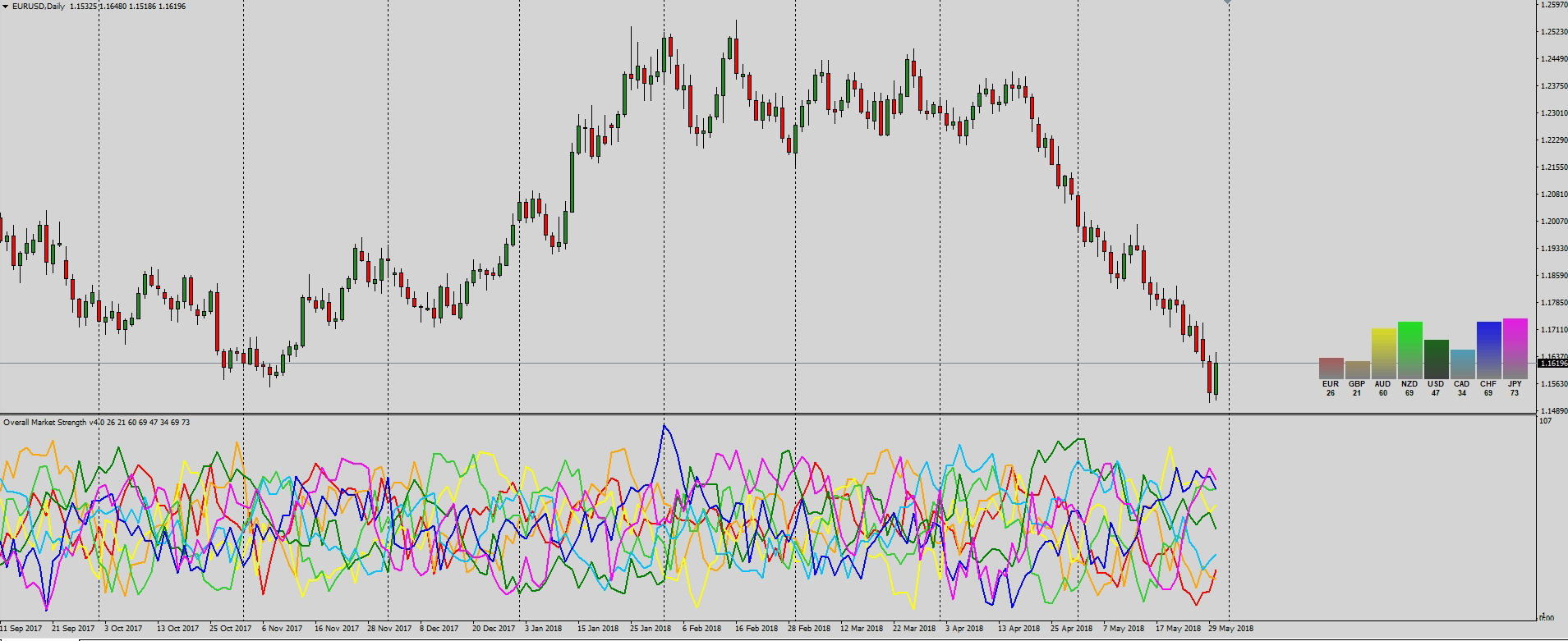
There are 4 bugs to fix
- Indicator applies to the chart fine but doesn't seem to run after initialization.
- Indicator only works on 1 hour charts and higher.
- Indicator "freezes" on start on new period.
- Graphic panel doesn't update to represent indicator value.
Examples of coding include the following
- Custom strength algo
   int   i,pos;

////---
   if(rates_total<=1)
      return(0);

////--- preliminary calculation
   if(prev_calculated>1) pos=prev_calculated-1;
   else  pos=1;

   for(i=pos-1; i<rates_total; i++)
     {double eg = 50 + (((iClose("EURGBP",0,i)-iClose("EURGBP",0,(i+Delta)))/(iHigh("EURGBP",0,(iHighest("EURGBP",0,MODE_HIGH,Delta,i)))-iLow("EURGBP",0,(iLowest("EURGBP",0,MODE_LOW,Delta,i)))))*100)/2;
      double ea = 50 + (((iClose("EURAUD",0,i)-iClose("EURAUD",0,(i+Delta)))/(iHigh("EURAUD",0,(iHighest("EURAUD",0,MODE_HIGH,Delta,i)))-iLow("EURAUD",0,(iLowest("EURAUD",0,MODE_LOW,Delta,i)))))*100)/2;
      double en = 50 + (((iClose("EURNZD",0,i)-iClose("EURNZD",0,(i+Delta)))/(iHigh("EURNZD",0,(iHighest("EURNZD",0,MODE_HIGH,Delta,i)))-iLow("EURNZD",0,(iLowest("EURNZD",0,MODE_LOW,Delta,i)))))*100)/2;
      double eu = 50 + (((iClose("EURUSD",0,i)-iClose("EURUSD",0,(i+Delta)))/(iHigh("EURUSD",0,(iHighest("EURUSD",0,MODE_HIGH,Delta,i)))-iLow("EURUSD",0,(iLowest("EURUSD",0,MODE_LOW,Delta,i)))))*100)/2;
      double ec = 50 + (((iClose("EURCAD",0,i)-iClose("EURCAD",0,(i+Delta)))/(iHigh("EURCAD",0,(iHighest("EURCAD",0,MODE_HIGH,Delta,i)))-iLow("EURCAD",0,(iLowest("EURCAD",0,MODE_LOW,Delta,i)))))*100)/2;
      double eh = 50 + (((iClose("EURCHF",0,i)-iClose("EURCHF",0,(i+Delta)))/(iHigh("EURCHF",0,(iHighest("EURGBP",0,MODE_HIGH,Delta,i)))-iLow("EURCHF",0,(iLowest("EURCHF",0,MODE_LOW,Delta,i)))))*100)/2;
      double ej = 50 + (((iClose("EURJPY",0,i)-iClose("EURJPY",0,(i+Delta)))/(iHigh("EURJPY",0,(iHighest("EURJPY",0,MODE_HIGH,Delta,i)))-iLow("EURJPY",0,(iLowest("EURJPY",0,MODE_LOW,Delta,i)))))*100)/2;


      EURBuffer[i] = (eg+ea+en+eu+ec+eh+ej)/7;

//--- and so
- graphic panel
//+------------------------------------------------------------------+
//|  Create Panel                                                    |
//+------------------------------------------------------------------+
void CreatePanel()
//+------------------------------------------------------------------+
  {
   string name="label_";

   for(int i=1;i<=24; i++)
     {
      string labelname=name+IntegerToString(i,3,'0');

      switch(i)
        {
         case   1:
            createBarGraph(labelname,264,43,30,2);
            break;
         case   2:
            createBarGraph(labelname,232,43,30,2);
            break;
         case   3:
            createBarGraph(labelname,200,43,30,2);
            break;
   //--- and so on
  }
//+------------------------------------------------------------------+

//+------------------------------------------------------------------+
//|  create Bar Graph                                                |
//+------------------------------------------------------------------+
void createBarGraph(string lname,int xdistance,int ydistance,int xsize,int ysize)
//+------------------------------------------------------------------+
  {
   int ypoint=ydistance;
   string name=lname+"_";

   for(int num=51; num>=1; num--)
     {
      createRectangleLabel(name+IntegerToString(num,2,'0'),xdistance,ypoint,xsize,ysize);
      ypoint+=2;
     }
  }
//+------------------------------------------------------------------+

//+------------------------------------------------------------------+
//|  Create Rectangle Label                                          |
//+------------------------------------------------------------------+
void createRectangleLabel(string name,int xdist,int ydist,int xsize,int ysize,)
  {
   ObjectCreate(name,OBJ_RECTANGLE_LABEL,0,0,0);
   //--- and so on
  }
//+------------------------------------------------------------------+

//+------------------------------------------------------------------+
//|  Create Edit                                                     |
//+------------------------------------------------------------------+
void createEdit(string name,int xdist,int ydist,int xsize,int ysize,string text,int fontsize,color clr)
//+------------------------------------------------------------------+
  {
   ObjectCreate(name,OBJ_EDIT,0,0,0);
   //--- and so on
  }
//+------------------------------------------------------------------+
- graphic panel update
      objectSetBlank("label_001");
      objectSetGraph("label_001_",EURBuffer[0],C'128,128,128',C'134,121,121',C'140,115,115',C'147,108,108',C'153,102,102',C'159,96,96',C'166,89,89',C'172,83,83',C'179,77,77',C'185,70,70',C'191,64,64',C'198,57,57',C'204,51,51',C'210,45,45',C'217,38,38',C'223,32,32',C'230,25,25',C'236,19,19',C'242,13,13',C'249,6,6',C'255,0,0');
      ObjectSetString(0,"label_017",OBJPROP_TEXT,DoubleToString(EURBuffer[0],0));
- Set graph
//+------------------------------------------------------------------+
//|  object Set Graph                                                |
//+------------------------------------------------------------------+
void objectSetGraph(string name,double value,color a,color b,color c,color d,color e,color f,color g,color h,color i,color j,color k,color l,color m,color n,color o,color p,color q,color r,color s,color t,color u)
  {
//---
   ObjectSet(name+"51",OBJPROP_COLOR,a);
   if(value > 2.0) ObjectSet(name + "50", OBJPROP_COLOR, a);
   if(value > 4.0) ObjectSet(name + "49", OBJPROP_COLOR, b);
   if(value > 6.0) ObjectSet(name + "48", OBJPROP_COLOR, b);
   if(value > 8.0) ObjectSet(name + "47", OBJPROP_COLOR, c);
   if(value > 10.0) ObjectSet(name + "46", OBJPROP_COLOR, c);
   if(value > 12.0) ObjectSet(name + "45", OBJPROP_COLOR, d);
   if(value > 14.0) ObjectSet(name + "44", OBJPROP_COLOR, d);
   if(value > 16.0) ObjectSet(name + "43", OBJPROP_COLOR, e);
   if(value > 18.0) ObjectSet(name + "42", OBJPROP_COLOR, e);
   if(value > 20.0) ObjectSet(name + "41", OBJPROP_COLOR, f);
   if(value > 22.0) ObjectSet(name + "40", OBJPROP_COLOR, f);

//--- and so on
The full code is 440 lines and will be provided upon expression of interest.
Thank you for your time
Bob
Répondu
1
Évaluation
Projets
507
40%
Arbitrage
159
17%
/
74%
En retard
99
20%
Chargé
2
Évaluation
Projets
210
40%
Arbitrage
90
20%
/
43%
En retard
85
40%
Gratuit
3
Évaluation
Projets
744
56%
Arbitrage
48
31%
/
31%
En retard
120
16%
Gratuit
Publié : 1 code
4
Évaluation
Projets
93
34%
Arbitrage
10
40%
/
30%
En retard
5
5%
Gratuit
Commandes similaires
Custom MT5 Trading Robot for Gold and Forex
200 - 300 USD
Project: Custom MT5 Day Trading Expert Advisor I need a custom automated trading robot (EA) for MetaTrader 5, developed in MQL5. Markets: - Gold (XAUUSD) - Selected Forex pairs Trading style: Automated day trading. All positions should be closed according to predefined strategy rules and before the end of the selected trading session. Strategy: The developer should propose a clear trading strategy, explain its rules
Ninjascript strategy tester
30+ USD
Hi, I need NinjaTrader 8 Strategy Analyzer backtests on two of my strategies, each over 1 year AND 3 years of data. Please quote the full job. Common settings: NT8 Strategy Analyzer, MCL (Micro WTI Crude Oil) continuous front-month contract (MCL ##-##), 5-minute bars, 1yr + 3yr of the most recent data, $2.50 round-turn commission per contract. Deliverables per run: full Strategy Analyzer summary (net profit, profit
a { text-decoration: none; color: #464feb; } tr th, tr td { border: 1px solid #e6e6e6; } tr th { background-color: #f5f5f5; } Project Description I need an Expert Advisor (EA) for MetaTrader 5 (MT5) that can automatically trade Gold (XAUUSD) and major Forex pairs. The EA must analyze market conditions, open and close trades automatically, manage risk effectively, and be fully compatible with the MT5 Strategy Tester
To create a unique description that meets the freelance site's requirements, you can type the following: "I am looking for an experienced MQL5 developer to create a custom Forex Expert Advisor. The trading strategy should be based on a moving average crossover system, filtered by the Relative Strength Index indicator. The expert advisor needs to feature distinct strategy modules with adjustable settings for the
Mt5 to mt5 copier
30 - 50 USD
Hi Team i am looking for the copier, to copy trades to and mt5 broker where the EA Trading is Disabled. when we setup a market trade copiers, it alerts EA Trading is Disabled by the broker. can we develop the copy trading EA which and operate in this environment
Hello, I’d like to develop an AI-powered analysis dashboard for , with a clear, easy-to-use design that works on mobile and web, or on the platform we agree on. I’d like it to include: Main dashboard: Show the market status, the latest data update, and the current signal, if available, including direction, entry price, stop loss, targets, and risk-to-reward ratio. AI signal explanations: Explain in clear language why
Scalping bort
30+ USD
GOLD SCALPING BOT STRATEGY Symbol: XAUUSD (Gold vs USD) Broker: Exness Account: Standard Starting Balance: $20 1. TIMEFRAME - Trend analysis: M15. - Entry timeframe: M5. - Trade only when the market has a clear direction. 2. INDICATORS - EMA 50 - EMA 200 - RSI 14 - Support and Resistance 3. BUY RULES The bot must open a BUY trade only when all these conditions are met: 1. EMA 50 is above EMA 200 on M15. 2. Price is
Request for an Existing Automated Trading System (Expert Advisor) I am looking to acquire an existing, fully functional Expert Advisor (EA) that trades Forex CFDs, with the option of trading other CFDs if the strategy supports them safely. Performance objectives Target average net monthly return: 1.5%. A consistent 1.0% monthly return may be considered if the system demonstrates strong risk control and credible
Hi All, I am looking for a bot EA which makes good profit. If any having please share it for TEST. After proper TESTING only I will make the payment, no cheating no fraud. Please do not waste the time also
Allow me to set the daily trading bias manually to BUY or SELL. Check my defined 4H and 1H trend-alignment conditions. Execute entries based on my 15-minute pullback and continuation rules. Trade only between 06:00 and 16:00 Nigeria time, Monday to Friday. Calculate lot size based on my chosen risk percentage and stop-loss distance. Automatically place stop-loss and take-profit orders. Enforce my daily trade limits
Informations sur le projet
Budget
30+ USD