EcFx XAU Redline
- Experts
-
Jarrod Emery
 I’m the founder of ExpertCodeFX and an MQL5 Expert Advisor developer focused on practical, testable automation for MetaTrader 5.
 - Version: 1.140
- Updated: 21 August 2026
- Activations: 10
ECFX XAU Redline v1.14
ECFX XAU Redline is a multi-engine Expert Advisor for Gold in MetaTrader 5. Version 1.14 preserves the lower-risk v1.11 stock core and adds an independently accounted 48-hour and 72-hour trend complement. The additional engine was designed to diversify the core during sustained Gold trends without changing the established Lock30x, Aurum or Sovereign signal rules.
Redline is intended for XAUUSD, GOLD or the broker's equivalent Gold symbol. Attach one instance to an M5 chart. The EA reads completed H1 bars internally and requires an MT5 Hedging account for independent position ownership.
WHAT CHANGED IN VERSION 1.14
- The lower-risk v1.11 Lock30x, Aurum and Sovereign stock configuration is preserved.
- A separate H1 trend complement evaluates completed 48-hour and 72-hour breakout ranges.
- Both buy and sell trend-complement directions are enabled in the stock profile.
- Complementary-engine balance, floating profit, daily-loss state and position ownership are isolated from the protected Redline core.
- Restart-safe history reconstruction restores the complementary virtual ledger after terminal or EA reinitialization.
- The validated trend-complement exposure is built into the factory defaults. A set file is not required for normal installation.
- Complementary trailing stops require at least 50 broker points of favourable improvement before another modification is sent, reducing one-tick request churn.
- Routine debug, health and trade-event logging remains disabled by default.
- The clean Redline chart theme, dashboard and dotted pending, stop-loss and take-profit levels are retained.
- MQL5 automated-validation compatibility is retained for non-Gold validation symbols.
TRADING METHOD
The protected Redline core continues to operate its three independently identified engine families. The new trend complement uses completed H1 data, a fast and slow exponential-average regime check, completed-bar average true range and rolling 48-hour and 72-hour price ranges.
When the completed H1 trend and price alignment agree, the complement can place a pending stop order beyond the relevant completed range. Each order has an ATR-based initial stop and emergency target. Break-even, stepped trailing-stop and maximum-hold rules manage an activated position. Pending orders expire automatically. The trailing step is an execution-quality control; it does not create an additional entry signal.
The method is deterministic and causal. It does not request future bars, external signals, a DLL, WebRequest access or a custom indicator.
STOCK SETUP
- Platform: MetaTrader 5.
- Instrument: XAUUSD, GOLD or the broker's Gold equivalent.
- Chart: M5.
- Account position mode: Hedging.
- Lock30x: enabled.
- Aurum: enabled.
- Sovereign: enabled.
- Isolated Trend Complement: enabled.
- Trend signal timeframe: H1.
- Trend ranges used by the stock engine: 48 and 72 completed H1 bars.
- Trend reference exposure: 0.20 lot per active zone at 50,000 reference equity.
- Trend maximum open positions: two.
- Trend daily entry ceiling: twelve.
- Trend virtual daily equity-loss ceiling: 3.0%.
- Trend margin-usage ceiling: 10.0% of its protected risk-reference balance.
POSITION SIZING
The v1.11 core retains its lower-risk stock scaling, which requests approximately 0.45 lot for its principal 50,000 profile before broker normalization and active safety reductions.
The trend complement starts from 0.20 lot per active zone at 50,000 reference equity. Its sizing can scale with protected core capital, is normalized to the broker's minimum, maximum and lot step, and is restricted by its absolute lot and margin ceilings. The complement cannot increase its own risk merely because its own recent trades made a profit, and it does not reduce the protected core's sizing when the complement is in drawdown.
These values describe the software's stock mechanics. They are not personal risk recommendations. Users should reduce exposure when the broker, leverage, account size or loss tolerance differs from the tested environment.
ENGINE ISOLATION AND RESTART HANDLING
Each engine uses its own magic-number ownership. Complementary realized and floating profit is removed from the balance and equity values used by the protected core. The complementary engine maintains its own virtual balance, daily-loss reference and daily entry count.
After a terminal restart or EA reattachment, v1.14 reconstructs the complement's realized result and current-day entries from MT5 account history. It also restores the saved current-day equity reference when that state is available. This prevents a routine restart from resetting the complementary daily risk controls.
RECENT REGIME GUARD
The protected v1.11 core retains its configurable Recent Market Regime Guard and its stock start-date input. The new 48-hour and 72-hour trend complement does not add a calendar-year switch or a special 2026-only trading rule. Changing any inherited date, engine, session, direction or risk input creates a different configuration from the stock evidence.
HISTORICAL VALIDATION SNAPSHOT
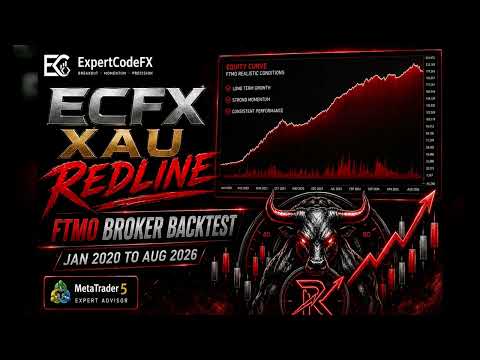
The stock 0.20 trend-complement profile was tested on one frozen FTMO XAUUSD M5 matrix from 1 January 2020 to 18 August 2026 with 50,000 initial deposit and 1:30 leverage. The continuous historical test reported 2,034,604.94 net profit, 1.20 profit factor, 49,999 trades, 12.47% maximum balance drawdown and 17.08% maximum equity drawdown. The tester reported 73% real ticks for this long run.
Within that same continuous run, trades closed during 2026 to 18 August produced 482,297.82 net profit across 2,578 trades. May and July 2026 were losing months. The 2026 improvement came from the isolated trend complement, which contributed 569,371.06 while the protected core contributed -87,073.24 in the engine-level reconciliation.
These are historical Strategy Tester results from one broker environment, not live trading results and not a forecast. They are sensitive to the broker's Gold specification, price history, spread, commission, swap, server time, stops level, execution and leverage. Nearby-exposure and repeat checks form part of the release package, but no backtest can establish future profitability.
BACKTESTING AND FIRST USE
Start with factory defaults on XAUUSD M5 and select Every tick based on real ticks where reliable tick history is available. Record the exact EA version, inputs, broker, symbol, date range, deposit, leverage, modelling quality, spread, commission, swap, trades, net result and maximum equity drawdown.
Test a long window and a recent fresh-account window. Then forward-test the exact unchanged build on a demo account with the intended broker before considering live use. Do not load a preset from v1.11, v1.12 or v1.13 into v1.14 because older files can overwrite the new stock defaults.
DASHBOARD AND LOGGING
The Redline dashboard reports enabled engine families, account and exposure state, operating status, broker time and protection state. ONLINE means that an engine is enabled; it does not mean that a valid trade must be available immediately.
Routine detailed logs are disabled by default. Diagnostic logging can be enabled temporarily when investigating a reproducible issue. Trade-request failures and important initialization errors remain available so a broker or setup problem is not silently hidden.
IMPORTANT OPERATING NOTES
- Use one Redline instance per symbol and account strategy unless each instance has deliberately separated magic numbers.
- Keep algorithmic trading and terminal connectivity enabled.
- Do not change several signal or risk inputs at once and compare the result with the stock evidence.
- Updating the Market file does not replace an EA already attached to a chart. Remove the old instance, install the updated Market version, reattach it and verify the displayed version and inputs.
- A VPS reduces interruption risk but does not remove market, execution, software or infrastructure risk.
RISK NOTICE
ECFX XAU Redline is automated trading software and does not guarantee profit. Leveraged Gold trading can produce rapid losses, gaps, spread expansion, slippage, rejected orders and loss of some or all deposited funds. Historical simulations do not predict future results. Use the Strategy Tester and a demo account first, select exposure appropriate for the account and monitor the EA after any broker, symbol, terminal, version or input change.