Practice Simulator Sync

4.5

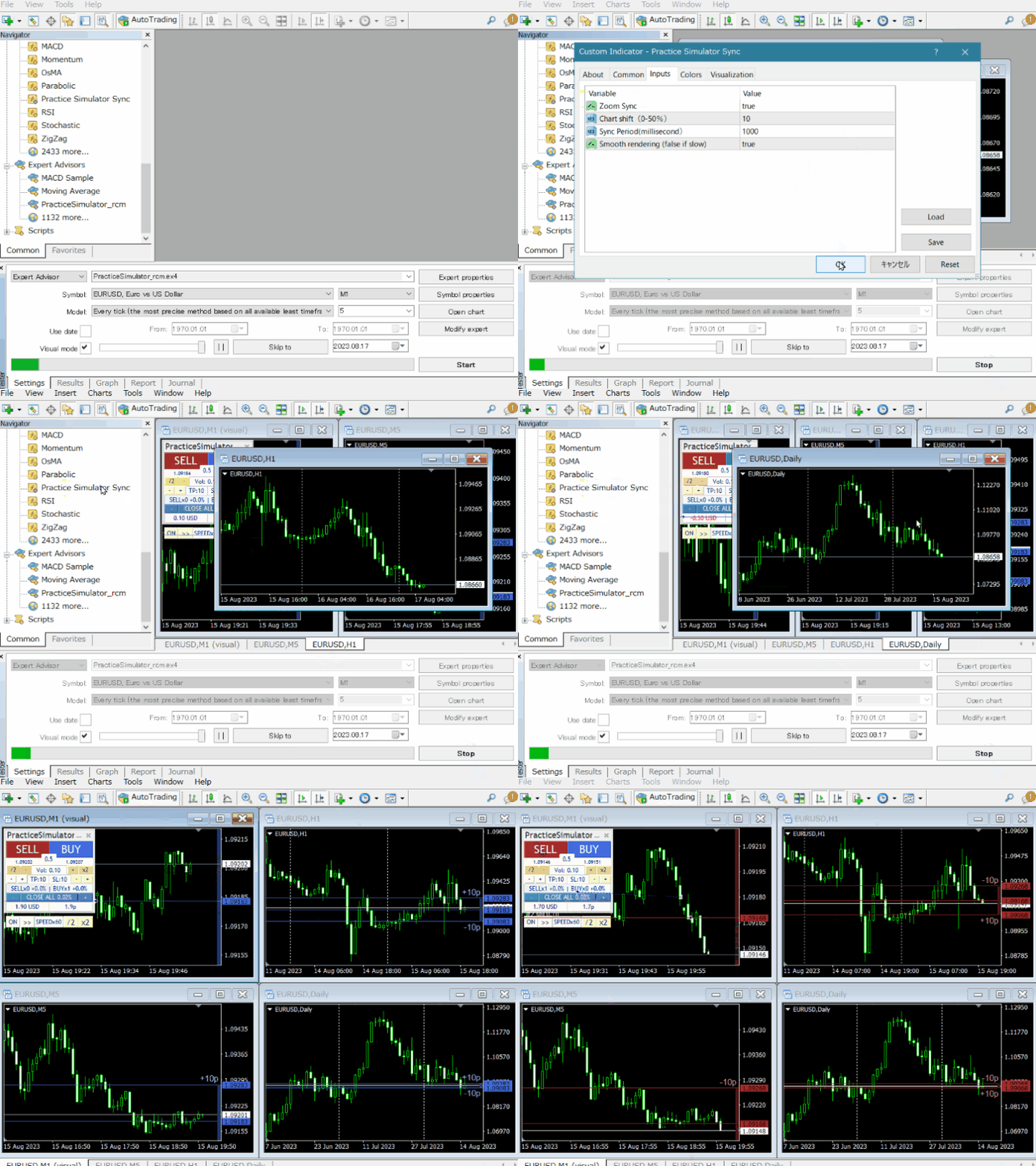
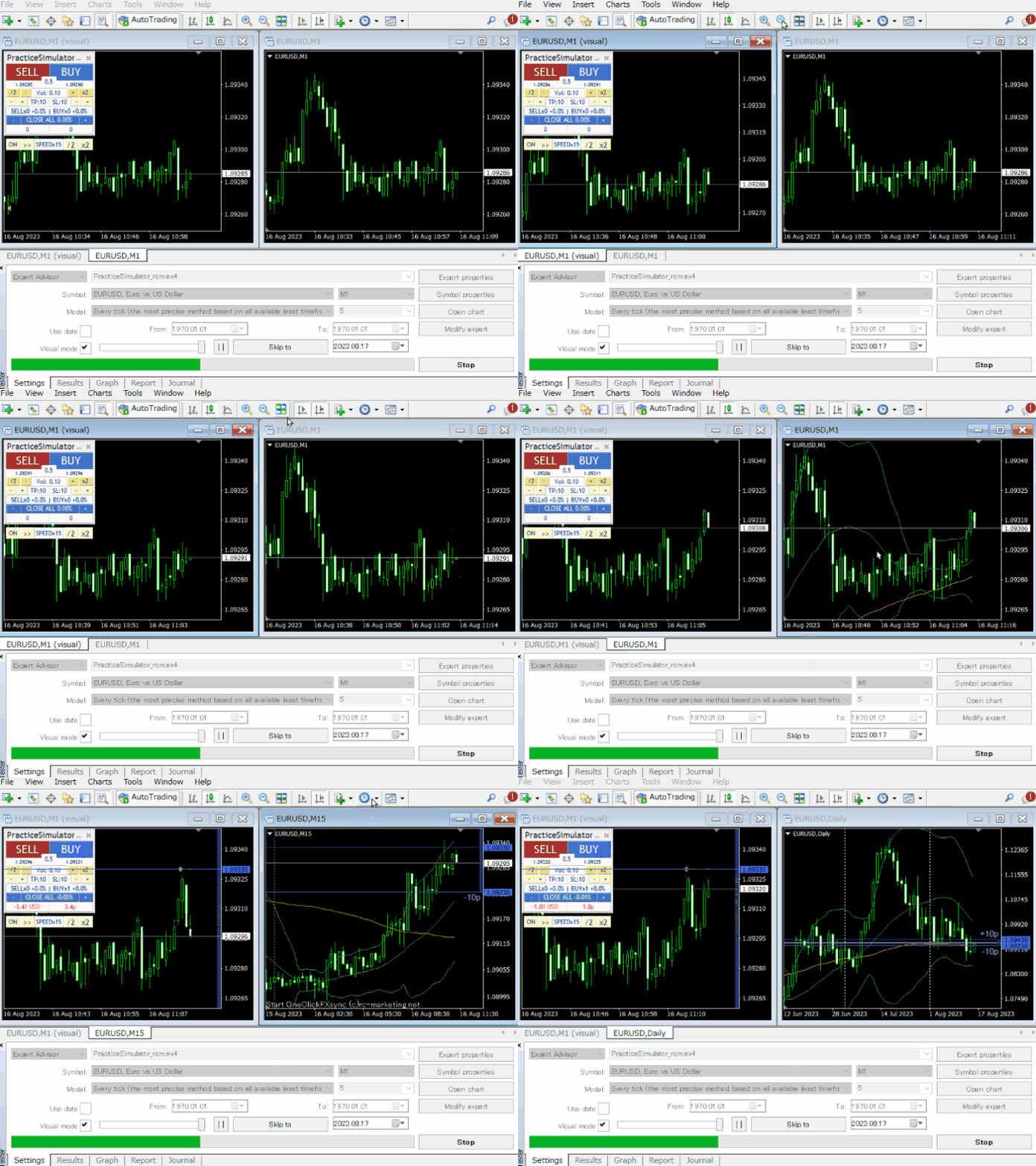
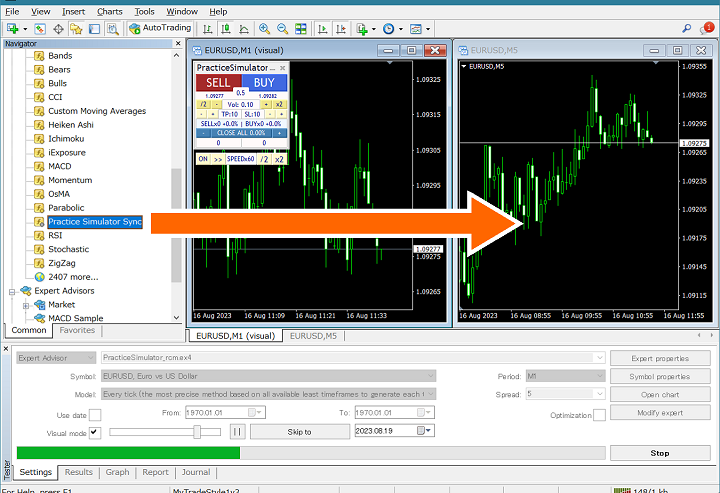
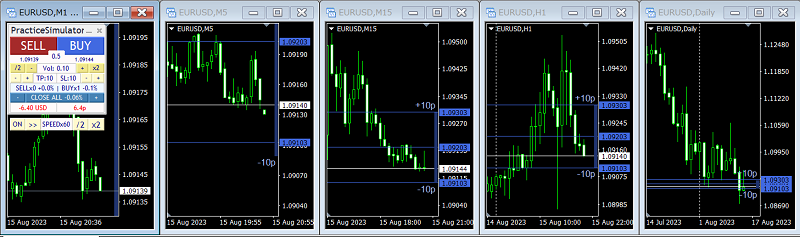
This module synchronizes with the Practice Simulator to display chart time and position information, not only for the same currency pair, but also display synchronized charts for various timeframes and different currency pairs.

Note: This module does not work by itself. "Practice Simulator" is required.

Practice Simulator

https://www.mql5.com/en/market/product/98348


Two synchronisation modes are available.


Simple synchronisation mode:

You can easily create a synchronised chart by opening the chart you want to synchronise and inserting this tool into it.

The chart is moved to the specified position and partially hidden from view. So the chart may sometimes be visible in chart shift, sub-windows, etc.


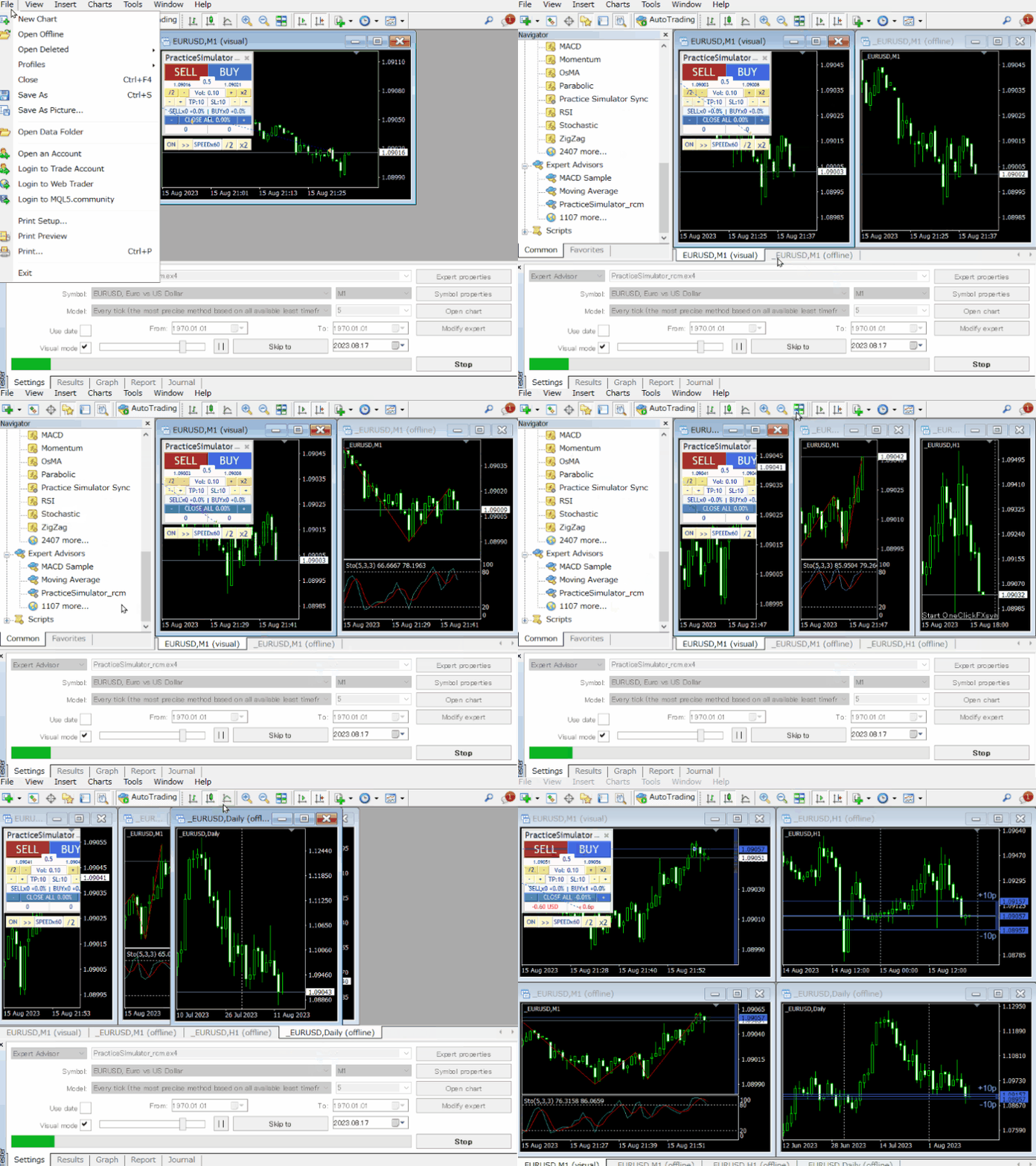
Active synchronisation mode:

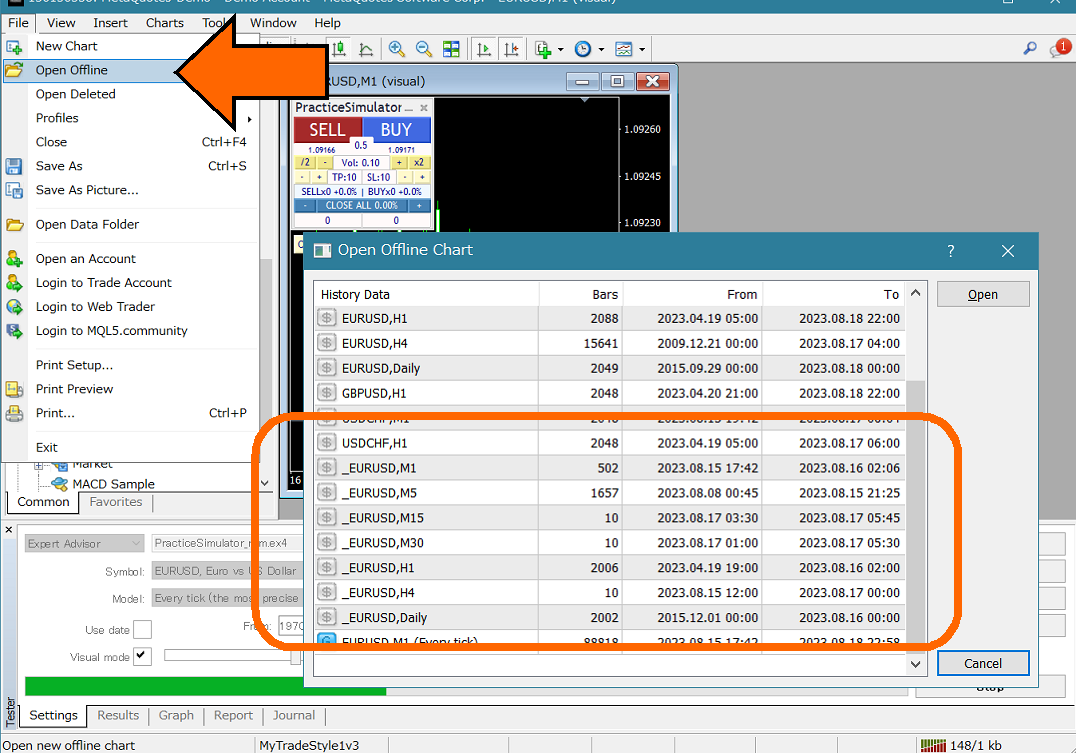
Use offline charts to create charts for synchronisation.

The process is more complex, but works almost exactly like a live chart.


For more detailed setup information, click here.

https://www.mql5.com/en/blogs/post/753894

Reviews 2
Vladimir Shramchenko
499
Vladimir Shramchenko 2025.02.25 06:38 
 

Thank you, it's a very useful tool.

Marx-David
197
Marx-David 2023.10.15 06:22 
 

thank you. Very good for practicing the analysis of price action patterns.

Recommended products
Renko Chart with Moving Average. Classic Renko charts idea. It is protted on main chart and Moving Average can be applied. Prices for bars are used from a lower timeframe. Parameters: BarsBack - how many bars of lower timeframe to use. If value is zero than it will use all available bars. LTF - lower timeframe. BrickSize - Renko bar in points. BullishColor - color for bull candle. BearishColor - color for bear candle. HideLineChart - if this value is true the line chart when be hidden when sele
FREE
MASi Three Screens
Aleksey Terentev
5 (2)
MASi Three Screens is based on the trading strategy by Dr. Alexander Elder. This indicator is a collection of algorithms. Algorithms are based on the analysis of charts of several timeframes. You can apply any of the provided algorithms. List of versions of algorithms:     ThreeScreens v1.0 - A simple implementation, with analysis of the MACD line;     ThreeScreens v1.1 - A simple implementation, with analysis of the MACD histogram;     ThreeScreens v1.2 - Combines the first two algorithms in
FREE
Market Profile 3
Hussien Abdeltwab Hussien Ryad
3 (2)
Market Profile 3 MetaTrader 4 indicator  — is a classic Market Profile implementation that can show the price density over time, outlining the most important price levels, value area, and control value of a given trading session. This indicator can be attached to timeframes between M1 and D1 and will show the Market Profile for daily, weekly, monthly, or even intraday sessions. Lower timeframes offer higher precision. Higher timeframes are recommended for better visibility. It is also possible t
FREE
A simple chart player for replaying historical charts. You can review market movements by advancing candlesticks one bar at a time. Playback can be paused during operation and resumed at any time. [Features] Automatic playback from past to future Advances one bar at a fixed interval Pause is available during playback [Playback Specifications] Playback direction: Past → Future Playback speed: Fixed Bars moved: 1 bar per step Pause / Resume playback END to stop playback [Controls] Pause / Restar
FREE
this EA draws vertical lines on the chart, either consecutive or alternating lines, depending on the input settings. Since vertical lines often represent time events, timing is important in trading. StartTime = D'2025.03.12 23:00';  // Starting point (time and date) NumberOfLines = 10;                    // Total number of lines to draw IntervalCandles = 1;                   // Interval in candles (must be > 0) IntervalMinutes = 30;                  // Interval in minutes (0 to disable) Directi
FREE
Free automatic Fibonacci is an indicator that automatically plots a Fibonacci retracement based on the number of bars you select on the BarsToScan setting in the indicator. The Fibonacci is automatically updated in real time as new highest and lowest values appears amongst the selected bars. You can select which level values to be displayed in the indicator settings. You can also select the color of the levels thus enabling the trader to be able to attach the indicator several times with differe
FREE
Real-time spread tracking and monitoring software Displays spread values in form of histograms on current timeframe of chart Convenient for analyzing spread changes, as well as for comparing trading conditions of different brokers By placing on desired chart, the spread changes at different trading times are displayed Additionally Fully customizable Works on any instrument Works with any broker
FREE
BrokerInfo
Nikolaos Pantzos
5 (2)
'BrokerInfo' is an indicator to show some information of account on the chart. You can to see on chart information about: GMT time. Broker time. Maximum simultaneously open orders. Leverage. Maximum lot size. Minimum lot size. Lot step. Stop level in pips. Symbol spread in pips. You can to get source code from here . Parameters SizeBackground – background size. PositionUpDn – position to show info on the chart.
FREE
DF Fib Trader Pro DF Fib Trader Pro is an automated trading system designed for MetaTrader 4. It uses Fibonacci-based price levels combined with trend and structure analysis to define entry and exit points. The EA supports both long and short positions and includes built-in risk management parameters. Core Features: Uses Fibonacci retracement and extension logic to plot entry, SL and TP points. Configurable lot size and stop loss/take profit levels Choice of 1 or 2 entry points Supports fixed o
FREE
Email Drawdown Alert
Roman Starostin
5 (12)
Free informative Indicator-helper. It'll be usefull for traders who trade many symbols or using grid systems (Averaging or Martingale). Indicator counts drawdown as percent and currency separate. It has a number of settings: Count deposite drawdown according equity value and send e-mail or notifications to user if DD more than set; Sending e-mail when max open orders reached; Shows price and remaining pips amount before MarginCall on current chart and Account generally; Display summary trade lot
FREE
LT Watermark MT4
Thiago Duarte
5 (5)
This indicator draw a watermark on the chart, with the timeframe and symbol name. You can change everything, including add a aditional watermark. Functions: Symbol watermark: Size -  text size. Font -  text font. Color -  text color. Background text -  watermark at foreground or background mode. Horizontal correction -  x correction in pixels. Vertical correction -  y correction in pixels. Separator period X symbol -  what will separate the period from symbol. Aditional watermark: Enable custom
FREE
Buffer Finder Tool
Afsal Meerankutty
4.75 (4)
CyberZingFx Buffer Finder Tool Developed for Finding Buffers of Indicator to use in Universal Indicator EA . This is Not an Indicator or EA CyberZingFx Buffer Finder Tool is utility tool designed specifically for MetaTrader 4 (MT4) users. It is a standalone application that helps you easily find the buffers of any MT4 indicator, allowing you to use them in your Universal Indicator EA. With the Buffer Finder Tool, you no longer have to search through the data window to find the buffers you need.
FREE
Индикатор "Стрелки" (Arrow Drawing Tool) Краткое описание: Удобный инструмент для рисования стрелок на графике с помощью кнопки и мыши. Позволяет визуально отмечать направления движения цены, уровни поддержки/сопротивления и важные ценовые зоны. Основные возможности: Простое управление   - кнопка "Стрелка" для активации режима рисования Автоматическая окраска   - зеленые стрелки для движения вверх, красные для движения вниз Настраиваемый дизайн   - регулируемая длина и угол наконечника стрелки Г
FREE
This indicator help to mark the high and low of the session Asian,London,Newyork , with custom hour setting This indicator is set to count from minute candle so it will move with the current market and stop at the designated hour and create a accurate line for the day. below is the customization that you can adjust : Input Descriptions EnableAsian Enables or disables the display of Asian session high and low levels. EnableLondon Enables or disables the display of London session high and
FREE
Night Scalper EA Lite
Robots4Forex Ltd
2.33 (3)
The Night Scalper EA Lite is a fully automated Expert Advisor that trades at night and relies on price reversion. The EA trades using market orders and has the option to use time averaging to improve performance. This EA works best on EURUSD using the M5 timeframe, but will also work on AUDUSD, GBPUSD, NZDUSD, USDCAD, USDCHF and likely many more. A VPS is advisable when trading this system and a low spread and commission based broker is best. Check the comments for back test results and optimiz
FREE
Double Fibonacci
Fabio Mazzotta
5 (1)
Fibonacci will be designed by default based on the monthly candle but you can simultaneously view Fibonacci on a weekly candle or you can choose your two favorite timeframes. When you run this script, an input prompt will appear and the following input parameters can be configured: Input Parameters: Name Example Default Timeframe1 Monthly 43200 Timeframe2 Weekly 10080 TF1status 1 on 1 TF2status 0 off 0 candleID you can choose which candle to apply 1 Prefix1 It's is the prefix of the first object
FREE
Trendline indicator
David Muriithi
2 (1)
Are you tired of drawing trendlines every time you're analyzing charts? Or perhaps you would like more consistency in your technical analysis. Then this is for you. This indicator will draw trend lines automatically when dropped on a chart. How it works Works similar to standard deviation channel found on mt4 and mt5. It has 2 parameters: 1. Starting Bar 2. Number of bars for calculation The   starting bar   is the bar which drawing of the trend lines will begin, while the   number of bars for c
FREE
MTF Heiken Ashi MA is a multiple timeframe Heiken Ashi & Moving Average indicator. Fully customizable for advanced & unique Heiken Ashi & Moving Average calculations. Key Features Modified appearance and appeal from the traditional using only H eiken Ashi MA bodies. MTF Higher or lower timeframes available making this it great for trends and scalping. There are many settings that can be non-repaint for signals at a new bar and at bar 0. Inputs Timeframe  = PERIOD_CURRENT - timeframe of Moving
FREE
Индикатор для синхронизации и позиционировании графиков на одном и более терминалах одновременно. Выполняет ряд часто необходимых при анализе графиков функций: 1. Синхронизация графиков локально - в пределах одного терминала при прокрутке, изменении масштаба, переключении периодов графиков, все графики делают это одновременно. 2. Синхронизация графиков глобально - тоже самое, но на двух и более терминалах, как МТ4, так и МТ5. 3. Позиционирование графика на заданном месте при переключении периодо
FREE
Change Timeframe for All
Mohamed Amine Talbi
5 (1)
The script changes the timeframe of all open charts on the MetaTrader platform in a simple click without having to do it manually by going through all the open charts and changing them one by one, it is handy when there are many open charts. The script lets you choose which timeframe to apply to the open charts. The timeframes available in the dropdown menu are the ones already available on the MetaTrader platform : M1, M5, M15, M30, H1, H4, D1, W1, MN1.
FREE
MaSonic MT4
Tadanori Tsugaya
Quickly search for matching Moving Averages (MAs) at any point you click on the chart! By instantly displaying the MAs that pass through any selected point, it’s excellent for identifying trend peaks and supporting better trading decisions. Features: Simple Operation: Click on any point where you want to find the MA. Instant Results: Displays matching MAs if found. Sleep Function: Hide buttons when not in use for a cleaner interface. Manual Control: Adjust MAs manually with on-screen buttons. Fi
FREE
High Low Open Close MT4
Alexandre Borela
4.81 (21)
If you like this project, leave a 5 star review. This indicator draws the open, high, low and closing prices for the specified period and it can be adjusted for a specific timezone. These are important levels looked by many institutional and professional traders and can be useful for you to know the places where they might be more active. The available periods are: Previous Day. Previous Week. Previous Month. Previous Quarter. Previous year. Or: Current Day. Current Week. Current Month. Current
FREE
Smart Trade Monitor — Real-Time Position Tracking, P&L Analysis & Alert System   Real-Time Monitoring : Auto-tracks open/closed positions, displays yesterday’s & previous day’s P&L—no manual calculations!   Smart Alerts (Premium Only) : Instant push notifications + sound alerts for position changes—never miss a trading opportunity!   User-Friendly : One-click setup, key data displayed directly on charts for faster decisions.   Cross-Platform : Supports both MT4 & MT5, compatible with
FREE
Update:ver1.53 (2023/08/16) ・概要と必要環境 手動発注もしくは他ツール等からの発注に対し、指値発注予約の複製を生成します。こちらは「発注操作の簡易化」に特化したものになります。発注判断となる分析は、資料を漁る、経験則を導く、他の分析ツールやEAを併用する等、利用者ご自身で頑張ってください。なお、ver1.28より、「決済後、自動で再発注する」機能が実装されました。(有償版でのみ有効化できます) ・導入と導入後の操作 導入そのものは簡単です。「自動売買可能なEA」として、適当なチャートにて動作させるだけです。(チャートの対象相場は問いません。このEAは、チャートを見ていません)。あとは、「このEAでのローカルコピー以外の発注」があれば、それに応じて「損失が出た場合に備えての追加取引の予約」という形で、指値発注が自動生成されます。 導入操作上の注意として、「本EAを、複数のチャートで動作」はできません。EAがチャート自体を見ておらず、注文状況だけを見ているため、複数のチャートで動かす意味もありません。また、ターミナルとEAの設定として「自動売買」を許可しない
FREE
Trend Mate Scanner
ANGEL CALLE CRUZ
5 (1)
This product is based on the single indicator TREND MATE. Link: https://www.mql5.com/es/market/product/50082 The aim of this EA is to watch for all pairs in a single panel in order to have a quick view of changes or new uptrends/downtrends. It is possible to watch from your mobile by sending push notifications when changes appear. If you want to have all push notifications for even exit trends you may receive multiple messages.
FREE
The Saz_Timer indicator belongs to the Saz_Forex suite of professional indicators designed by Traders, for Traders. This indicator will show minutes and seconds of real time on the chart window. The indicator uses the OnTimer() event so it can update even while no ticks received on the chart. The text is shown toward the bottom right of the chart, encircled red in the screenshot. Inputs: Text Colour, allows selection of the colour for the text.
FREE
Smart FVG Indicator MT4   delivers professional Fair Value Gap (FVG) detection, monitoring, and alerting directly on your charts. It combines   ATR-based filtering   with structure-aware logic to remove noise, adapt to liquidity, and keep only the most relevant imbalances for precise decisions. Key Advantages Accurate FVG detection:   Identifies genuine inefficiencies, not just simple candle gaps. ATR-based precision:   Adaptive sensitivity filters out low-quality signals across markets and time
FREE
Features: 1- Get OB/OS Levels from Golden MA Levels 2- Wait for Buy/Sell Start Level Cross 3- Optional: Should price cross Mid Level in earlier bars 4- Optional: Crossing bar High/Medium Volume 5- Optional: MA Stacked to check up/down trend for current TF 6- Optional: NRTR higher timeframes aligned Check Detailed blog post explained: https://www.mql5.com/en/blogs/post/758457 Levels with Buffers available here: Golden MA Levels Indicator: https://www.mql5.com/en/market/product/119515 Note: Arr
FREE
The Candle Countdown Timer for MetaTrader 4 (also available for MT5) is a vital indicator designed to help you manage your trading time effectively. It keeps you updated about market open and close times by displaying the remaining time before the current candle closes and a new one forms. This powerful tool enables you to make well-informed trading decisions. Key Features: Asia Range: Comes with an option to extend the range. Broker Time, New York, London Time: Displays the current broker time
FREE
Follow The Line
Oliver Gideon Amofa Appiah
3.94 (16)

FOLLOW THE LINE GET THE FULL VERSION HERE: https://www.mql5.com/en/market/product/36024 This indicator obeys the popular maxim that: "THE TREND IS YOUR FRIEND" It paints a GREEN line for BUY and also paints a RED line for SELL.  It gives alarms and alerts of all kinds. IT DOES NOT REPAINT and can be used for all currency pairs and timeframes. Yes, as easy and simple as that. Even a newbie can use it to make great and reliable trades. NB: For best results, get my other premium indicators for more
FREE
Buyers of this product also purchase
Local Trade Copier EA MT4
Juvenille Emperor Limited
4.96 (105)
Experience exceptionally  fast trade copying with the Local Trade Copier EA MT4 . With its easy 1-minute setup, this trade copier allows you to copy trades between multiple MetaTrader terminals on the same Windows computer or Windows VPS with lightning-fast copying speeds of under 0.5 seconds. Whether you're a beginner or a professional trader, the Local Trade Copier EA MT4 offers a wide range of options to customize it to your specific needs. It's the ultimate solution for anyone looking to inc
Trade Assistant MT4
Evgeniy Kravchenko
4.42 (192)
It helps to calculate the risk per trade, the easy installation of a new order, order management with partial closing functions, trailing stop of 7 types and other useful functions. Additional materials and instructions Installation instructions   -   Application instructions   -   Trial version of the application for a demo account Line function -   shows on the chart the Opening line, Stop Loss, Take Profit. With this function it is easy to set a new order and see its additional characteris
Forex Trade Manager MT4
InvestSoft
4.98 (426)
Welcome to Trade Manager MT4 - the ultimate   risk management tool   designed to make trading more intuitive, precise, and efficient. This is not just an order placement tool; it's a comprehensive solution for seamless trade planning, position management, and enhanced control over risk. Whether you're a beginner taking your first steps, an advanced trader, or a scalper needing rapid executions, Trade Manager MT4 adapts to your needs, offering flexibility across all markets, from forex and indice
Copy Cat More Trade Copier MT4 is not just a simple local trade copier; it is a complete risk management and execution framework designed for today’s trading challenges. From prop firm challenges to personal portfolio management, it adapts to every situation with its blend of robust execution, capital protection, flexible configuration, and advanced trade handling. The copier works in both   Master (sender) and Slave (receiver)   modes, with real-time synchronization of market and pending orders
The product will copy all telegram signal to MT4   ( which you are member  ) , also it can work as remote copier.  Easy to set up, copy order instant, can work with almost signal formats, image signal, s upport to translate other language to English Work with all type of channel or group, even channel have "Restrict Saving Content", work with  multi channel, multi MT5 Work as remote copier: with signal have ticket number, it will copy exactly via ticket number. Support to backtest signal. How to
Exp COPYLOT CLIENT for MT4
Vladislav Andruschenko
4.69 (65)
Trade copier for MetaTrader 4.   It copies forex trades, positions, and orders from any accounts. It is one of the best trade copiers   MT4-MT4, MT5 - MT4   for the   COPYLOT MT4   version (or   MT4 - MT5 MT5 - MT5   for the   COPYLOT MT5   version).        MT5 version Full Description +DEMO +PDF   How To Buy    How To Install     How to get Log Files    How To Test and Optimize    All products from Expforex Copier  version for      MetaTrader 5  terminal ( МТ5 - МТ5, МТ4 - МТ5 )-  Copylot Cli
EasyInsight AIO MT4
Alain Verleyen
4 (2)
EASY Insight AIO – All-In-One Power for AI-Driven Trading Want to skip the setup and start scanning the entire market – Forex, Gold, Crypto, Indices, and even Stocks – in seconds? EASY Insight AIO is the complete plug-and-play solution for AI-powered trade analysis. It includes all core Stein Investments indicators built-in and automatically exports clean, structured CSV files – perfect for backtesting, AI prompts, and live market decision-making. No need to install or configure indicators manu
Trade copier MT4
Alfiya Fazylova
4.58 (33)
Trade Copier is a professional utility designed to copy and synchronize trades between trading accounts. Copying occurs from the account / terminal of the supplier to the account / terminal of the recipient, which are installed on the same computer or VPS . Before buying, you can test the demo version on a demo account. Demo version here . Full instruction here . Main functionality and benefits: Supports copying MT4> MT4, MT4> MT5, MT5> MT4, including MT5 netting accounts. * Supports copying Dem
MT4 to Telegram Signal Provider   turns your trading account into a signal provider. Every trade action, whether manual, by EA or from your phone, is instantly sent as a message to Telegram. You can fully customize the format or use a ready-made template for quick setup. [ Demo ] [ Manual ] [ MT5 Version ] [ Discord Version ]  New: [ Telegram To MT5 ] Setup A step by step user guide is available. Key Features Ability to customize order details sent to subscribers You can create a tiered subs
TradePanel MT4
Alfiya Fazylova
4.84 (89)
Trade Panel is a multifunctional trading assistant. The application contains more than 50 trading functions for manual trading and allows you to automate most trading operations. Attention, the application does not work in the strategy tester. Before purchasing, you can test the demo version on a demo account. The demo version is here . Full instructions here . Trade. Allows you to perform trading operations in one click: Open pending orders and positions with automatic risk calculation. Open mu
Trade Dashboard MT4
Fatemeh Ameri
4.96 (53)
Tired of complex order placement and manual calculations? Trade Dashboard is your solution. With its user-friendly interface, placing orders becomes effortless, by a single click, you can open trades, set stop loss and take profit levels, manage trade lot size, and calculate risk to reward ratios, allowing you to only focus on your strategy. Say goodbye to manual calculations and streamline your trading experience with Trade Dashboard. Download  Demo Version  right now. You can find  Details of
KT Equity Protector MT4
KEENBASE SOFTWARE SOLUTIONS
3.4 (5)
Safeguard Your Trading Capital Effortlessly Protecting your trading capital is just as important as growing it. The KT Equity Protector is your personal risk manager, continuously watching your account equity and automatically stepping in to prevent losses or lock in profits by closing all active and pending orders when predefined profit targets or stop-loss levels are reached. No more emotional decisions, no guesswork—just reliable equity protection working tirelessly on your behalf. KT Equity
EchoTrade Telegram to MT4 Copier
Perpetual Chinemerem Vincent
5 (2)
EchoTrade Telegram to MT5 Copier Seamless, Instant, and Reliable Signal Copying - Direct from Telegram to MetaTrader 4! The product does not run in the strategy tester but you can get free trial version   here  for testing before purchase. Tired of manually executing trades from Telegram signals? EchoTrade automates the process, instantly copying trades from any Telegram channel or group directly into your MT5 account—accurately, efficiently, and without delay. Key Features: Universal Compatib
News Filter EA MT4
Rashed Samir
5 (9)
News Filter EA: Advanced Algo Trading Assistant News Filter EA is an advanced algo trading assistant designed to enhance your trading experience. By using the   News Filter EA , you can integrate a Forex economic news filter into your existing expert advisor, even if you do not have access to its source code. In addition to the news filter, you can also specify   trading days   and   hours   for your expert. The News Filter EA also includes   risk management   and   equity protection   features
CloseIfProfitorLoss with Trailing
Vladislav Andruschenko
4.87 (31)
Closing positions in MetaTrader 4 upon reaching the total profit/loss with the profit trailing function. You can enable the Virtual stops (Separate Order) , Calculating and closing for BUY and SELL positions separately (Separate BUY SELL) , Closing and calculating all symbols or the current symbol only (All Symbols) , Enable trailing for profit ( Trailing Profit) Close on total profit and loss in deposit currency, points, or % of the balance. The application is designed for use on any account t
Multi Copy
Kaijun Wang
5 (1)
Copier->Convenient and fast interface interaction, users can use it right away   ->>>> Recommended to use on Windows computers or VPS Windows Basic functions: The normal interaction speed of copy trading is less than 0.5s Automatically detect signal sources and display a list of signal source accounts Automatically match symbols, 95% of commonly used trading symbols on different platforms (special cases such as different suffixes) are automatically matched, basically no manual settings are requ
Risk Manager for MT4
Sergey Batudayev
4.6 (10)
Expert Advisor Risk Manager for MT4 is a very important and in my opinion necessary program for every trader. With this Expert Advisor, you will be able to control the risk in your trading account. Risk and profit control can be carried out both in monetary terms and in percentage terms. For the Expert Advisor to work, simply attach it to the currency pair chart and set the acceptable risk values ​​in the deposit currency or in % of the current balance. Version for MT5 -  https://www.mql5.com
Everything for chart Technical Analysis indicator MT4 in one tool Draw your supply demand zone with rectangle and support resistance with trendline and get alerts to mobile phone or email alert -  Risk reward indicator Video tutorials, manuals, DEMO download   here .  Find contacts on my   profile . 1.   Extended rectangles and trendlines Object will be extended to the right edge of the chart when price will draw new candles on chart. This is rectangle extender or trendline extender. 2. Price to
Ultimate Extractor - Professional Trading Analytics for MT4 Ultimate Extractor transforms your MetaTrader 4 trading history into actionable insights with comprehensive analytics, interactive charts, and real-time performance tracking. Ability to combine multiple accounts and MT4 and MT5 into a single dashboard. What It Does Automatically analyzes your MT4 trading history across all Expert Advisors and generates detailed HTML reports with interactive visualizations. Tracks live performance metric
X2 Copy MT4
Liubov' Shkandrii
Fast. Accurate. Innovative. Tech-Driven.  Discover Instant Trade Copying with the Revolutionary X2 Copy MT4. With just a 10-second setup, you'll get a powerful tool for syncing trades between MetaTrader terminals on a single Windows computer or VPS with unprecedented speed - under 0.1 seconds. Whether you're managing multiple accounts, following signals, or scaling your strategy, X2 Copy MT4 adapts to your workflow with unparalleled precision and control. Stop waiting — start copying with market
Trailing Stop Universal MT4 / MT5 utility is a multifunctional tool for protecting floating profit on open positions and reducing possible risks in trading. To realize these goals, the tool offers the user the following features. Breakeven function - transfers a position to breakeven when the profit of the position allows it. If this function is enabled and the conditions of its operation are met, it moves the StopLoss order to the opening price of the position or even to the profitable area of
Unlimited Trade Copier Pro is a tool to copy trade remotely to multiple MT4, MT5 and cTrader accounts at different computers/locations over internet. This is an ideal solution for you if you are a signal provider and want to copy your trades to other receivers globally on your own rules. One provider can copy trades to multiple receivers and one receiver can get trade from multiple providers as well. The provider can even set the subscription expiry for each receiver, so that receiver will not b
Practice Simulator is an all-in-one trade simulator for backtesting, trading practice, and live trading. Whether you are a beginner needing practice or an experienced trader analyzing data, this tool supports all levels. Focus on Forex Trading, Market Analysis, or Strategy Optimization. Practice Simulator offers simulated trading anytime, even on market holidays, with a simple yet feature-rich interface for risk management and trade assistance. For detailed information, visit Setup & User Guide.
Trend Line Optimizer
Evgenii Aksenov
4.11 (19)
This is an automatic parameter optimizer for the   Trend Line PRO   indicator Easily and quickly you will select the optimal parameters for your favorite Trend Line PRO indicator.  Optimization takes only a few seconds. The optimizer allows you to find the best parameters for each pair and period: Amplitude, TP1-TP3, StopLoss, as well as values for Time Filter and HTF Filter on the selected history section (Days)  To optimize different timeframes, you need a different range of history: M5-M15
Now, you have your very own  PROP FIRM AUTO-CLOSER  program! Once your account target or drawdown hits, all open orders will close automatically. “One mistake and your prop account is gone.  Prop Firm Close All Orders for MT4  ensures that never happens.” All of your   OPEN ORDERS   will automatically close when: Your   ACCOUNT TARGET   is hit,  OR Your specified   ACCOUNT DRAWDOWN   is hit,  OR WEEKEND CLOSE   is set and current time is already past the specified time,  OR CLOSE ALL ORDERS   bu
Equity Protect Pro: Your Comprehensive Account Protection Expert for Worry-Free Trading If you're looking for features like account protection, equity protection, portfolio protection, multi-strategy protection, profit protection, profit harvesting, trading security, risk control programs, automatic risk control, automatic liquidation, conditional liquidation, scheduled liquidation, dynamic liquidation, trailing stop loss, one-click close, one-click liquidation, and one-click restore, Equity P
This is a simple utility which will put Automatic Stop Loss and Take Profit. It also has Trailing Stop Loss and Break Even features. The input value of the Stop Loss and Take Profit is in Pips. Whenever you open a trade it will put stop loss and take profit in pips automatically. *If you need a more practical stop loss and take profit for your trades then you may like this ATR based stop loss utility,  Here! Inputs: 1. SL and Trailing SL - This is the Stop Loss value in Pips. Also used as Traili
Trade Manager MT4 DaneTrades
Levi Dane Benjamin
4.09 (11)
DaneTrades Trade Manager is a professional trade panel for MetaTrader 4, designed for fast, accurate execution with built‑in risk control. Place market or pending orders directly from the chart while the panel automatically calculates position size from your chosen risk, helping you stay consistent and avoid emotional decision‑making. The Trade Manager is built for manual traders who want structure: clear risk/reward planning, automation for repeatable management, and safeguards that help reduc
VirtualTradePad mt4 Extra
Vladislav Andruschenko
4.86 (59)
Trading Panel for trading in 1 click.  Working with positions and orders!  Trading from the chart or the keyboard. Using our trading panel, you can trade in one click from the chart and perform trading operations 30 times faster than the standard MetaTrader control. Automatic calculations of parameters and functions that make life easier for a trader and help a trader conduct their trading activities much faster and more conveniently. Graphic tips and full information on trade deals on the chart
The News Filter
Leolouiski Gan
5 (25)
This product filters all expert advisors and manual charts during news time. It is able to remove any of your EA during news and automatically reattach them after news ends. This product also comes with a complete  order management system that can handle your open positions and pending orders before the release of any news. Once you purchase The News Filter , you will no longer need to rely on built-in news filters for future expert advisors, as this product can filter them all from here onwards
More from author
Practice Simulator is an all-in-one trade simulator for backtesting, trading practice, and live trading. Whether you are a beginner needing practice or an experienced trader analyzing data, this tool supports all levels. Focus on Forex Trading, Market Analysis, or Strategy Optimization. Practice Simulator offers simulated trading anytime, even on market holidays, with a simple yet feature-rich interface for risk management and trade assistance. For detailed information, visit Setup & User Guide.
Trade Simulator MT5
Sajiro Yoshizaki
5 (2)
Trade Simulator is not just a trade panel. It allows you to practice realistic trading using historical data, with interactive chart control. You can place trades, adjust stop levels, and monitor results as if trading live. You can also place and manage orders directly in the MT5 Strategy Tester. The same tool and interface can be used directly on live charts for actual trading. For detailed information, visit Setup & User Guide .  Also, take a look at the MT4 version and the  Advanced edition .
FREE
This tool adds an original time scale with a specified or automatically calculated time difference to the bottom of the chart. By using this handy tool, you can improve the readability of the chart and reduce mental stress by displaying it in a time format familiar to you or your country. Even if you don't need to calculate time differences, simply replacing the default time scale with Local_Time can improve the chart's readability. Local_Time supports various time formats such as "DD.MM hh:m
FREE
Trade Simulator MT4
Sajiro Yoshizaki
5 (1)
Trade Simulator is not just a trade panel. It allows you to practice realistic trading using historical data, with interactive chart control. You can place trades, adjust stop levels, and monitor results as if trading live. You can also place and manage orders directly in the MT4 Strategy Tester. The same tool and interface can be used directly on live charts for actual trading. For detailed information, visit Setup & User Guide .  Also, take a look at the MT5 version and the  Advanced edition .
FREE
ClickDrag draws lines and moves objects on the chart easily. Click and then Drag to start drawing a trend line. Moving the mouse horizontally draws a price line. Moving the mouse vertically draws a date line. Existing lines and objects can be moved by Click&Drag. Displays the price and time difference between the start point to end point. After start Click&Drag, Shake left and right to change the color. Shake up and down to delete. - What is Click & Drag ? 1. press the left mouse button (pre
FREE
SyncObjects is a tool that allows you to synchronize objects drawn on multiple charts in real-time within MetaTrader. Objects such as trend lines, horizontal lines, and text labels can be automatically reflected on other charts. It enables seamless analysis across different timeframes and currency pairs, enhancing the efficiency of your trading environment. Additionally, it works well with trade practice and testing tools like PracticeSimulator , allowing you to conduct chart analysis and testin
FREE
This tool offers two major benefits: it enhances the usability of MT5 economic indicators and enables seamless sharing of the data with MT4. For example, it allows you to effectively use economic indicator data from more than 10 years ago for training and backtesting. Additionally, it is compatible with MT4's PracticeSimulator , making it a valuable tool for everything from practicing trades with historical data to live trading on MT4. For seamless sharing of economic indicators with MT4 . >> MT
FREE
ArwByIdx MT5
Sajiro Yoshizaki
This product receives information from indicators/signal tools and displays arrows or notifications when specific conditions are met. For example, arrows and notifications are shown when MA25 and MA50 cross, when SAR reverses, when MACD changes its plus/minus, or when the closing price crosses the Bollinger Bands. Please refer to the sample settings image for specific configurations. For detailed manuals and configuration files: https://www.mql5.com/en/blogs/post/755082 A free version is als
FREE
ClickDrag draws lines and moves objects on the chart easily. Click and then Drag to start drawing a trend line. Moving the mouse horizontally draws a price line. Moving the mouse vertically draws a date line. Existing lines and objects can be moved by Click&Drag. Displays the price and time difference between the start point to end point. After start Click&Drag, Shake left and right to change the color. Shake up and down to delete. - What is Click & Drag ? 1. press the left mouse button (pre
FREE
This tool adds an original time scale with a specified or automatically calculated time difference to the bottom of the chart. By using this handy tool, you can improve the readability of the chart and reduce mental stress by displaying it in a time format familiar to you or your country. Even if you don't need to calculate time differences, simply replacing the default time scale with Local_Time can improve the chart's readability. Local_Time supports various time formats such as "DD.MM hh:m
FREE
TradeSnap automatically captures and saves the screen when a BUY/SELL order is executed. Simply set it on the chart and it will be saved automatically without any extra work. Lines, arrows, etc. on the chart are also saved as they are in the image. The image size that can be 10000x10000 pixels, so you can save a horizontal image that shows the price movement history. Press the "s" key to save the current chart. Parameter info --Event Parameter-- Magic number (0=ALL):  Set Mugic Number if y
FREE
Msg2Slack is the tool that sends messages from MT4/MT5 text boxes to Slack. With just one click on the button located on the right side of the text box, you can easily send text and chart images to your Slack channel. Even if you draw lines, marks, comments, and more on the chart, the image will be posted. Whether you want to send messages to yourself or a group, this simple yet powerful tool makes it incredibly easy to capture chart images and send messages on the fly. The Msg2Slack tool is d
FREE
ArwByIdx MT4
Sajiro Yoshizaki
This product receives information from indicators/signal tools and displays arrows or notifications when specific conditions are met. For example, arrows and notifications are shown when MA25 and MA50 cross, when SAR reverses, when MACD changes its plus/minus, or when the closing price crosses the Bollinger Bands. Please refer to the sample settings image for specific configurations. For detailed manuals and configuration files: https://www.mql5.com/en/blogs/post/755082 A free version is als
FREE
It works fine in the strategy tester. Try it out with the FREE DEMO.(build 1353 ) How to run the FREE DEMO => https://www.mql5.com/en/blogs/post/749299 Msg2Discord posts free text and captures from a text box to Discord. If you write lines, marks or comments on the graph, the image will be sent. A very useful and simple tool. - Sending Free Messages 1. enter free text in the EDIT box. 2. Press the SEND button. - Sending a free message + image capture 1. enter text in the EDIT box. 2. 2. pr
FREE
PL Graph Visualizer is a utility that displays real-time graphs of your account's profit and loss. The graph can be viewed separately by currency pair or by magic number, allowing you to see the changes in profit and loss of each position at a glance. This tool can be used in conjunction with the integrated close tool, which can be found here, to further enhance its functionality. https://www.mql5.com/en/market/product/116884 The real-time graphs show not only the total profit and loss of the
FREE
This tool offers two major benefits: it enhances the usability of MT5 economic indicators and enables seamless sharing of the data with MT4. For example, it allows you to effectively use economic indicator data from more than 10 years ago for training and backtesting. Additionally, it is compatible with MT4's PracticeSimulator , making it a valuable tool for everything from practicing trades with historical data to live trading on MT4. Important Notice This tool requires economic indicator data
FREE
TradeSnap
Sajiro Yoshizaki
TradeSnap automatically captures and saves the screen when a BUY/SELL order is executed. Simply set it on the chart and it will be saved automatically without any extra work. Lines, arrows, etc. on the chart are also saved as they are in the image. The image size that can be 10000x10000 pixels, so you can save a horizontal image that shows the price movement history. Press the "s" key to save the current chart. Parameter info --Event Parameter-- Magic number (0=ALL):  Set Mugic Number if y
FREE
Chart Buddy MT5
Sajiro Yoshizaki
Chart Buddy is an entertainment tool designed to add fun to your trading charts. A character moves along the right side of the chart, giving the impression that it's cheering on the price movement, adding a unique and enjoyable touch to your trading experience. While it doesn't affect your trades directly, the animations provide a lighthearted distraction and make it feel like you have a personal supporter. Key Features: Price Movement Supporter : The character moves in response to price directi
FREE
Chart Buddy MT4
Sajiro Yoshizaki
Chart Buddy is an entertainment tool designed to add fun to your trading charts. A character moves along the right side of the chart, giving the impression that it's cheering on the price movement, adding a unique and enjoyable touch to your trading experience. While it doesn't affect your trades directly, the animations provide a lighthearted distraction and make it feel like you have a personal supporter. Key Features: Price Movement Supporter : The character moves in response to price directi
FREE
Msg2Line sends free text and captures from a text box to "LINE Messenger". If you write lines, marks or comments on the graph, the image will be sent. You can address it to yourself or to a group. A very useful and simple tool. - Sending Free Messages 1. enter free text in the EDIT box. 2. Press the SEND button. - Sending a free message + image capture 1. enter text in the EDIT box. 2. 2. press the w/img button. - Sending a Captured Image 1. simply press the w/IMG button. *Requires LINE
FREE
SpeedManager
Sajiro Yoshizaki
This is a playback speed management tool that enables efficient testing and analysis in the Strategy Tester. It enhances the usability of the Strategy Tester and can be used as a means to streamline the development and evaluation of trading strategies. Features of the tool: Playback speed control: Users can freely change the playback speed in the Strategy Tester, allowing them to fast forward, speed up and pause at any point. One bar, one tick forward: The 'Next Bar' button allows users to adva
FREE
Msg2Slack is the tool that sends messages from MT4/MT5 text boxes to Slack. With just one click on the button located on the right side of the text box, you can easily send text and chart images to your Slack channel. Even if you draw lines, marks, comments, and more on the chart, the image will be posted. Whether you want to send messages to yourself or a group, this simple yet powerful tool makes it incredibly easy to capture chart images and send messages on the fly. The Msg2Slack tool is d
FREE
This tool does not work with the Strategy Tester. Test version: https://www.mql5.com/en/blogs/post/753244 This tool allows you to visualize account performance by showing key metrics based on your account balance. You can select the lines, drag and drop them to instantly see key metrics at different price points. If you ever want to return to the original position after moving the lines, simply double-click, and they will snap back to their original parameters. This tool can notify you when t
The "Binary Lab Simulator" is a tool designed for practicing and verifying trading strategies. This tool operates 24/7, including weekends and non-trading hours, and supports various expiration periods such as 30 seconds, 1 minute, and 3 minutes, creating an environment similar to real trading. It is compatible with external tools for analyzing entry results. Multiple templates can be saved easily, allowing for seamless testing from the online environment to the simulator. "Binary Lab Simulator"
This tool does not work with the Strategy Tester. Test version: https://www.mql5.com/en/blogs/post/753244 This tool allows you to visualize account performance by showing key metrics based on your account balance. You can select the lines, drag and drop them to instantly see key metrics at different price points. If you ever want to return to the original position after moving the lines, simply double-click, and they will snap back to their original parameters. This tool can notify you when t
Filter:
Vladimir Shramchenko
499
Vladimir Shramchenko 2025.02.25 06:38 
 

Thank you, it's a very useful tool.

Marx-David
197
Marx-David 2023.10.15 06:22 
 

thank you. Very good for practicing the analysis of price action patterns.

Reply to review