
MoonDog EA
- Experts
- Version: 4.40
- Updated: 20 November 2026
- Activations: 15

Save $50 on MoonDog EA for a limited time.
Live signals and setup
Main MoonDog live signal
Second MoonDog live signal — SET 4, More Trades
Third MoonDog live signal - SET 7 this is beta test
Open the MoonDog setup guide
About MoonDog
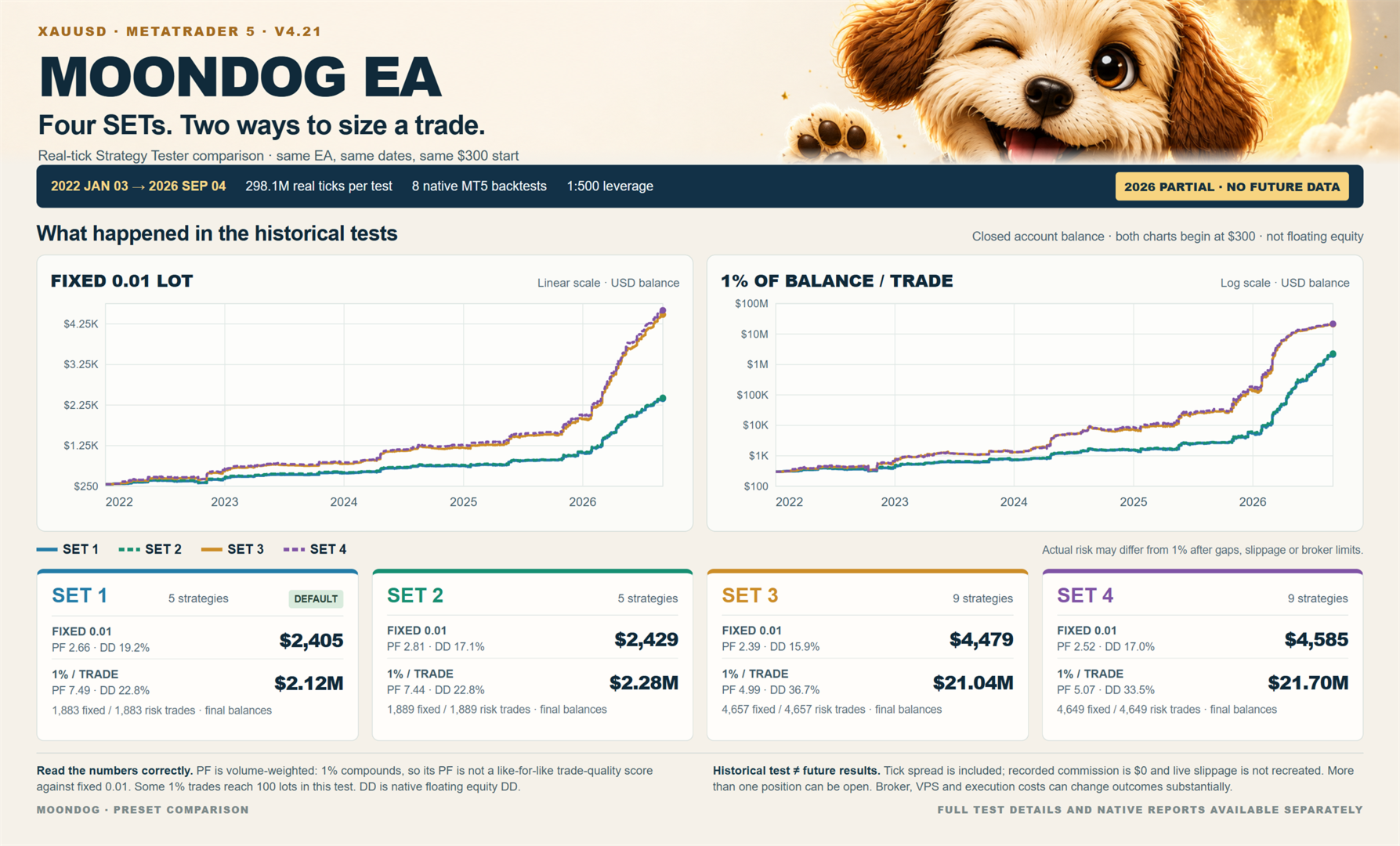
MoonDog is a breakout Expert Advisor for XAUUSD on MetaTrader 5. It runs its strategies from one chart. Each trade has an initial stop loss and take profit.
Choose your setup
- SET 1 — Default. Five original strategies, a 20-pip stop loss and classic 50% MoonLock.
- SET 2. Five original strategies with MoonLock settings tailored to each strategy.
- SET 3. All nine strategies with classic 50% MoonLock.
- SET 4. All nine strategies with MoonLock settings tailored to each strategy.
- SET 5. The SET 4 configuration with Orbit excluded.
- SET 6 — Selective Five. The same five strategies and default trade management as SET 1, with stricter entry filters.
- SET 7 — Balanced Nine. All nine strategies with stricter entry filters, a dedicated Orbit filter and individual MoonLock and stop-loss settings.
Choose SET 6 if you want the familiar exits of SET 1 with more selective entries. Choose SET 7 if you want all nine strategies with exits tailored to each strategy. You can switch off individual strategies in any setup.
Trading and risk settings
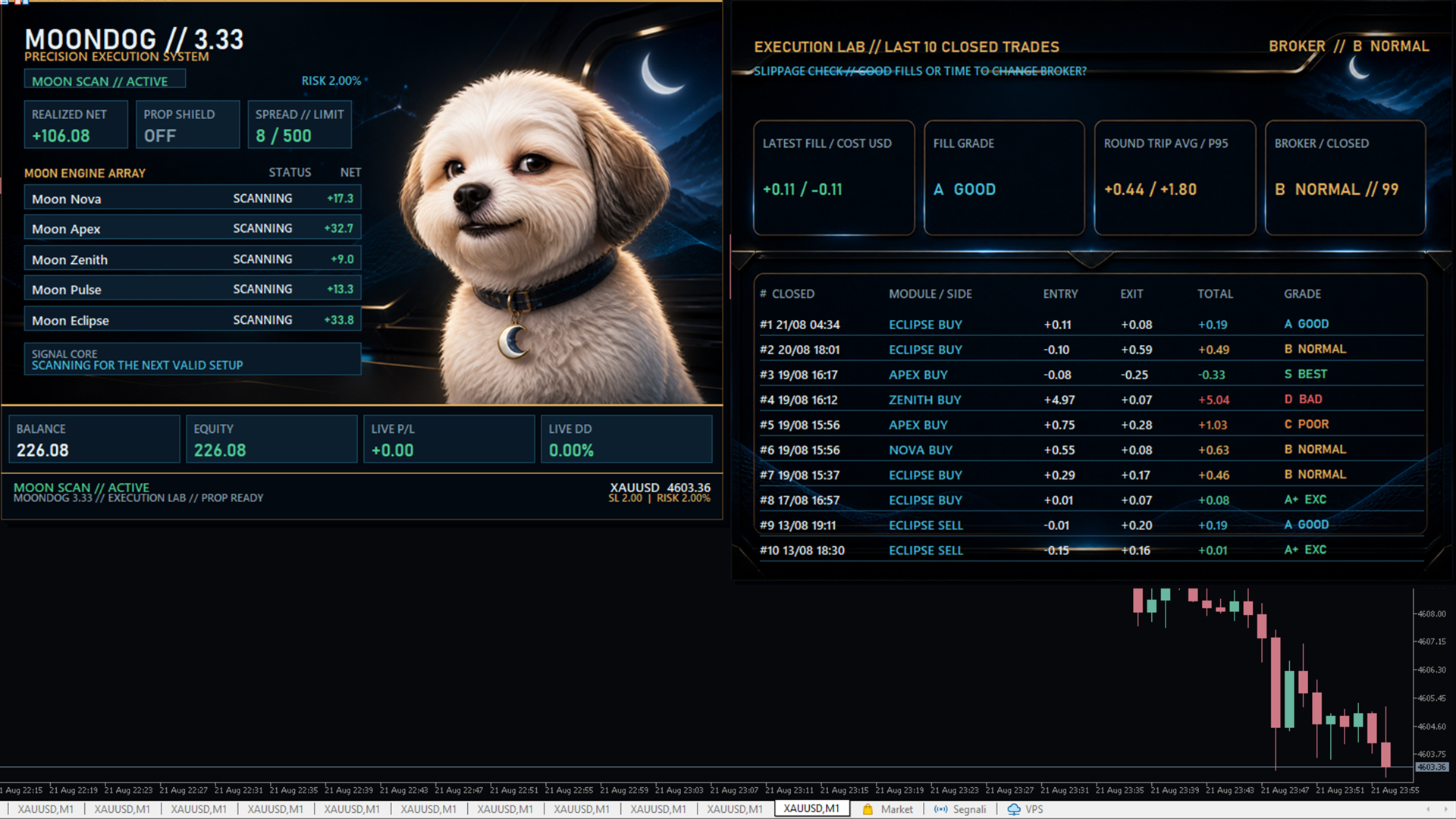
Conservative mode uses two local ONNX models to filter entries and review pending orders. More Trades mode applies the entry filter only. You can also turn off ONNX filtering.
MoonLock tracks peak floating profit after activation and sends a market close when its protection level is reached. You can configure partial take profit on hedging accounts, or use custom break-even and trailing settings.
MoonDog supports fixed lots, percentage-based risk and optional lot growth based on balance. AUTO uses 0.01 lot on live and demo charts and targets 2% risk per trade in the Strategy Tester. Check your sizing when comparing test and live results.
News protection and order management
MoonDog can pause new entries during US jobs, inflation and Federal Reserve announcements. Forex Factory is available as an additional calendar source, with setup instructions at the top of Inputs. After a confirmed pause, MoonDog checks for valid entries again. The dashboard shows why pending orders were cancelled.
When updating a pending order’s lot size, MoonDog checks that it can send the replacement before removing the existing order. Detailed order comments and a local execution log are available for reviewing trades.
Support and trading risk
Start on demo and check the setup, lot size and news settings after each update. Contact me through MQL5 if you need help with installation or broker settings. Read the broker and execution guide
Losses, drawdowns and quiet periods are part of trading. Give the system time across different market conditions and use a position size you can manage. Live results vary with spread, trading costs, slippage and broker execution.
























Hands down, the best EA I've tried at such an affordable price! This one is pure gold, guys. I've struggled to make consistent profits with other EAs that cost significantly more, but this one has truly impressed me. James, the developer, is absolutely incredible. Highly recommended and definitely worth every penny!