All orders
 Rules
Rules
Specification
READ THE ENTIRE DESCRIPTION FIRST - THIS IS MY 3RD ATTEMPT AT TRYING TO FIND SOMEONE WHO CAN ACTUALLY COMPLETE THE TASK.
This project is the creation of an EA that will assist in setting up a BUY/SELL STOP trade when when the price action on the chart would normally not allow for such a trade to be placed.
The problem: If price action is not already extended beyond the desired BUY/SELL stop level, a placement of a STOP order will immediately trigger the order.
The solution: An internal queue based set to place the order with user input levels when the correct setup occurs.
Your skillset must include
An understanding of BUY and SELL stops
The ability to program and utilize an on screen menu in conjunction with input settings (F7).
How to program buttons to execute routines and trigger position management.
An understanding of what FIFO is and how it works “FIRST IN FIRST OUT.”
Support after release to revise into future versions (with additional compensation of couse).
—
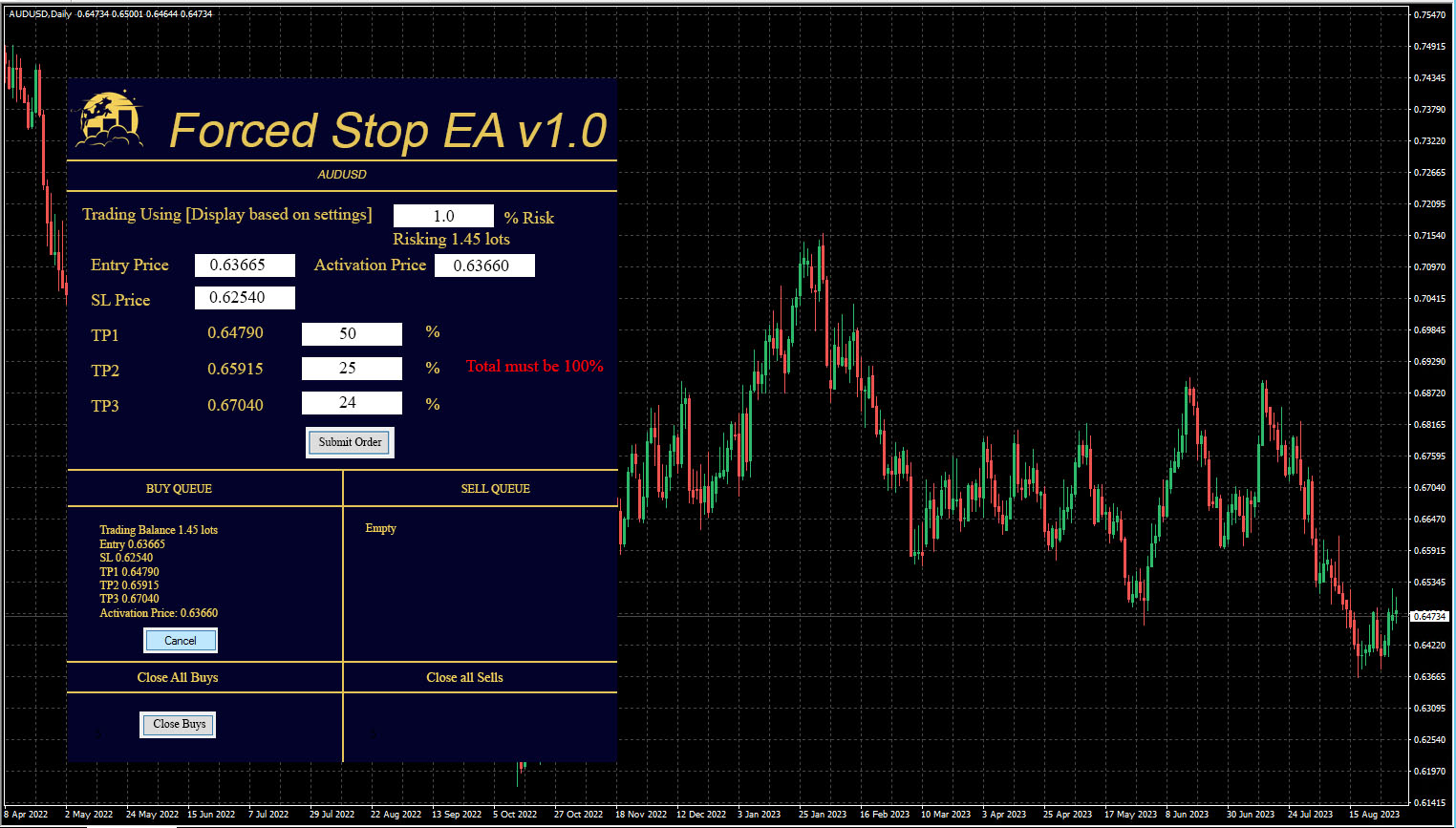
The following is my best explanation of the product I would like to see. The aesthetics were done in photoshop and made larger to better illustrate. The final result is up to your interpretation and what is possible in Metatrader.
—
Settings:
Trade Using - Fixed Lot/Balance %/Net Liquidity %/Overide
Overide Balance - Default 0
Move SL to BE After - TP ½, Default TP 1, TP 1 ½, TP 2, TP 2 ½
MOVE SL TO PREVIOUS TP? - Default True/False
Use Trail Stop - Default True/False
Activate After - TP ½, Default TP 1, TP 1 ½, TP 2, TP 2 ½
Trail By -
Step -
Trade Monday - True
Monday Time - 00:00:00 - 23:59:59
Trade Tuesday - True
Tuesday Time - 00:00:00 - 23:59:59
Trade Wednesday - True
Wednesday Time - 00:00:00 - 23:59:59
Trade Thursday - True
Thursday Time - 00:00:00 - 23:59:59
Trade Friday - True
Friday Time - 00:00:00 - 23:59:59
Trade Saturday - True
Saturday Time - 00:00:00 - 23:59:59
Trade Sunday - True
Sunday Time - 00:00:00 - 23:59:59
Magic Number: 20111
Comment: Forced Stop
—
Explanation
NOTE: We wil talk about BUYS for this example. Sells will need to have some of the math changed as is typical.
NOTE 2: We will only ever have 1 BUY STOP and 1 SELL STOP QUEUED and running at a time.
Trade Using: We will auto calculate the lot size to use based on this setting. Fixed lot obviously is field based on the control panel and Overide balance is whatever the in inputed into the Overide Balance field. The purpose of the Overide Balance is so that you can trick the EA to think you only have $5000 available by inputting $5000 (when normally your balance might actually be $100,000) and so when you risk 1% from the control panel, the auto calculation will risk enough to get 1% of $5000 instead of 1% of $100,000.
Move SL to BE After: When this target is hit, move SL to BE including fees commissions and swap.
MOVE SL TO PREVIOUS TP? With this setting on True, when TP2 is hit, the stop loss is moved to TP1, for example.
Use Trail Stop - Default True/False
Activate After - TP ½, Default TP 1, TP 1 ½, TP 2, TP 2 ½
Trail By -
Step -
This is generic Trailing Stop parameters. But I would like to be able to activate at half TP intervals.
Trade Monday - True
Monday Time - 00:00:00 - 23:59:59
These are typical time and date constraints.
—-
The Control Panel
Trading Using [Display based on settings] - This will display the option in the settings for reference such as “Balance %”
The white box next to it with the 1.0 represents how much risk we will take. The user should be able to input what % of risk they want to use. This area should be dynamic based on the settings such that if the user inputs FIXED LOT in the settings, this area would have an input box for FIXED LOT instead.
Right below the 1.0 box is the “Risking 1.45 lots” text example. This should calculate the final lot size that will be risked based on the settings and the input the user has placed.
Help with calculation: when not using fixed lot, the lot size to use is calculated like this:
Take the % risked against the balance. In this example, we’ll say the user has $100,000 balance. 1% of $100,000 is $1,000.
This $1000 risk is the amount that is lost if we hit our stop loss.
It is also the amount we will win if we took all trades off the table at TP1.
The formula to find the lot size is
((% risk * Balance ) / ((Entry Price - Stop Loss) * (1 / Entry Price)))/ Currency Multiplier*.
(($1000) / ((0.63665 - 0.62540) * (1 / 0.63665))) / 100000
(($1000) / ((0.01125) * (1.5707))) / 100000
($1000 / 0.01767) / 100000
56593.0956 / 100000 = 0.56593 or 0.57 Lots to Risk
*Currency Multiplier - I know that 100,000 works for 5 decimal pairs like EURUSD but JPY pairs and Gold etc will need to be figured out and formulated based on the chart the EA is running on. You may find it useful to simplify my formula. I tried my best! 😛 Make sure it works for XAU too.
Entry Price: The price the stop will enter at
Activation Price: This is the price that must be touched before the order is placed.
SL Price: The price of the SL(Required).
The TP1, TP2, TP3 fields.
Each TP is calculated by this formula:
TP1: (Entry Price - SL Price) + Entry Price.
TP2: 2(Entry Price - SL Price) + Entry Price.
TP3: 3(Entry Price - SL Price) + Entry Price.
The white boxes next to the TP numbers are the percent of the play that is banked for profit when the TP is hit. The TP 1, 2, and 3 must equal 100%. If 100% is entered in TP1, then there will only be a TP1 and the numbers in TP 2 and 3 should be 0. If not, A red error message should display next to the Enteries.
Submit Order Button: This button activates the trade by placing it into the appropriate QUEUE. By looking at the if the SL is lower than the Entry price, it is a buy, and if the SL price is higher than the entry price, it is a sell. If there is an active trade in the QUEUE (Lets say BUY) or it has already been triggered and is still open, reject any attempts to enter in another BUY trade until the the existing BUY closes. When the button is clicked and the Queue populates, the fields should return to default.
The Parameters of the trade should get placed into the BUY QUEUE and the EA should wait for the Activation Price before submitting the BUY STOP order.
If the Cancel button is hit, remove the trade from the QUEUE.
When a Trade is ACTIVE, the text data in the QUEUE display should change GREEN for BUY and RED for SELLS
Button Close Now:
If active trades are open on the appropriate side, a button should be available: A Close now button closes that side’s active trades.
I’m not sure how you plan to have the EA keep track of the trades, but you should plan on a method that allows for more than 1 chart of the same pair to be active with the EA.
Make sure there is an editable magic number and editable comment.
Looking forward to working with you!