Rules and confluences of the order panel
1. C.T. Frame, is the period chosen for calculations

2. N.OfBars, is the amount of candles for calculations

3. Correlation, if I type -80, it means that I will only work on pairs with negative correlation, (less than that the signs must be ignored).

4. The yellow START button.
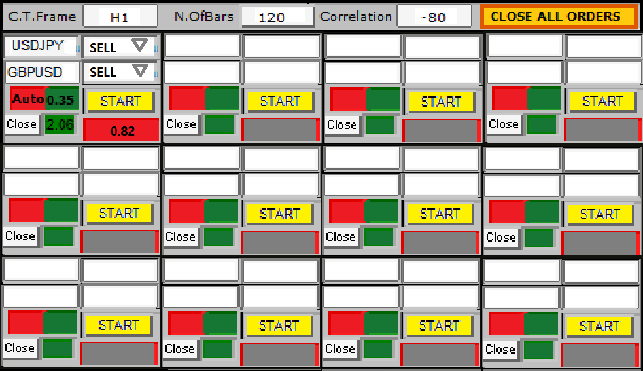
Every time you have confluence in 2 pairs, as in this example of GBPUSD/USDJPY, with 82%, the signal with the pairs should appear respectively within the windows, and when you click the START button with "double click", have to open short in 2 orders simultaneously (this following the drop box button rule).
And if I want to make an average price later on, I just double-click again on the START button.

5. CLOSE ALL ORDERS button, if I want to close all orders at any time, just make a “sequential triple click”, and all orders will be closed.

6. The red “Auto” button, for example if I type in the green field 0.35, every time the set of orders (GBPUSD/USDJPY) gives a profit of 0.35% equivalent to the account balance, then orders for these pairs are closed automatically.
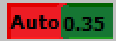
But if I type “0” (zero) in the field next to the “Auto” button, in this case the closing of these orders would be manual whenever I want, with a triple click on the “Close” button.

7. The value of 2.06 in the green field (next to the Close button) must match in the account currency the current negative or positive balance for the order set, (GBPUSD/USDJPY).

8. The correlation percentage warning button.
The value 0.82, (in the red field) shows that the current negative correlation is in the percentage of 82%, (above the stipulated 80). This should be updating in real time every 5 minutes and showing in the window. And whenever the value exceeds 0.80, the button must turn red, and when it goes below 0.80, it must change the color to "gray"

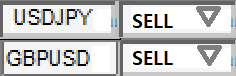
9. The drop box button.
I should have this editable outer option in front of each pair, so I can buy for example for both sides, or if I want to use positive correlation, buy and sell.
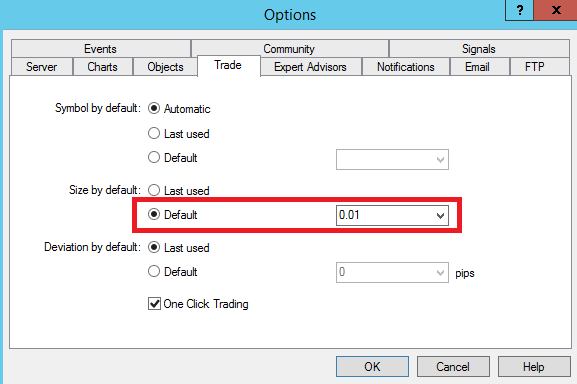
10. All orders must be executed with the default lot i have configured inside MT4, but leave it pre-configured in 0.01 (as in the image below).
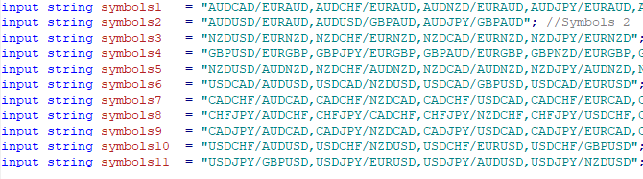
11. Put strings inside the code where I can type only the pairs I want, as in the example in this image below.
12. I recommend you assemble the grid of pairs with at least 12 sets of pairs according to the image here, keeping the colors, but if necessary the layout can be different in some details, what you need to keep is just the logic.
Similar orders
I am looking for an experienced MQL5 developer or development team to build a scalable Telegram-to-MT5 copy trading system. The main purpose of the system is to monitor trading signals from my Telegram channel and automatically execute those signals on connected client MT5 accounts. Core Requirements Receive and parse trading signals from Telegram Automatically execute trades on connected MT5 accounts Support more
Hello, I want to develop a custom MT5 Expert Advisor (EA) for XAUUSD Gold. IMPORTANT: I want a proper rule-based automated trading EA, NOT a martingale, grid or guaranteed-profit bot. 1. MARKET & TIMEFRAME - Platform: MT5 - Symbol: XAUUSD only - Main trend timeframe: M15 - Entry timeframe: M5 - Must support broker suffixes such as XAUUSDm, XAUUSD., etc. 2. TREND RULE BUY trend: - M15 price above EMA 50 - EMA 50 above
I need a TradingView Pine Script (v6) indicator that gives BUY and SELL signals in real time on the live chart. MAIN REQUIREMENT – NO REPAINTING: 1. Signals must appear only when the candle closes (barstate.isconfirmed). Example: on 1-min chart, signal for the 10:35 candle must appear at 10:36 and never disappear or move. 2. Signals on historical bars must look exactly the same as they looked live. 3. No lookahead
Description I am looking for a highly skilled MQL5 Developer & Trader with strong experience in EA optimization, stress testing, and forward validation. The EA is already coded and running. What I need now is: 1.Simple code editing, code adjustment/upgrading and code tamplates inserting, 2.Parameter Optimization & Re-Validation – Find the best stable settings for XAUUSD (not overfitted). 3.Robustness / Stress Testing
المطلوب موشر لتداول الذهب مجرب وقوية يعطي اشاره قوية فقط مع وقف خساره ومختبر ومجرب في حال الموافقه علي لموشر بعد التجربه لمدة ٣ ايام يتم الشراء دايم مبلغ ٢٠٠ دولار
yo i have a strategy i would really like to turn into a signal bot basically please this is very technical and serious to me the strategy needs more time 1 time frame and the bot most be 100% accurate
can you help me use a Tickblaze Algo NRBO on the NT platform? I have it somewhat set up, but I have other questions about running it & knowing how to operate it in NT. Thank you if anyone have experience in this kindly bib and let do it asap
I need a trading system similar to the attached files. Check attachment for details on the indicator. i guess the indicator contains some of (Rainbow MA , MTF Dashboard , Symbol Switcher , and Trend Histogram), though may not be exactly as listed
I have a EA/Bot I’ve designed and want it to be put onto me MetaTrader5 this month. I’m new here and also need to figure out how to get a live account and add a UK broker
Hi. I am looking for an experienced MQL5 developer for an advanced XAUUSD MT5 indicator. Before choosing a developer, I would like to see a small proof-of-concept or an example of a similar indicator you have already developed. My final indicator must be written from scratch in MQL5 and I must receive the complete .mq5 source code + compiled .ex5 . Main requirements: XAUUSD MT5 / MQL5 Indicator only — NO AutoTrading
 All orders
 Rules
Rules
