Signalator Local Trade Copier MT5

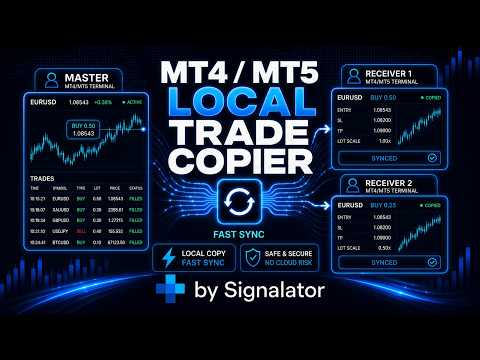
Signalator Local Trade Copier MT5 is a fast local trade copier for running Master and Receiver terminals on the same computer or VPS. It supports cross-platform copying between MT4, MT5 and cTrader terminals in any direction: MT4 ↔ MT5 ↔ cTrader, and all other combinations.

Copy trades locally without an external cloud relay. The Master publishes trade activity into a local bridge, and each Receiver controls what to copy, which Master accounts to accept, how to map symbols, how to size lots, and how to handle SL/TP, partial closes, pending orders, Telegram alerts, logs and export.

The local bridge can work with fast polling, configurable down to 0.1 seconds where supported by your setup. Actual execution speed still depends on terminal load, VPS performance, broker execution and market conditions.

MT4 Local Copier - Setup guides and practical instructions

Main features

  • Local MT5 / MT4 copying - copy trades between your own MT5 / MT4 terminals on one computer or VPS.
  • Fast local bridge - configurable polling down to 0.1 seconds, depending on settings and environment.
  • Master and Receiver roles - use one source account and one or more receiver accounts.
  • Multi-receiver setups - copy one Master account to several Receiver accounts.
  • Multi-master structure - organize different Masters through separate BridgeName values or receiver-side account filters.
  • Selected Master accounts - allow Receivers to accept only the source accounts you specify.
  • Read-only Master support - the Master can publish activity even when trading is disabled on that terminal. Receiver accounts still need trading permission.


Copying control

  • Market orders - copy BUY and SELL trades.
  • Full close synchronization - close linked receiver trades when the Master closes.
  • Partial close copying - keep receiver exposure aligned after partial closes.
  • SL/TP synchronization - copy initial SL/TP and later SL/TP changes when enabled.
  • Pending order management - copy pending order placement, modification, cancellation and execution follow-up.
  • Buy/Sell filter - accept both directions, BUY only or SELL only.
  • Reverse mode - intentionally copy opposite direction when required.


Symbol mapping and lot sizing

  • Automatic symbol mapping - handle common broker suffixes, prefixes and symbol variants.
  • Manual mapping - override mapping when a custom match is needed, for example XAUUSD=GOLD.
  • Mapping dashboard - review active, pending and accepted mappings from the interface.
  • Same, Fixed and Multiplier lot modes - choose simple receiver-side sizing.
  • Balance and equity scaling - scale receiver lots according to account size.
  • Lot limits - apply minimum and maximum receiver lot controls.


Protection and diagnostics

  • Same-account protection - block copying when Master and Receiver are the same trading account.
  • Loop protection - prevent receiver-copied trades from being republished as new Master trades.
  • Receiver validation - check bridge, source account, symbol, lot size and broker trading conditions.
  • Reconnect handling - after restart or connection loss, the Receiver checks current Master status before acting on old data.
  • Execution reporting - show skipped trades, rejected orders, invalid symbols, disabled trading, market closed errors, volume errors and broker retcodes.


Monitoring, alerts and export

  • Telegram alerts - receive Master events, copy results, skipped actions, errors and warnings.
  • Privacy options - hide lot size or account details in Telegram messages when needed.
  • Copier log - review copied, skipped, warning, error and system events.
  • CSV and HTML export - export copier activity for review, reporting and account comparison.


Interface

  • Chart dashboard - monitor Master status, Receiver status, mappings, copied activity, Telegram status and errors.
  • Movable dashboard panels - arrange modules side by side on the chart.
  • Switch view - use one active module or dashboard layout with several visible panels.
  • Trade Panel - open and manage trades directly from the copier interface.
  • Tiny mode - compact monitoring view for small VPS screens or multi-terminal layouts.
  • UI scaling - adjust panel size for laptops, VPS windows and high-resolution monitors.
  • Themes and languages - Dark, Light and Dune themes with English, Spanish, Russian and Chinese interface options.


Customer support

If you encounter any issue during setup or use, please contact us directly. Most copier issues are caused by simple configuration details such as BridgeName mismatch, symbol mapping, broker lot limits, disabled trading, missing WebRequest permission or invalid stop levels. These are usually solved quickly after checking the copier log and setup details.


Signalator ecosystem

Signalator Local Trade Copier MT5 is part of the Signalator trading utility ecosystem, which includes tools for instant trade notifications, summaries, Telegram reporting, multi-terminal execution workflows, licensing, access control and user management software.

You may also be interested in Multi TF Trade Symbol Scanner Alerts, a Signalator tool for scanning selected symbols, comparing trend direction across multiple timeframes and receiving market-condition alerts.
Recommended products
Trade Copier Simple Guide Trade Copier is an Expert Advisor (EA) for MetaTrader 5 (MT5) that lets you automatically copy trades from one account (the "Master") to another (the "Receiver"). It's designed for users who want to duplicate trading strategies across multiple accounts on the  same computer . No internet or external servers are needed—it uses a shared file on your machine to transfer trade info securely and quickly. How It Works Master Mode : Attach the EA to a chart on your main tradin
Volatility Regime Monitor is a professional MetaTrader 5 dashboard for classifying current volatility with transparent, measurable context. It combines ATR, recent bar-range statistics and historical percentiles to show whether the market is compressed, normal or expanding without generating entry signals. MAIN FEATURES • ATR and recent range context • Historical volatility percentile state • Compression, normal and expansion classification • Historical regime table • Transparent thresholds and
Telegram to mt5 pro
Janet Abu Khalil
4 (4)
Telegram to MT5 Pro — Advanced Telegram Signal Copier with Auto-Fix, Multi-TP, Risk Control and Full Trade Management Telegram to MT5 Pro — Professional Telegram Signal Copier Telegram to MT5 Pro is a high-performance trade copier that automatically executes signals from Telegram directly into your MetaTrader 5 account, with full control over risk, execution, and trade management. The system consists of two components: • The Expert Advisor (EA) running inside MetaTrader 5 • A companion desktop
"Quick Copier" is designed to copy trading without any complicated settings. It copies master orders faster than "Just Copier" (https://www.mql5.com/en/market/product/20920). Please also check this product at fxina.hostingerapp.com.  The copy can be done in one PC. One EA can be set as master (provider) or slave (receiver). The receiver lot can be set to multiple providers lots. Any type of copy is available. MT4 -> MT5 MT4 -> MT4 MT5 -> MT5 MT5 -> MT4 If you want to copy MT4 -> MT5 or MT5 -> MT
You can see Binance Spot data instantly in Metatrader 5 and it allows you to use all the features that Metatrader has provided to you. You can access the data of all symbols listed on Binance Futures. Don't forget to set the timezone. Binance it's 00:00 UTC. You need to fix it according to your own country You need to install the free Binance Spot Symbol List plugin. https://www.mql5.com/tr/market/product/83507 After loading, it automatically downloads the data of the cryptos in the market obser
Swap Rate Exporter is the only dedicated MT5 tool that scans every symbol on your broker and exports a complete swap rate table to a CSV file in seconds. Stop checking swap rates one symbol at a time. One click — every symbol, every swap, neatly organized and ready for Excel or Google Sheets. What It Exports For every symbol on your broker: Symbol name and description Swap Long and Swap Short (per standard lot) Swap type (Points, Currency, Interest % and more) Triple swap day (Wednesday / Friday
MQL5 Blogs : https://www.mql5.com/en/blogs/post/761446 MT4 Version : https://www.mql5.com/en/market/product/136790 MT5 Version : https://www.mql5.com/en/market/product/136791 Time Wizard is a professional trading assistant built for traders who need speed, timing, and execution control in one clean dashboard. This Expert Advisor is designed for event-based trading, scheduled execution, and fast semi-automatic order management. It allows you to prepare your orders in advance, define the exact
Have you ever take a long time to watch a Symbol when the network link is not good ? Have you ever wait for a long time when you switch chart between different Symbols or different TimeFrames ? If you do long-term backtesting , Have you ever to be downloaded datas for a long time ? Yes, If there is no data in the system, those will happen.  1. What is this: Download all the Symbol data in Market Watch to the system. PS: This is not outputting data to Files. This Link go to Demo version: https:/
Just Copier MT5
Agung Imaduddin
4.75 (4)
"Just copier" is designed to copy trading without any complicated settings. The copy can be done in one PC. One EA can be set as master (provider) or slave (receiver). The receiver lot can be set to multiple providers lots. Please also check this product at fxina.hostingerapp.com.  Any type of copy is available. MT4 -> MT5 MT4 -> MT4 MT5 -> MT5 MT5 -> MT4 If you want to copy MT4 -> MT5 or MT5 -> MT4, please purchase "Just copier" for MT4 and "Just copier" for MT5 separately. Just Copier can copy
Trade Replay Exit Optimizer Backtest your own trades with a different exit Your entries may be fine. Your exits could be quietly costing you. Trade Replay Exit Optimizer reads your real MetaTrader 5 account history, keeps the exact same entries , and replays them in the Strategy Tester with a different exit rule, so you can finally see whether a better stop, target, trailing or time exit would have improved your results. No subscription, no upload of your trades to a third party, and no new
​Notification Spy Protector is a MetaTrader 5 Expert Advisor (Utility) that monitors your trading activity and sends real-time alerts to your mobile device (via MT5 Push) and/or Telegram. Equipped with a solid and reliable Account Protector, this utility is fully compatible and highly recommended for Prop Firm trading to safeguard your accounts from violating drawdown limits. It also provides advanced transaction filters and a clean on-chart dashboard. Never miss a trade. Protect your account f
Why this Telegram copier is better than the rest! Creates a new position for every TP. Can add multiple layers and positions. Can run a Runner for maximum profit! Questions and special offers: Telegram @Fxmelvin You can automatick trade like MO Automatic copying from Telegram — we have developed free software for use on a VPS. Contact us for more information. This makes trading fully automated. Telegram Setup instruction Open your Telegram APP and search for "BotFather". Type  /start  and click
SignalForge - The Complete Signal Copier and Trade Manager for MT5 SignalForge is a full signal copying and trade management suite for MetaTrader 5. It copies signals from Discord, Telegram, and file-based sources, then manages every trade with breakeven, trailing stops, partial closes, add-on positions, and a news filter that respects prop firm rules. A built-in channel backtester lets you test any signal channel before you trade it live. One EA handles every signal source, full trade manageme
Telegram to mt5 signal copier
Chukwuemeka Kingsley Anyanwu
5 (2)
Copies Signal from any Telegram channel and instantly executes the trade on MT5 without admin rights! Do you receive trading signals on Telegram and wish they could execute instantly on Meta Trader 5? Telegram to MT5 Signal Copier  is a powerful bridge between your Telegram signal channels and MetaTrader 5. It listens to messages from a specific Telegram channel and automatically extracts trading signals — including symbol, action, entry price, stop loss, and take profit — then executes them in
Real-Time Spread Display Tool A   real-time spread display tool   is a specialized software or application designed to provide traders and investors with instant, live data on the   spread —the difference between the bid price (the price at which buyers are willing to purchase an asset) and the ask price (the price at which sellers are willing to sell it)—for various financial instruments. This tool is critical in markets such as forex (FX), stocks, futures, and cryptocurrencies, where price f
MT5 to Delta Exchange API Bridge EA Connector allows your expert advisor with mq5 file to integrate and communicate with Delta Exchange using API Keys You can place order, check balance and other order managements using Delta Exchange API - Place Limit, SL Limit and Take Profit Limit Orders - Place Market, SL-Market, TP-Market orders - Cancel Order - Query Orders - Change Leverage, margin - Get Position info and many more, details available at demo script Script Documentation 
You have 5 positions open on XAUUSD. Net floating is +$30 - looks fine. But look closer: 3 buys, 2 sells. The buys are carrying 0.60 lots, the sells only 0.20. One of those buys has been sitting underwater for 90 minutes. Margin level is at 390% and drifting down. Stress is building - quietly, invisibly - while the terminal just shows you a list of rows. Current price: $59 - increases by $10 after every 20 purchases until reaching the final price of $119 . Next price: $69 . Complete Buyer Kit: 4
QBrain Strategy Auditor
Nesrine Emilie Darragi
QBrain Strategy Auditor helps users identify incomplete or weak evidence before drawing conclusions from closed MetaTrader 5 outcomes. The utility is designed for strategy review. It does not open, modify, or close trades. It does not predict returns and does not certify a strategy. Main functions - Reads closed terminal account history in a selected date range or a normalized CSV placed in the MT5 file sandbox. - Checks whether the available evidence is sufficient for analysis. - Displays k
A ticker that shows the average bitcoin price of the selected currency and keeps updating it at regular intervals. PRO version updates more often and displays details about the price change! Make sure you have added the API address http://metakod.com/mk/api in the list of allowed URLs on tab Tools → Options → Expert Advisors. All of the supported currencies and the API address are listed in the screenshots below. Inputs Logging level - Controls the amount of details written to the log (default:
MetaTrade Hub   is an easy-to-use and customizable tool. This product is presented in an attractive   graphical interface  that allows you to send adjustable signals in two ways ( Manual or Automatic ) from   Metatrader5   to the   Telegram channel or Discord channel.   In this case, your account becomes a   Signal Provider.  You can also share N ews reports with others. All   message formats   -   language   -   emojis   can be adjusted and personalized. You can   Enable   or   Disable   certai
Ofir Blue exporter is a handy utility to export your orders history to a JSON file . You'll need it if you want to back-test Ofir blue or Ofir Hedging , using your own trading history. How it works: Install the indicator on a chart Press export all or export <current symbol> (for example GBPUSD) The indicator will create the json file in the directory files/ofirblue/export. This directory is in the common file area. The file will be automatically taken in charge by Ofir blue strategy tester
FREE
Telegram EA Manager
Ebunoluwa Abimb Owodunni
All in one Multipurpose Telegram Trade Management , Manage and Copy Trades on the go From Telegram Pro Version MT5:  www.mql5.com/en/market/product/95742 Pro Version MT4:  www.mql5.com/en/market/product/85691 Execute Trades on mobile with fast execution When away from desktop MT5, or scalping the market with mobile device, or needed to copy trades from telegram groups while away, or doing some other activities, Telegram EA Manager is an effective tool to perform any trade operation with swift
FREE
Safety Control: Your Ultimate Balance Management Solution for Prop Firm Challenges Overview Tired of manually monitoring your trading activities in prop trading challenges? Meet Safety Control, an advanced Expert Advisor for MetaTrader 5 that will change the way you trade forever. This proprietary software aims to help you manage your balance effortlessly during prop firm challenges. Features Automated Drawdown Control : Safety Control continuously monitors your account's balance and equity in r
NEW in v2.0 - Gold Pulse now also answers WHY gold is moving: MACRO verdict - USD, yields and risk in one read: HEADWIND or TAILWIND for gold.; NEXT high-impact event with a live countdown (economic calendar).; Hover any element to reveal the exact numbers behind it - visual at a glance, data on demand. Know exactly where gold is in the day, get ALERTED the instant something matters, and never miss the moments that move XAUUSD. Live session clock, ADR consumption, ATR/spread, multi-timeframe bi
ProBridger
Marius Ovidiu Sunzuiana
How Traders and Analysts Can Use the Data Export Bridge to Improve Their Analytics The MQL Data Export Bridge unlocks a new level of analytical power by transforming MetaTrader into a real‑time data provider for any external research environment. Here are the most impactful ways different users can apply the bridge to enhance their trading performance. Build Predictive Models with Machine Learning Who benefits: Quantitative traders, data scientists, algorithm developers How it helps: Export t
Fast copier for sending trades to multiple MT4 / MT5 accounts. MT5 Trade Copier Master EA sends trades instantly from your master account to one or multiple slave accounts. Supports copying to: • MT5 accounts • MT4 accounts Perfect for: • Multi-account traders • Signal providers • Account managers • Personal account mirroring Main Features • Fast local trade copying • Low latency execution • Multiple slave accounts support • Copy open positions on startup • Stable file-based communication • Easy
This tool allows you to export MetaTrader indicator data (buffers) for any financial instrument available in your MetaTrader 5. You can export multiple Symbols and Timeframes into a single CSV file. You can also schedule the export frequency (every 1 minute, 5 minutes, 60 minutes, etc.). There is no need to open multiple charts to retrieve recent data—the tool downloads the data directly. The CSV file will be saved in the folder: \MQL5\Files . How it works Report Tab Select the indicators and o
FREE
AW Metatrader to Telegram MT5
AW Trading Software Limited
5 (1)
An automated system for sending notifications so that none of your subscribers miss your trading events from your trading terminal. A utility that sends notifications to the Telegram messenger about any trading operations on your account. Step-by-step instructions for connecting the utility to a channel in Telegram ->  HERE  / MT4 -> HERE  Advantages: Easy setup and detailed instructions, Possibility to send adjustable screenshots, Customizable notification text using emoji, Adjustment of notifi
Quick operation, quick purchase, sale, empty operation. Provide three buttons: Buy, Sell, empty. Buy: Quickly place more orders after clicking, default 1 hand, profit point and stop-loss point are 110 points, after successful order can be manually modified. Sell: Quickly place an empty order after clicking, default 1 hand, profit point and stop-loss point are 110 points, can be manually modified after the order is successful. Empty: Quickly clear all orders, including purchase and s
Trade Copy MT5
Shao Chen
4 (2)
TradeCopy  is an efficient MT4, MT5 trade copy software,using as EA on MT4 real account. You can download the Demo unlimit version to test on Demo account: Trade Copy MT4 Demo Free Trade Copy MT5 Demo Free Features: 1.Can achieve  cross-MT4 and MT5 trade copy . 2. The Sender and the receiver are in the same file, which is convenient to use. 3.Can achieve cross-broker trade copy. 4.More trade copy style,  you can copy by balance,equity, lot ratio or fixed lot . 5.Can enlarge or reduce the amoun
Buyers of this product also purchase
Trade Assistant MT5
Evgeniy Kravchenko
4.41 (216)
It helps to calculate the risk per trade, the easy installation of a new order, order management with partial closing functions, trailing stop of 7 types and other useful functions. Additional materials and instructions Installation instructions - Application instructions - Trial version of the application for a demo account Line function -   shows on the chart the Opening line, Stop Loss, Take Profit. With this function it is easy to set a new order and see its additional characteristics bef
Forex Trade Manager MT5
InvestSoft
4.98 (672)
Trade Manager MT5 is an advanced position size calculator and trade management tool for MetaTrader 5, designed to help traders plan trades faster, control risk more precisely, and manage open positions directly from the chart. It combines order placement, risk based lot calculation, Stop Loss and Take Profit management, Break Even, Trailing Stop, Partial Close, Equity Protection, and external trade management in one panel. Whether you trade forex, indices, metals, commodities, crypto, or future
TradePanel MT5
Alfiya Fazylova
4.88 (167)
Trade Panel is a multi-functional trading assistant. The app contains over 50 trading functions for manual trading and allows you to automate most trading tasks. Before making a purchase, you can test the demo version on a demo account. Download the trial version of the application for a demonstration account: https://www.mql5.com/en/blogs/post/750865 . Full instructions here . Trade. Allows you to perform trading operations in one click: Open pending orders and positions with automatic risk cal
Astro Trade MT5
Indra Maulana
5 (2)
AstroTrade Trading Assistant AstroTrade is a comprehensive multi-functional trading utility developed for the MetaTrader 5 platform. It integrates essential tools for trade execution, risk management, and technical monitoring into a single unified interface. The application is designed to assist traders in managing their daily operations through a visual and structured environment. Visual Trade Execution and Risk Management The application includes a specialized trading panel that assists in c
================================================================================ POC BREAKOUT - V20.72. Full Professional Grade Toolkit ================================================================================ POC Breakout is a full MetaTrader 5 trading dashboard for discretionary traders who want breakout signals, Point of Control (POC) context, volume profiles, order flow, market structure, news, alerts, and advanced trade planning in one professional workspace. Attached directly to you
Local Trade Copier EA MT5
Juvenille Emperor Limited
4.97 (146)
Experience exceptionally fast trade copying with the   Local Trade Copier EA MT5 . With its easy 1-minute setup, this trade copier allows you to copy trades between multiple MetaTrader terminals on the same Windows computer or Windows VPS with lightning-fast copying speeds of under 0.5 seconds. Whether you're a beginner or a professional trader, the   Local Trade Copier EA MT5   offers a wide range of options to customize it to your specific needs. It's the ultimate solution for anyone looking t
Beta Release The Telegram to MT5 Signal Trader is nearly at the official alpha release. Some features are still under development and you may encounter minor bugs. If you experience issues, please report them, your feedback helps improve the software for everyone. Telegram to MT5 Signal Trader is a powerful tool that automatically copies trading signals from Telegram channels or groups directly to your MetaTrader 5 account. It supports both public and private Telegram channels, and you can conn
Telegram to MT5 Multi-Channel Copier automatically copies trading signals from your Telegram channels directly into MetaTrader 5. No bots, no browser extensions, no manual copying. You receive a signal on Telegram and the EA opens the trade on your terminal in a few seconds. The product includes two components: a Windows application that listens to your Telegram channels, and this Expert Advisor that executes the signals on your MT5 terminal. An MT4 version is also available. Setup guide and app
Trade copier MT5
Alfiya Fazylova
4.58 (52)
Trade Copier is a professional utility designed to copy and synchronize trades between trading accounts. Copying occurs from the account / terminal of the supplier to the account / terminal of the recipient, which are installed on the same computer or VPS . PROMOTION - If you have already purchased the "Trade Copier MT5," you can receive the "Trade Copier MT4" for free (for copying MT4 > MT5 and MT4 < MT5). For more detailed information about the conditions, please contact us via private message
Grid Manual MT5
Alfiya Fazylova
4.73 (22)
Grid Manual is a trading panel for working with grid strategies. The utility is universal, has flexible settings and an intuitive interface. It works with a grid of orders not only in the direction of averaging losses, but also in the direction of increasing profits. The trader does not need to create and maintain a grid of orders, the utility will do it. It is enough to open an order and the "Grid manual" will automatically create a grid of orders for it and will accompany it until the close. F
Exp COPYLOT CLIENT for MT5
Vladislav Andruschenko
3.97 (35)
Professional Trade Copier for MetaTrader 5 Fast, professional, and reliable trade copier for MetaTrader . COPYLOT allows you to copy Forex trades between MT4 and MT5 terminals with support for Hedge and Netting accounts. COPYLOT MT5 version supports: - MT5 Hedge to MT5 Hedge - MT5 Hedge to MT5 Netting - MT5 Netting to MT5 Hedge - MT5 Netting to MT5 Netting - MT4 to MT5 Hedge - MT4 to MT5 Netting MT4 version Full Description +DEMO +PDF How To Buy How To Install How to get Log Files H
Power Candles Strategy Scanner - Self-Optimizing Multi-Symbol Setup Finder Power Candles Strategy Scanner runs the same self-optimizing engine that powers the Power Candles indicator - on every symbol in your Market Watch, side by side. One panel tells you which symbols are statistically tradable right now, which strategy wins on each, the optimal Stop Loss / Take Profit pair, and pings you the moment a fresh signal fires. This tool is part of the Stein Investments ecosystem - 18+ tools plus Max
Premium Trade Manager - The Trade Panel With a Coach Built In Premium Trade Manager puts a trading coach inside your chart, with a full execution engine underneath it. Set the trade up the way you always do, then let Max, your AI trading coach, read that exact setup against your live account and give you a straight verdict before you commit: is the stop disciplined, is the risk sane, is a high-impact release minutes away, are you near a prop-firm limit. Below sits the engine that runs everything
Timeless Charts
Samuel Manoel De Souza
5 (8)
Timeless Charts is an all-in-one trading utility for professional traders. It combines custom chart types such as Seconds Charts and Renko with advanced order flow analysis using Footprints , Clusters , Volume Profiles , VWAP studies, and anchored analysis tools for deeper market insight. Trading and position management are handled directly from the chart through an integrated trade management panel , while Market Replay and Virtual Accounts provide environments for practicing trading skills and
FarmedHedge Pair Trading Dashboard
Tanapisit Tepawarapruek
5 (3)
Farmed Hedge Yield Farming | All Markets (Manual - Hybrid - Semi/Automated EA) MULTI-ASSET SUPPORT Trade any asset available on your broker - Forex: Major, Minor, Exotic pairs - Crypto: BTC, ETH, XRP, SOL, BNB - Stocks: Apple, Tesla, Amazon, Google, etc. - Commodities: Gold, Silver, Oil, Gas - Indices: US30, NAS100, SPX500, DAX40 - Any CFD your broker offers VERIFIED TRADING RESULTS - Farmed Hedge Yield Axi Copy:  https://www.mql5.com/en/signals/2356376 - Farmed Hedge Yield Exn Copy:   https:/
Trade Manager DaneTrades
Levi Dane Benjamin
4.23 (30)
DaneTrades Trade Manager is a professional trade panel for MetaTrader 5, designed for fast, accurate execution with built‑in risk control. Place market or pending orders directly from the chart while the panel automatically calculates position size from your chosen risk, helping you stay consistent and avoid emotional decision‑making. The Trade Manager is built for manual traders who want structure: clear risk/reward planning, automation for repeatable management, and safeguards that help reduc
Trade Dashboard MT5
Fatemeh Ameri
4.95 (132)
Trade Dashboard simplifies how you open, manage, and control your trades, with built-in lot size calculation. It allows you to execute trades, manage risk, and control positions directly on the chart, with tools such as partial close, breakeven, and trailing stop. Designed to reduce manual work and help you stay focused on your trading decisions. A demo version is available for testing. Detailed explanations of features are provided within the MQL5 platform. Installation instructions are include
YuClusters
Yury Kulikov
4.93 (43)
Attention: You can view the program operation in the free version  YuClusters DEMO .  YuClusters is a professional market analysis system. The trader has unique opportunities to analyze the flow of orders, trade volumes, price movements using various charts, profiles, indicators, and graphical objects. YuClusters operates on data based on Time&Sales or ticks information, depending on what is available in the quotes of a financial instrument. YuClusters allows you to build graphs by combining da
Custom Alerts AIO: All-in-One Market Scanner – No Setup Required Overview Custom Alerts AIO is the fastest and easiest way to monitor multiple markets for real-time trading signals—without any setup or extra licenses. It comes with all required Stein Investments indicators already embedded, making it the perfect plug-and-play solution for traders who value simplicity and performance. Just load it to any chart and start receiving alerts across Forex, Metals, Crypto, and Indices. Shares can be a
Seconds Chart MT5
Boris Sedov
4.61 (18)
Seconds Chart is a unique tool for creating second-based charts in MetaTrader 5 . With Seconds Chart , you can construct charts with timeframes set in seconds, providing unparalleled flexibility and precision in analysis that is unavailable with standard minute or hourly charts. For example, the S15 timeframe indicates a chart with candles lasting 15 seconds. You can use any indicators and Expert Advisors that support custom symbols. Working with them is just as convenient as on standard charts.

Anchor Trade Manager
Kalinskie Gilliam
5 (7)
Anchor: The EA Manager Your EAs manage their own trades. Anchor manages the account around them. Anchor gives you one place to control your EAs, manage risk and decide when trading is allowed. Any EA, any vendor, any broker or symbol. No source-code changes required. The Problem Most EAs only know what they are doing. They cannot see when another EA is already trading, when several EAs open and are stacking risk or when the account has reached your loss limit. Even using just one EA, it may not
VirtualTradePad PRO SE MT5 — professional trading control center for MetaTrader 5 VirtualTradePad PRO SE is a premium chart-based trading panel and trade-management workspace for MetaTrader 5 . It is designed for traders who want faster execution, clearer position control, structured trade management, visual level planning and a professional workflow directly from the chart. This is not only a BUY / SELL panel. PRO SE combines manual trading, pending orders, position management, partial exits, b
Footprint Chart Pro — Professional OrderFlow EA for MetaTrader 5 Version 6.34 | Professional tool for real traders | Institutional-Grade Visualization DEMO USERS - PLEASE SELECT EVERY TICK / REAL TICK WHEN TESTING AND YOU HAVE DOWNLOADED HISTORICAL DATA. IF YOU SEE A WAITING SCREEN AND IT IS NOT DOWNLOADING, IT MEANS YOU HAVE LOW HISTORICAL DATA. TRY 1 MIN AND 5 MIN FIRST ON 1 DAY DATA. ONE DAY DATA SHOULD BE THE NEWEST AND MOST CURRENT DATE. PLEASE WAIT UNTIL THE MARKET HAS ROLLED OVER PERIOD.
Quant AI Agents
Ho Tuan Thang
5 (1)
Quant AI Agents are independent trading Expert Advisors. Instead of trading using a fixed strategy like other conventional EAs, Quant AI Agents   is a   multi-agent AI trading framework   that turns natural-language strategy prompts into live.  WANT THE SAME RESULTS AS MY LIVE SIGNAL?   Use the exact same brokers I do:   IC MARKETS , IC TRADING   .  Unlike the centralized stock market, Forex has no single, unified price feed.  Every broker sources liquidity from different providers, creating un
Exp5 Duplicator
Vladislav Andruschenko
4.78 (9)
Duplicator for MetaTrader 5 — professional position duplicator inside one terminal A reliable Expert Advisor for traders who want to automatically duplicate already opened positions in MetaTrader 5, increase volume, apply custom lot settings, and manage duplicates with precise rules. It is a practical tool for manual trading, algorithmic systems, and flexible management of existing positions inside one terminal. Duplicator for MT5 does not open positions by its own trading strategy. Its role is
The product will copy all telegram signal to MT5 ( which you are member) , also it can work as remote copier.  Easy to set up, copy order instant, can work with almost signal formats, image signal,  s upport to translate other language to English Work with all type of channel or group, even channel have "Restrict Saving Content", work with  multi channel, multi MT5 Work as remote copier: with signal have ticket number, it will copy exactly via ticket number. Support to backtest signal. How to s
Trade Copier Ultimate
Janitha Sandaruwan Amaradasa Wickramasingha Arachchilage
5 (4)
Trade Copier Ultimate - Telegram to MT5 Signal Copier Trade Copier Ultimate automatically copies Telegram trading signals into MetaTrader 5. The EA can read signal messages, detect the symbol, order type, entry price, Stop Loss, Take Profit levels and selected update commands, then execute or manage the trade in MT5 using your lot and risk settings. It is more than a basic Telegram to MT5 copier. TCU also supports Bot API and user-account Bridge workflows, Discord signal routing, local MT5 to MT
Welcome to ENTRY IN THE ZONE WITH SMC MULTI TIMEFRAME Entry In The Zone and SMC Multi Timeframe is a real-time market analysis tool based on Smart Money Concepts (SMC), designed to analyze market structure, price direction, and key trading zones. It supports both Single-Timeframe Analysis and Multi-Timeframe Analysis, providing a clearer view of the overall market structure across multiple timeframes, with real-time BUY / SELL signals that do not repaint. It is designed to help filter trading op
MT5 to Telegram Signal Provider turns your trading account into a signal provider. Every trade action, whether manual, by EA or from your phone, is instantly sent as a message to Telegram. You can fully customize the format or use a ready-made template for quick setup. [ Demo ] [ Manual ] [ MT4 Version ] [ Discord Version ]     New: [ Telegram To MT5 ] Setup A step by step user guide is available. Key Features Ability to customize order details sent to subscribers You can create a tiered subs
Trump Shock Guard
Thomas Christoph Lipka
TRUMP SHOCK – Real-Time Market Protection for MT5 TRUMP SHOCK is a MetaTrader 5 risk-management utility designed to react to sudden market-moving news and unexpected volatility. Markets such as Gold, Oil and USD-related instruments can move within seconds following major political statements or breaking news. TRUMP SHOCK monitors important Truth Social posts and general breaking news and can automatically trigger predefined protective actions in MetaTrader 5 — helping you reduce unwanted exposur
More from author
Signalator Trade Summary Panel MT5 is a free local MetaTrader 5 utility that gives traders a clear account and open-trade overview directly on the chart. It is part of the Signalator Trading and Analysis Ecosystem — a growing set of practical MetaTrader tools for account monitoring, market analysis, symbol scanning, alerts and trader workflow improvement. This panel focuses on the account and position side of the workflow. It helps you quickly understand floating profit or loss, account status,
FREE
Signalator Lot Size Evaluator MT5 Overview Signalator Lot Size Evaluator MT5 is a free local MetaTrader 5 utility for manual traders who want to estimate position size before placing a trade. It calculates a suggested lot size from the selected symbol, BUY or SELL direction, planned entry price, stop loss, risk percentage, account size and broker symbol settings. The workflow is simple: enter the trade setup, define the risk and check the suggested lot size before opening the trade manually. Pa
FREE
Signalator Trade Summary Panel MT4 is a free local MetaTrader 4 utility that gives traders a clear account and open-trade overview directly on the chart. The standard Trade tab shows individual positions, but it can be difficult to quickly understand the whole account situation when several trades or symbols are open. This panel summarizes the most important information in one compact dashboard. The panel shows current floating profit or loss, floating P/L as a percentage of account balance,
FREE
Signalator Lot Size Evaluator MT4 is a free local MetaTrader 4 utility for manual traders. It helps calculate an estimated lot size before opening a trade manually. The calculation is based on account size, trade direction, entry price, stop loss, risk percentage or fixed money risk, and broker symbol settings. The main purpose is simple: Enter your setup → define your risk → get the suggested lot size. The panel also shows useful pre-trade information such as spread, risk amount, SL/TP distance
FREE
Signalator Symbol Inspector is a local MetaTrader 5 utility that displays practical symbol and broker conditions directly on the chart. It helps traders inspect the real trading parameters of the current symbol before using manual trades, Expert Advisors, panels, scripts, or other trading tools. The utility does not open, modify, or close trades. It does not provide trading signals. It does not connect to any external server. Main features: • Current Bid / Ask and spread • Spread cost estim
FREE
Signalator Symbol Inspector is a local MetaTrader 4 utility that displays practical symbol and broker conditions directly on the chart. It helps traders inspect the real trading parameters of the current symbol before using manual trades, Expert Advisors, panels, scripts, or other trading tools. The utility does not open, modify, or close trades. It does not provide trading signals. It does not connect to any external server. Main features: • Current Bid / Ask and spread • Spread cost estim
FREE
GoldVectorEA
SIGNALATOR LIMITED
GoldVectorEA GoldVectorEA is a specialized automated trading system developed specifically for Gold / XAUUSD . It is built around disciplined execution and structured risk control, with no martingale, no grid system, one trade at a time, and stop loss protection on every position. The EA includes a built-in user-adjustable risk management module, allowing traders to configure operation more conservatively or more aggressively depending on account size, capital allocation, and drawdown tolerance
Signalator Notify MT4 Trade, connection, price-watch and Telegram alerts for MetaTrader 4 Signalator Notify MT4 is a utility Expert Advisor for MetaTrader 4 that monitors important trading and terminal events and sends clear notifications when something changes. It is designed for traders who want fast awareness of trade activity, pending order changes, Stop Loss / Take Profit updates, profit milestones, price-watch events, connection status, and compatible external indicator signals without
Trade Export Manager MT4 is an advanced MetaTrader 4 utility for highly customizable trade and account exports, structured CSV/HTML/TSV/JSON/XML reports, Telegram report delivery, live trade notifications, and scheduled daily, weekly, or monthly trading reports from one dashboard. Setup guides and practical instructions Installation guide - Telegram setup guide  - Trade Export Manager MT5 Export features and options Highly customizable exports - choose the report type, required fields, columns,
Signalator Local Trade Copier MT4 is a fast local trade copier for running Master and Receiver terminals on the same computer or VPS. It supports cross-platform copying between MT4, MT5 and cTrader terminals in any direction: MT4 ↔ MT5 ↔ cTrader , and all other combinations. Copy trades locally without an external cloud relay. The Master publishes trade activity into a local bridge, and each Receiver controls what to copy, which Master accounts to accept, how to map symbols, how to size lots, an
GoldVectorEA MT5
SIGNALATOR LIMITED
GoldVectorEA MT5   is a specialized automated trading system developed specifically for   Gold / XAUUSD . It is built around disciplined execution and structured risk control, with no martingale, no grid system, one trade at a time, and stop loss protection on every position. The EA includes a built-in user-adjustable risk management module, allowing traders to configure operation more conservatively or more aggressively depending on account size, capital allocation, and drawdown tolerance. Gold
Multi TF Symbol Trend Scanner Alerts helps you scan selected symbols, compare trend direction across multiple timeframes, and receive alerts when important market conditions appear. You attach it to a MetaTrader chart and get a clean dashboard where you can see the current symbol trend, monitor a symbol watchlist, check cross-timeframe confirmation, and control alert delivery from one place. The goal is simple: less manual chart switching, faster market overview, and a clearer notification work
Trade Export Manager MT5 is an advanced MetaTrader 5 utility for highly customizable trade and account exports, structured CSV/HTML/TSV/JSON/XML reports, Telegram report delivery, live trade notifications, and scheduled daily, weekly, or monthly trading summaries from one dashboard. Setup guides and practical instructions Installation guide - Telegram setup guide   Export features and options Highly customizable exports - choose the report type, required fields, columns, filters, formats, file l
Filter:
No reviews
Reply to review