Cerberus Equity Watcher

5

Cerberus the Equity Watcher is a risk management tool that constantly monitors your account equity and avoid major drawdowns, caused by faulty EAs or by your emotional behaviour if you are a discretional trader. It is extremely useful for systematic traders that rely on EAs that might contain bugs, or that might not performed well in unexpected market conditions. 

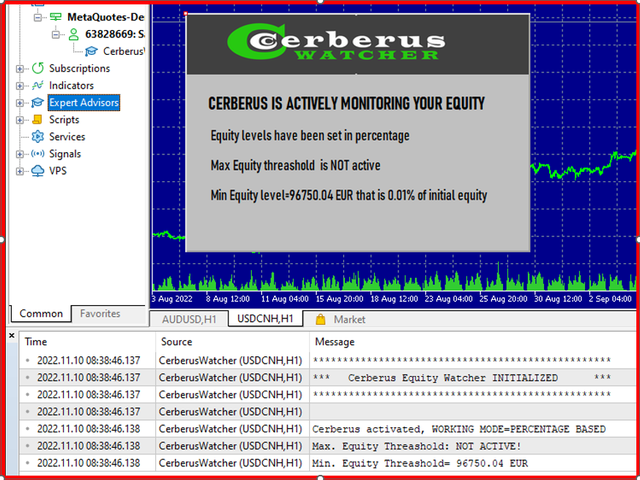
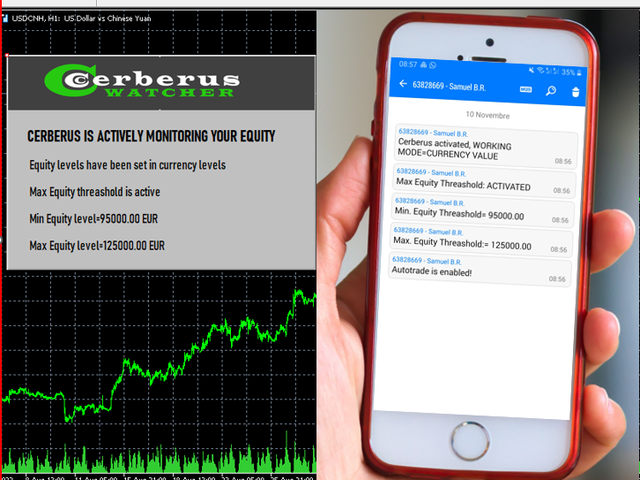
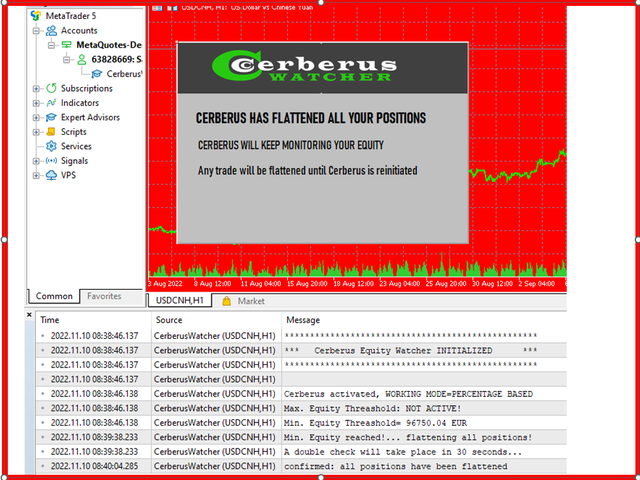
Cerberus let you set a minimum equity value and (optionally) a  maximum value, if either of those are reached all positioned are flattened, all pending orders are closedand all EAs are "killed". Upon flattening all positions a notification is sent to the user mobile phone and a clear message is displayed on the screen. After the "flattening" Cerberus keeps watching the equity value and keeps killing any further attempt to trade until it is reinitialized.

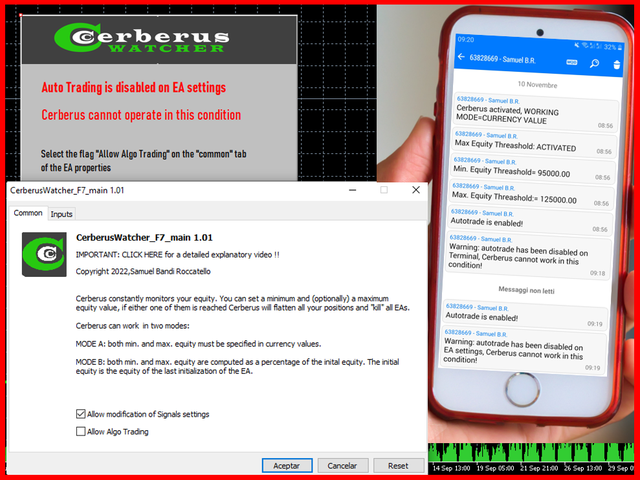
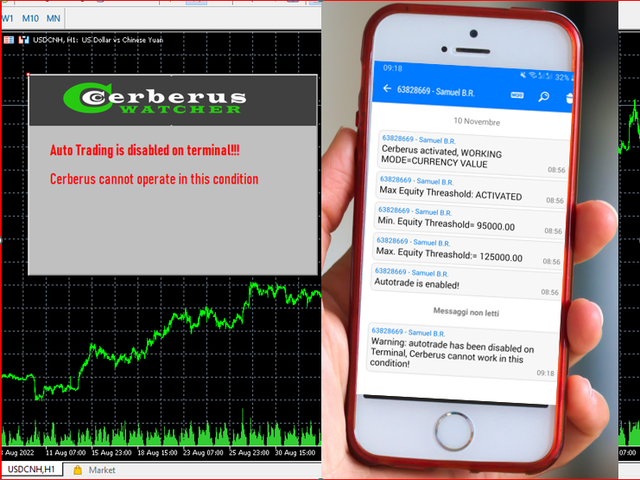
Any operation performed by Cerberus is clearly displayed on the screen, reported on the Expert advisor tab and  notifications are sent to the user. In order to avoid user mistakes, several checks are performed on the input value inserted by the user and on the current status of the automatic trading.

NETTING ACCOUNTS COMPATIBLE:  Cerberus is fully compatible with both hedging and netting accounts. 

******

FEATURES

Minimum and Maximum Equity Value can be set in the account currency or in percentage of initial equity
Maximum Equity value is optional
If min/max Equity is reached all EAs are killed indipendently of the symbol they trade
A double check is performed several seconds after the first flattening
Cerberus keeps monitoring the equity also after flattening
Equity is monitored every 1 second, frequency can be set by user ( multiples of 1 second only)
Push notification are sent after initialization, deinitialization and after flattening
Audio notifications are played after flattening and after the second check
After flattening: Status changed is displayed on screen, push notifications are sent to mobile phone 
Option to  turn the chart background red after flattening 
Checks are performed on Input parameters
If autotrading is  disabled for any reason: a message displayed on the screen and a notification is sent to the mobile


APPLICATIONS:

PROP FIRM CHALLENGES: use Cerberus to control max drawdown and max daily losses (for more details visit this link https://www.mql5.com/en/blogs/post/751110)
SYSTEMATIC TRADERS:   do not rely on EAs  to "autokill" themselves if things go wrong, let Cerberus supervise them  (please read further here)
DISCRETIONARY TRADERS: Cerberus can be set on a VPS server and allow you to avoid huge losses caused by emotional states, in my blog I provide a detailed video on how to use Cerberus to control yourself


    OBSERVATIONS

    • EAs often contain bugs  and they could wipe out your account in matter of seconds, Cerberus adds an extra layer of security to your account by "freezing everything" if things go really wrong! 
    • Market conditions are often unpredictable and when things go wrong multiple assets correlates in the same direction, in this situation many EAs  can generate losses at the same time. By putting a max loss on your equity you keep living another day. 
    • Cerberus has been designed with a focus on reliability! We reduced the input parameters to the minimum in order to make sure the product is 100% reliable.
    • Minimum and Maximum Equity levels are not updated daily: the idea behind Cerberus is that these parameters are manually set everyday before the trading session begins.
    • flattening is done as fast as possible but the speed depends on the frequency paramater
    • Frequency cannot be more than once per second

    PROP FIRM CHALLENGES

    • 80% of traders fail for breaking the max daily loss rule 
    • 40% of traders fail for breaking the max drawdown 
    • Both rules can be enforced mechanically by using Cerberus in conjuction with any productivity software (This trick is explained in the blog here)
    • In order to avoid breaking any rules, we suggest using stricter values for the the min. Equity levels to compensate for slippage

      Reviews 9
      Ouma
      36
      Ouma 2024.12.07 13:28 
       

      I would advise to set it up fully as the creator describes in his blog post so with a VPS service (I connect to mine via remote desktop) & to also set it up with the creator's advice to block access to the VPS. Then it's absolutely tinker proof. If I managed to set it all up anyone can set it up TRUST ME - it was easy to do actually and I now am just full of regret for not setting it all up properly sooner as it's an amazing system and I will never trade without it. Once set up properly; I've literally tried every way possible to break it and it's not possible. It would have saved me a lot of money had I set this up earlier but yep guess I had to pay my tuition to the markets. Creator also helped me a TONNE with my many questions on how to set it up because I'm not tech savvy at all.

      ratio77
      44
      ratio77 2024.01.11 11:47 
       

      Muy buen producto! hago scalping y me está ayudando a no sobreoperar poniendo limites tanto de perdidas como de ganacias.

      denjo
      216
      denjo 2023.03.17 11:39 
       

      Very good Product!

      Recommended products
      BossFXTradePanelEA (MT5)  [First 10 copies sold at 50 USD price will increase to 99USD] BossFXTradePanelEA is a fully interactive trade management panel designed for MetaTrader 5, providing traders with an easy-to-use, one-click interface to execute and manage trades. This EA simplifies trade execution , risk management, and position control by combining market orders, stop loss, take profit, trailing stops, and breakeven functionalities into a single, intuitive panel.  Key features include: On
      MassDestroyer
      Raphael Djangmah Osro Agbo
      MASS DESTROYER-MANUAL Most scalping robot open several positions in a matter of time.  In emergency situations where say over 30 positions are running at the same time and all these trades are going negative,  manually closing all of these positions can make your losses even bigger because of spreads and other market conditions This is where   DEST001   comes in.. This robot has been designed such that positions are closed in a matter of microseconds. The trader can chose some parameters as filt
      Golden Gestion TP SL No Limit MT5
      Matthias Hubert Patrick Snidaro
      Auto SL/TP Manager EA – Gestion Automatique Intelligente Auto SL/TP Manager EA est un Expert Advisor conçu pour automatiser la gestion des commandes avec une efficacité maximale et une grande discrétion. Il gère automatiquement : Le Stop Loss (SL) et le Take Profit (TP) Le Profit Lock (verrouillage progressif des bénéfices) Le Trailing Stop avec plusieurs méthodes avancées L' affichage masqué du SL et du TP pour plus de discrétion (non visible par le courtisan) C'est l'outil idéal pour les


      Trade Assistant 38 in 1
      Makarii Gubaydullin
      4.91 (22)
      Multifunctional tool: Lot Calculator, Grid Orders, R/R ratio, Trade Manager, Supply and Demand zones, Price Action and much more Demo version   |   User manual Trade Assistant   doesn't work in the strategy tester : you can download the   Demo Version HERE  to test the utility . Contact me   for any questions  / ideas for improvement / in case of a bug found If you need a MT4 version, it is available here Simplify, speed up and automate your trading   process . Expand the standard terminal capa
      "Hukan" is a Japanese word meaning hawk's eye, and this system is software that allows you to monitor the entire MT5 with a hawk's eye. You can check the real-time chart of the system by clicking the link.  (Forex, commodities, Bitcoin, stock CFDs, etc.) Short period Long period Stock CFD This product enables all the functions that I felt necessary while trading in one system. If you attach it to a single chart with a tool based on the Dow theory, it will calculate the Dow theory of the chart
      Close Trades Premium MT5
      Obiajulu Chukwudi Nwosa
      Like you when I first started trading, It was overwhelming...learning about indicators, about lotsize, leverage and many more things. Its been almost 3 years. I am more knowledgeable in trading. My trading continues to improve as I work on my strategy, technical analysis, trading psychology and trade management. One thing I am not worried about though is being able to close my trades quicky if a trade goes against me or if the trade has reached my take profit level with the help of my Close Trad
      The Supply and Demand Zone Indicator is a powerful and easy-to-use tool designed to help traders identify critical supply and demand zones on the chart. These zones can provide valuable insight into potential market reversals, breakouts, and important price levels where buyers or sellers are likely to take control. The best   FREE Trade Manager . If you want to create your own Hedging or Grid strategies without any coding make sure to check out the   ManHedger Key Features: Automatic Zone Detect
      FREE
      Anti Grid Position Protector
      Konstantinos Kalaitzidis
      Anti Grid Position Protector is a utility tool designed to protect you from the temptation of adding to a losing position in a hope of a drawdown recovery, or trying to hedge when you're not intended too. --------------------------Inputs--------------------------- Allow Hedging on Losing Positions? - It's a true/false input (double click to switch its value) which allows/disallows opening a trade (either pending order or market execution) in the opposite direction on an existing losing position
      One Click Trader Utility MT5
      AL MOOSAWI ABDULLAH JAFFER BAQER
      One-Click Trader Utility for MT5 Professional Trading at Your Fingertips One-Click Trader Utility is a premium MT5 tool designed for active traders who need lightning-fast execution and real-time performance metrics. For just $30, transform your trading experience with institutional-grade technology previously available only to professional traders. Key Features Ultra-Fast Execution - Open and close positions with a single click, critical for scalpers and news traders Real-Time Market Metrics -
      Our   Basic Support and Resistance   indicator is the solution you need to boost your technical analysis. This indicator allows you to project support and resistance levels on the chart /   MT4 Version Features Integration of Fibonacci Levels:  With the option to display Fibonacci levels alongside support and resistance levels, our indicator gives you an even deeper insight into market behavior and possible reversal areas. Performance Optimization:  With the option to update extended lines onl
      MT5 Trade Master
      Ervand Oganesyan
      Multifunctional trade dashboard to simplify manual trading. Deals and orders visualization, p&l calculations, one click trading, orders modification, breakeven, trailing stop, partial stop loss, partial take profit, closing by time, equity stop loss and take profit - all of that is possible in one or a few clicks, using hotkeys or with simple mouse drag of the levels on the chart. User friendly interface allows you to test necessary scenarios and move to the use the application almost immediatel
      **Bneu Prop Firm Challenge Manager Pro** is a trading utility for MetaTrader 5 designed to assist traders participating in proprietary trading firm evaluation challenges. The utility monitors account metrics, tracks challenge progress, and provides protection features to help maintain compliance with challenge rules. **Main Features** **Prop Firm Presets** - Pre-configured rule sets for common proprietary trading firms - FTMO preset with corresponding rule parameters - MyForexFunds (MFF) pres
      Blues Protector
      Andtle Austin Dube
      Boost your forex profits with Blues Protector, an advanced MQL5 Expert Advisor designed for MetaTrader 5. This automated trading bot dynamically manages your stop-loss levels to secure gains and reduce risks. Blues Protector EA - User Manual   (For MT5 - Ready-to-Use EX5 File)   1. What This EA Does    The Blues Protector EA automatically secures your profits by smartly adjusting stop-loss levels when your trade reaches a predefined profit level. It works silently in the background, protecting
      Auto SL TP adjustable
      Rattanon Hirunyakarn
      Manually enter the price for Buy position or Sell position. This EA will automatically open 3 orders and also 3 Pending (In deposited position) = Total 6 orders per one click Please see Screenshot or Videos for more explanation. - Easy to manage your different order. - Fast in modification for SL and TP. - Can modified the SL and TP depends on individual techniques.
      Automatic Trade Calculation Panel   One-Klick-Trading Automatic calculation of Lot sice Atuomatic calulation of Stop-Loss and TakeProfit Up to 3 partial closings Trailingstop (Stop-Loss moves automatically)   The lot size is calculated by the previously determined risk (e.g. 1.0% of the account size) and the distance of the Stop Loss from the entry point. The distance from the Stop Loss to the entry point results from the ATR indicator multiplied by a freely selectable factor. The Stop Loss and
      Pro BTB (Back To Break Even) Poursamadi Strategy Indicator MetaTrader 5 The Pro BTB Strategy Indicator , developed based on the proprietary analytical methodology of Poursamadi , is designed specifically for the MetaTrader 5 trading platform. Through advanced internal calculations, this indicator detects sudden price movements known as spikes . After analyzing price behavior, it identifies potential buy and sell opportunities and displays them directly on the chart as visual signals. In addition
      This tool will perform Trailing stop loss and Break even management for orders. Helps you limit or reduce the time spend watching orders on the screen, especially when you need to go to sleep. Just add this EA to 1 chart, you can manage all pairs. You can filter orders by comment, magic number, symbol and order ticket number. When Breakeven it can add shift/offset pips (to cover the commission...). You can try in strategy tester before purchase. The EA will add Buy and Sell alternately, so you
      Titan Machinist - Your Professional Management System for MetaTrader                                                                                                                                 Transform Your Trading with Automated Position Management Tired of having to manually manage every single trade? Titan Machinist is the ultimate solution to automate your trade management, allowing you to trade like a true professional. Suitable for any trading technique: one s
      The Stop Loss Manger - SL Mange With the Stop Loss Manager you can finally sleep peacefully while it effectively manages your risk in stock market trading. Simply set your individual stop loss limits and let the manager trade for you. Never worry about losses again - the Stop Loss Manager takes care of it for you! Get the ultimate support for your trading now and maximize your profits with ease. Join the community of successful traders who swear by Stop Loss Manager today. Function overview: 1.
      Talents ATR Scalper Utility (MT5) The Talents ATR Scalper Utility is a professional-grade trade execution and management tool built for MetaTrader 5. Inspired by the Biblical Parable of the Talents , this utility is designed to help traders multiply their potential with precision risk control, one-click simplicity, and advanced automation. Whether you’re scalping forex, gold, or indices, this tool delivers speed, consistency, and confidence. Key Features One-Click Trade Preview Click below price
      Stop Loss with Profit
      JOSE LUIS MOLINA RAJA
      Stop Loss with Profit This utility / expert for MetaTrader 5 modifies the stop loss of all your operations dynamically and automatically to ensure the minimum benefits you want, and be able to operate with or without Take Profit. Maximize your benefits, by being able to trade with Unlimited Take Profit. You will ensure the number of minimum points you want to earn in each operation and the stop loss will be adjusted as long as the benefit of the operation grows. For example: you open a purcha
      BTC Trading Assistant EA Manual Trading Tool with Automated Risk Management This Expert Advisor assists manual cryptocurrency traders by automating risk management, position sizing, and profit protection while providing visual trade management through an intuitive interface. Brief Description BTC Trading Assistant EA is a utility tool designed for manual cryptocurrency traders. The EA calculates position sizes based on account risk, automatically sets stop loss and take profit levels, manages br
      SLTPSetter
      Raphael Djangmah Osro Agbo
      SLTPSetter - StopLoss Take Profit Setter HOW DOES IT WORK? Risk and account management is a very critical aspect of trading. Before entering a position, you must be fully aware how much you will be willing to loss both in percentage and value. This is where SLTPSetter gets you covered.  All you need to do is attach the indicator on the chart and PRESS BUY OR SELL automatically, all parameters needed for placing the trades will be provided at the top left corner of the screen. Feel free to adjust
      Complete Trade Panel for the No Nonsense Forex method: This panel encapsulates almost all things you will need to execute your own NNFX algorithm, helping you trade even faster and easier. It has 3 parts: Symbol Panel Switch to any symbol in your charts quickly by pressing its name. Additional information can be displayed in the panel: currently open trades , correlation of those trades with other symbols (except if their stop loss is in breakeven or positive) and upcoming news (next daily candl
      Click Bait Pro – Synaptix Quant Click Bait Pro is a comprehensive trade management solution designed to provide precision, control, and efficiency in every market condition. Built with a structured approach to risk management, the tool ensures disciplined execution while offering traders the flexibility to adapt strategies across multiple market scenarios. Key Features: Account & Risk Management Real-time account information display with balance, equity, and risk exposure. Adjustable risk percen
      Telegram2MT5 Signal Copier
      Salvador Martinez Ramos
      Telegram2MT5 Signal Copier — Automate Your Telegram Copy Signals Directly in MetaTrader 5 With Telegram2MT5 Signal Copier, every signal you receive on Telegram is executed instantly and automatically in your MetaTrader 5 account. Telegram to MT5  -  Fast, reliable, and fully customizable. Get the Windows Bridge APP File and Tutorial Bridge file are needed to connet de Local Web Panel to the MT5 EA Compatible with Windows 10 & Windows 11 - 64 bits - And Windows Server from 2016 Main Features Ful
      Breakevan Utility
      Jose Luis Thenier Villa
      BreakEvan Utility  Is a simple tool in a panel with this utilities: This utility will draw a Golden Line in the chart applied showing the breakeven price, considering all the positions opened for that specific symbol. Also the information panel shows: Balance Breakeven Price for that chart Force Breakeven (for that symbol) as ON/OFF Force Breakeven Global (takes into account all trades opened) as ON/OFF Total Lots opened for Symbol Total Lots opened Global And two buttons: Force Breakeven: Whe
      With the 2UP Risk & Trade Management EA you will be able to enjoy seeing your positions being fulfilled all you gotta do is take the position and have the right lot size and the 2UP EA will do the rest - You can set your risk per position so your account never losses more than what is supposed to, it will close automatically once you reach a certain % of DrawDown. - You can set your reward as well based on %, how much do you wanna grow your account in % per trade ?,  it will close automatically
      MANAGING YOUR FOREX TRADING LIKE A PROFESSIONAL WITH   POSITION SIZE   CALCULATOR Position Size Calculator – an MT5 indicator, is a user-friendly tool that allows you to determine your required forex trading size for each trade based on how much you want to risk and available capital in your forex trading account. Load the calculator onto your chart and simply draglines to show your stop loss and take profit level. The calculator will automatically calculate the trade size instantly. This indica
      Buyers of this product also purchase
      Trade Assistant MT5
      Evgeniy Kravchenko
      4.42 (207)
      It helps to calculate the risk per trade, the easy installation of a new order, order management with partial closing functions, trailing stop of 7 types and other useful functions. Additional materials and instructions Installation instructions - Application instructions - Trial version of the application for a demo account Line function -   shows on the chart the Opening line, Stop Loss, Take Profit. With this function it is easy to set a new order and see its additional characteristics bef
      Forex Trade Manager MT5
      InvestSoft
      4.97 (592)
      Welcome to Trade Manager MT5 - the ultimate risk management tool designed to make trading more intuitive, precise, and efficient. This is not just an order placement tool; it's a comprehensive solution for seamless trade planning, position management, and enhanced control over risk. Whether you're a beginner taking your first steps, an advanced trader, or a scalper needing rapid executions, Trade Manager MT5 adapts to your needs, offering flexibility across all markets, from forex and indices t
      TradePanel MT5
      Alfiya Fazylova
      4.86 (148)
      Trade Panel is a multifunctional trading assistant. The application contains more than 50 trading functions for manual trading and allows you to automate most trading operations. Attention, the application does not work in the strategy tester. Before purchasing, you can test the demo version on a demo account. The demo version is here . Full instructions here . Trade. Allows you to perform trading operations in one click: Open pending orders and positions with automatic risk calculation. Open mu
      Beta Release The Telegram to MT5 Signal Trader is nearly at the official alpha release. Some features are still under development and you may encounter minor bugs. If you experience issues, please report them, your feedback helps improve the software for everyone. The price will increase after 20 sales. Remaining copies at $90: 2/20 . Telegram to MT5 Signal Trader is a powerful tool that automatically copies trading signals from Telegram channels or groups directly to your MetaTrader 5 account
      Trade Dashboard MT5
      Fatemeh Ameri
      4.96 (111)
      Tired of complex order placement and manual calculations? Trade Dashboard is your solution. With its user-friendly interface, placing orders becomes effortless, by a single click, you can open trades, set stop loss and take profit levels, manage trade lot size, and calculate risk to reward ratios, allowing you to only focus on your strategy. Say goodbye to manual calculations and streamline your trading experience with Trade Dashboard. Download  Demo Version  right now. You can find  Details of
      Copy Cat More Trade Copier MT5 is a local trade copier and a complete risk management and execution framework designed for today’s trading challenges. From prop firm challenges to personal portfolio management, it adapts to every situation with a blend of robust execution, capital protection, flexible configuration, and advanced trade handling. The copier works in both Master (sender) and Slave (receiver) modes, with real-time synchronization of market and pending orders, trade modifications, pa
      The product will copy all telegram signal to MT5 ( which you are member) , also it can work as remote copier.  Easy to set up, copy order instant, can work with almost signal formats, image signal,  s upport to translate other language to English Work with all type of channel or group, even channel have "Restrict Saving Content", work with  multi channel, multi MT5 Work as remote copier: with signal have ticket number, it will copy exactly via ticket number. Support to backtest signal. How to s
      Trade Manager DaneTrades
      Levi Dane Benjamin
      4.33 (27)
      DaneTrades Trade Manager is a professional trade panel for MetaTrader 5, designed for fast, accurate execution with built‑in risk control. Place market or pending orders directly from the chart while the panel automatically calculates position size from your chosen risk, helping you stay consistent and avoid emotional decision‑making. The Trade Manager is built for manual traders who want structure: clear risk/reward planning, automation for repeatable management, and safeguards that help reduc
      Ultimate Extractor
      Clifton Creath
      5 (9)
      Ultimate Extractor - Professional Trading Analytics for MT5 *****this is the local HTML version of Ultimate Extractor. Check out Ultimate Extractor Cloud on mql5 for the Cloud version****** Ultimate Extractor transforms your MetaTrader 5 trading history into actionable insights with comprehensive analytics, interactive charts, and real-time performance tracking. What It Does Automatically analyzes your MT5 trading history across all Expert Advisors and generates detailed HTML reports with inte
      MT5 to Telegram Signal Provider turns your trading account into a signal provider. Every trade action, whether manual, by EA or from your phone, is instantly sent as a message to Telegram. You can fully customize the format or use a ready-made template for quick setup. [ Demo ] [ Manual ] [ MT4 Version ] [ Discord Version ]     New: [ Telegram To MT5 ] Setup A step by step user guide is available. Key Features Ability to customize order details sent to subscribers You can create a tiered subs
      Exp COPYLOT CLIENT for MT5
      Vladislav Andruschenko
      3.82 (34)
      Trade copier for MT5 is a trade copier for the МetaТrader 5 platform. It copies forex trades  between any accounts   MT5 - MT5, MT4 - MT5 for the COPYLOT MT5 version (or MT4 - MT4 MT5 - MT4 for the COPYLOT MT4 version)    Reliable copier!         MT4 version Full Description +DEMO +PDF   How To Buy    How To Install     How to get Log Files    How To Test and Optimize    All products from Expforex You can also copy trades in the МТ4 terminal (МТ4 - МТ4, МТ5 - МТ4):     COPYLOT CLIENT for MT4
      Smart Stop Manager MT5
      Daniel Stein
      4.33 (3)
      Smart Stop Manager – Automated Stop-Loss Execution with Professional Precision Overview The Smart Stop Manager is the execution layer of the Smart Stop lineup, built for traders who require structured, reliable, and fully automated stop-loss management across multiple open positions. It continuously monitors active trades, calculates the optimal stop level using Smart Stop market-structure logic, and updates stops automatically with clean, transparent rules. Whether managing a single asset or
      Smart Stop Scanner – Multi-Asset Stop-Loss Intelligence for Modern Traders Overview The Smart Stop Scanner brings professional stop-loss monitoring to every chart. It analyzes market structure, detects meaningful breakouts, and identifies the most relevant protective levels across Forex, Gold, Indices, Metals, Crypto, and more. All results appear inside one clean, DPI-aware dashboard designed for clarity, speed, and instant decision-making. How Stop-Loss Levels Are Identified Instead of rely
      Telegram to MT5 Coppy
      Sergey Batudayev
      5 (7)
      Telegram to MT5: The Ultimate Signal Copying Solution Simplify your trading with Telegram to MT5, the modern tool that copies trading signals directly from Telegram channels and chats to your MetaTrader 5 platform, without the need for DLLs. This powerful solution ensures precise signal execution, extensive customization options, saves time, and boosts your efficiency. [ Instructions and DEMO ] Key Features Direct Telegram API Integration Authenticate via phone number and secure code. Easily man
      Telegram To MT5 Receiver
      Levi Dane Benjamin
      4.53 (15)
      Copy trade signals from Telegram channels you already belong to (including private and restricted channels) directly into MetaTrader 5. Set your risk rules once, monitor execution, and manage positions with built-in protections designed to reduce mistakes and overtrading. Fast setup : configure your channels, select what to copy, and start within minutes using a clean on-chart interface. User Guide + Demo | MT4 Version | Discord Version Who this is for Traders who follow one or more signal provi
      YuClusters
      Yury Kulikov
      4.93 (43)
      Attention: You can view the program operation in the free version  YuClusters DEMO .  YuClusters is a professional market analysis system. The trader has unique opportunities to analyze the flow of orders, trade volumes, price movements using various charts, profiles, indicators, and graphical objects. YuClusters operates on data based on Time&Sales or ticks information, depending on what is available in the quotes of a financial instrument. YuClusters allows you to build graphs by combining da
      Mentfx Mmanage mt5
      Anton Jere Calmes
      4.25 (8)
      The added video will showcase all functionality, effectiveness, and uses of the trade manager. Drag and Drop Trade Manager. Draw your entry and have the tool calculate the rest. Advanced targeting and close portions of a trade directly available in tool (manage trades while you sleep). Market order or limit order on either side with factored spread. Just draw the entry, the tool does the rest. Hotkey setup to make it simple. Draw where you want to enter, and the stop loss, the tool calculates al
      EasyTrade MT5
      Alain Verleyen
      5 (2)
      Easy Trade – Smart, Simple, Powerful Trade Management Easy Trade is the all-in-one trade management solution for MetaTrader users who want to keep risk under control and execution ultra-smooth. Designed from scratch with trader feedback in mind, Easy Trade makes it easy to execute, monitor, and manage trades across multiple symbols – without overcomplicating your workflow. Whether you're scalping manually or managing a small portfolio of setups, Easy Trade keeps your focus where it belongs: on
      Professional Footprint Chart EA - Complete Order Flow Trading Suite DEMO USERS - PLEASE SELECT EVERY TICK WHEN TESTING  See What Market Makers See! The most comprehensive order flow analysis tool for MetaTrader 5. Get institutional-grade volume analysis, real-time DOM, Time & Sales, and intelligent trade signals - all in one powerful EA. 6 Professional Panels - Complete order flow analysis suite Real-Time Tick Data - Live bid/ask volume at every price level Automatic Imbalance Detection - Spot
      Effortlessly manage multiple trading accounts The Local Trade Copier EA is a solution for individual traders or account managers who need to execute trade signals from external sources or who need to manage several accounts at the same time, without the need for a MAM or a PAMM account. It copies from up to 8 master accounts to unlimited slave accounts . [ Installation Guide | Update Guide | Troubleshooting | FAQ | All Products ] 100% self hosted Easy to install and use It can copy from MT4 to
      VirtualTradePad One Click Trading Panel
      Vladislav Andruschenko
      4.58 (72)
      Trading Panel for trading in One click.  Working with positions and orders!  Trading from the  chart  or the  keyboard . With our trading panel, you can execute trades with a single click directly from the chart and perform trading operations 30 times faster than with the standard MetaTrader control. Automatic calculations of parameters and functions make trading faster and more convenient for traders. Graphic tips, info labels, and full information on trade deals are on the chart MetaTrader.  
      Trade Manager DashPlus
      Henry Lyubomir Wallace
      5 (12)
      DashPlus is an advanced trade management tool designed to enhance your trading efficiency and effectiveness on the MetaTrader 5 platform. It offers a comprehensive suite of features, including risk calculation, order management, advanced grid systems, chart-based tools, and performance analytics. Key Features 1. Recovery Grid Implements an averaging and flexible grid system to manage trades during adverse market conditions. Allows for strategic entry and exit points to optimize trade recovery
      Advanced trading tool: One click smart orders that execute under your conditions Developed by trader for trading community:  position size calculator (lot size), open position after price action, strategy builder, set and forget trading, mobile notifications Risk Management -  Risk percentage position size calculator, gain percentage, target risk reward ratio, spread and commissions are included in calculations 7 Advanced order types  - Set and forget trading with price action automation (OCO,
      DrawDown Limiter
      Haidar, Lionel Haj Ali
      5 (20)
      Drawdown Limiter EA You are in the right place if you were searching for Drawdown control, Drawdown limiter, Balance protection, Equity Protection or Daily Drawdown Limit related to Prop Firm, FTMO, or Funded account trading, or if you want to protect your trading account. Have you suffered from controlling your drawdown when trading funded accounts? This EA is meant for you. Prop firms usually set a rule called “Trader Daily Drawdown”, and if it is not respected, you are disqualified.  I am an
      HINN Lazy Trader
      ALGOFLOW OÜ
      5 (2)
      Lazy Trader is your personal risk management assistant that independently finds the best market entries, manages positions, and helps you extract maximum profit from every trading idea! It monitors charts from M1 to W1 , finds optimal entry points based on your parameters, and manages trades without your involvement: - Got an idea on the daily chart? No need to wait for lower timeframes to form a signal — Lazy Trader will check everything and open all necessary positions while you live your lif
      Introducing the latest version of the Dynamic Fibonacci Grid Dashboard for MT5. Now packed with many new features, this new dashboard transforms your trading experience and allows you to see the market and the price action from a completely different perspective. Discover new possibilities with simultaneous analysis of multiple timeframes covering multiple symbols. User-friendly interface for manual trading and management of positions and an expanded ability to apply predefined automated strate
      EasyInsight AIO MT5
      Alain Verleyen
      4.91 (11)
      EASY Insight AIO – All-In-One Power for AI-Driven Trading Want to skip the setup and start scanning the entire market – Forex, Gold, Crypto, Indices, and even Stocks – in seconds? EASY Insight AIO is the complete plug-and-play solution for AI-powered trade analysis. It includes all core Stein Investments indicators built-in and automatically exports clean, structured CSV files – perfect for backtesting, AI prompts, and live market decision-making. No need to install or configure indicators manu
      The MT5 to Discord Signal Provider is a user-friendly, fully customizable utility designed for sending trading signals directly to Discord. This tool transforms your trading account into an efficient signal provider. Customize message formats to suit your style! For ease of use, select from pre-designed templates and choose which message elements to include or exclude. [ Demo ] [ Manual ] [ MT4 Version ] [ Telegram Version ]  New: [ Telegram To MT5 ] Setup Follow our detailed user guide for eas
      Auto Trade Copier for MT5
      Vu Trung Kien
      4.41 (27)
      Auto Trade Copier is designed to copy trades to multiple MT4, MT5 and cTrader accounts/terminals with 100% accuracy. The provider and receiver accounts must be on the same PC/VPS. With this tool, you can copy trades to receiver accounts on the same PC/VPS. All trading actions will be copied from provider to receiver perfectly. This version can be used on MT5 accounts only. For MT4 accounts, you must use Auto Trade Copier (for MT4). Reference: - For MT4 receiver, please download Trade Receiver Fr
      Custom Alerts MT5
      Daniel Stein
      5 (8)
      Custom Alerts: Monitor Multiple Markets and Never Miss a Key Setup Overview Custom Alerts is a dynamic solution for traders who want a consolidated way to track potential setups across multiple instruments. By integrating data from our flagship tools—such as FX Power, FX Volume, FX Dynamic, FX Levels, and IX Power— Custom Alerts automatically notifies you of crucial market developments without juggling multiple charts or missing prime opportunities. With support for all asset classes your brok
      More from author
      EmoGuardian
      Samuel Bandi Roccatello
      5 (5)
      DEMO VERSION    AVAILABLE !!!! contact me   (Try it FOR FREE for 20 days before purchasing! ) Stop losing prop firms accounts!! Avoid violations and risk warnings (1% ...) !! Avoid overtrading, FOMO and compulsive behaviours, by imposing advanced risk limits to your trading account using EmoGuardian. Automatically add Stop Losses to positions, manage EAs losses, load/unload EAs automatically. Limit the risk per position, per trade, per Time Range, per day. The risk management options have been
      Filter:
      Ouma
      36
      Ouma 2024.12.07 13:28 
       

      I would advise to set it up fully as the creator describes in his blog post so with a VPS service (I connect to mine via remote desktop) & to also set it up with the creator's advice to block access to the VPS. Then it's absolutely tinker proof. If I managed to set it all up anyone can set it up TRUST ME - it was easy to do actually and I now am just full of regret for not setting it all up properly sooner as it's an amazing system and I will never trade without it. Once set up properly; I've literally tried every way possible to break it and it's not possible. It would have saved me a lot of money had I set this up earlier but yep guess I had to pay my tuition to the markets. Creator also helped me a TONNE with my many questions on how to set it up because I'm not tech savvy at all.

      ratio77
      44
      ratio77 2024.01.11 11:47 
       

      Muy buen producto! hago scalping y me está ayudando a no sobreoperar poniendo limites tanto de perdidas como de ganacias.

      denjo
      216
      denjo 2023.03.17 11:39 
       

      Very good Product!

      EnricoM
      15
      EnricoM 2023.01.16 09:16 
       

      User didn't leave any comment to the rating

      Lorenzo Zanin
      18
      Lorenzo Zanin 2023.01.13 12:52 
       

      User didn't leave any comment to the rating

      Riccardo Paltanin
      18
      Riccardo Paltanin 2023.01.04 15:22 
       

      User didn't leave any comment to the rating

      Matteo Bergher
      18
      Matteo Bergher 2022.12.15 23:26 
       

      User didn't leave any comment to the rating

      AAtrader86
      34
      AAtrader86 2022.12.13 18:28 
       

      User didn't leave any comment to the rating

      Socrates Cogitans
      28
      Socrates Cogitans 2022.12.12 14:36 
       

      User didn't leave any comment to the rating

      Reply to review