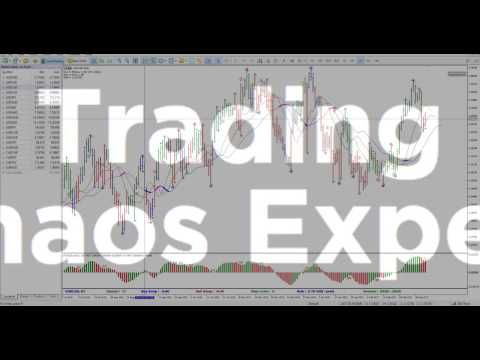
Trading Chaos Expert

5

This software has no equals in the world and represents a universal trade "console" covering trading signals, automated market entry, setting of Stop Loss and Take Profit, as well as Trailing Profit for multiple trades at the same time in a single open window. Intuitive control of the Expert Advisor in "three clicks" ensures a comprehensive use of all its functions on different computers, including tablets PCs.

Interacting with additional signal indicators that mark the chart to give a real market picture, the Expert Advisor allows you to make the right choice and to be on the winning side in most cases. A built-in money management algorithm, as well as automatic calculation of the lot size, trading virtual orders, and a number of other "know-how" features will save the trader from the account collapse. It is not a "black box". It is, rather, a well thought out trader's assistant which is not easy to do without, having tried it in action at least once.

Attention! Expert Advisors in the form of panels cannot be tested in the Strategy Tester! To be able to check it on your demo account, you should download a free demo version of this Expert Advisor - Trading Chaos Expert Demo.

The EA represents a panel with a built-in functionality of a trading robot which automates market entries based on trading signals visually estimated by the trader in full accordance with Bill Williams strategies "Trading Chaos: Second Edition" and "New Trading Dimensions". The Expert Advisor identifies directed price momentum that can be used to trade in a fully automated mode on a specific symbol and time frame in a separate window, as well as on multiple instruments simultaneously.

It concurrently analyzes all trading symbols displayed in the MetaTrader 5 "Market Watch" window. Parameters of open positions and pending orders are stored in RAM. After restarting MetaTrader 5 and reconnecting, the Expert Advisor completely restores its logic and trading orders and continues managing open positions.

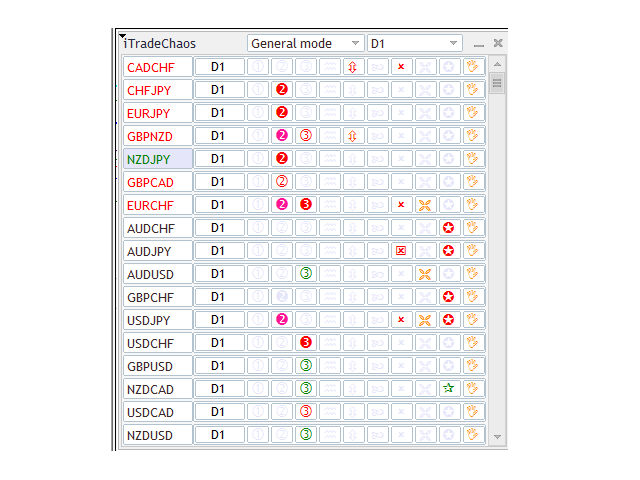
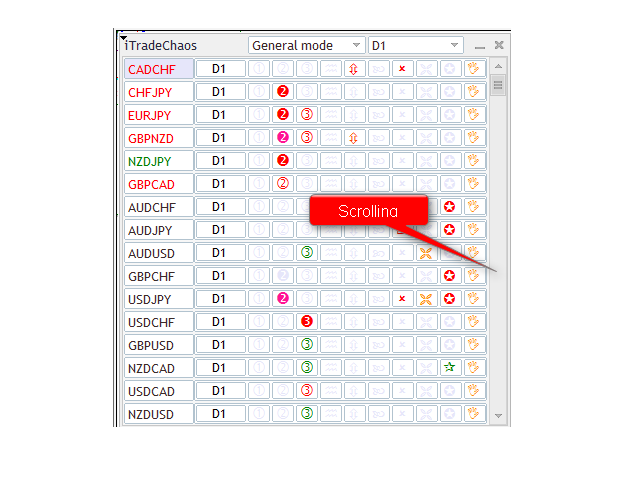
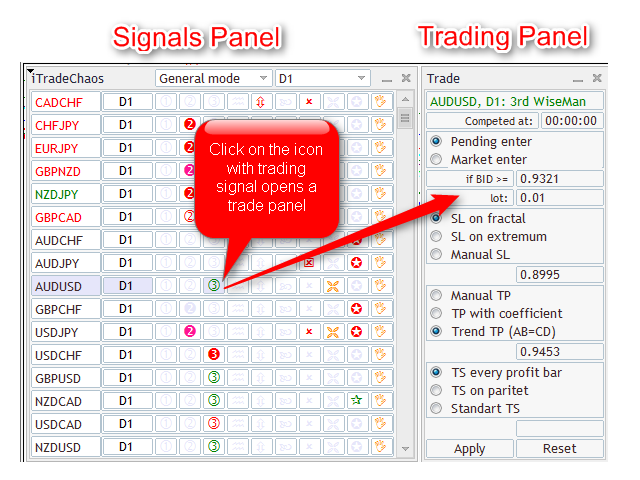
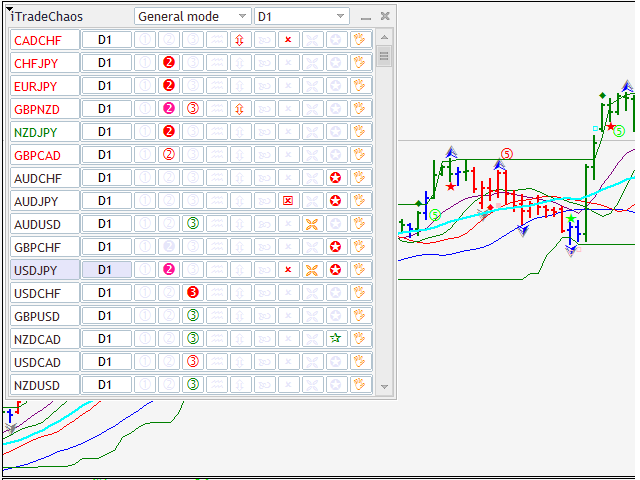
It consists of two interconnected panels. The "signal panel" is displayed directly on the chart. The main functions of the signal panel are:

  • Analysis of indicator data and bar (candle) patterns on a selected time frame and trading signal display in the signal table.
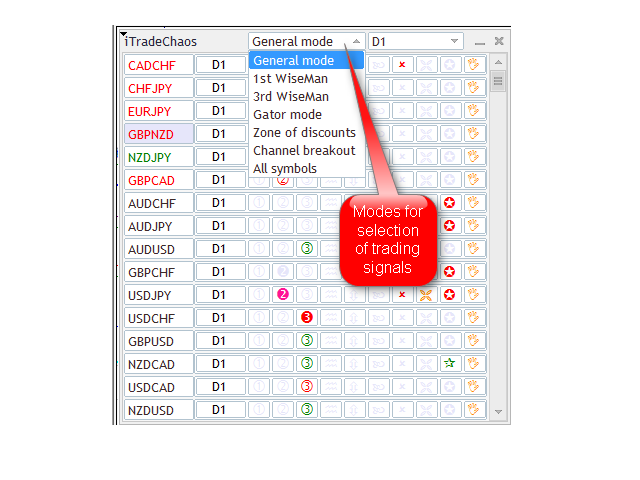
  • Selection of the trading signal display mode and grouping of signals by type.
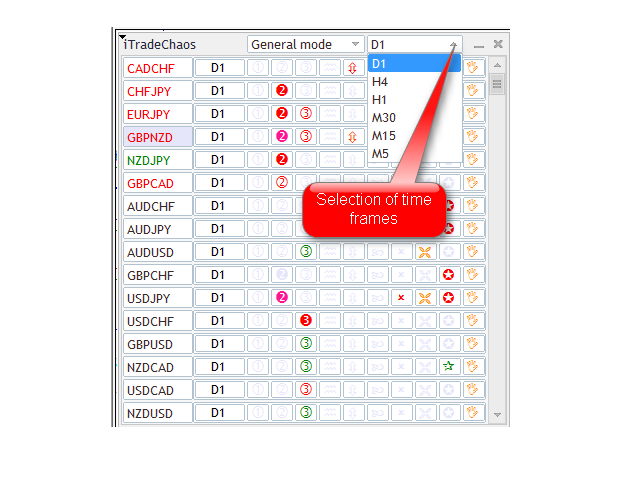
  • Selection of the time frame for the purpose of getting trading signals and trading.
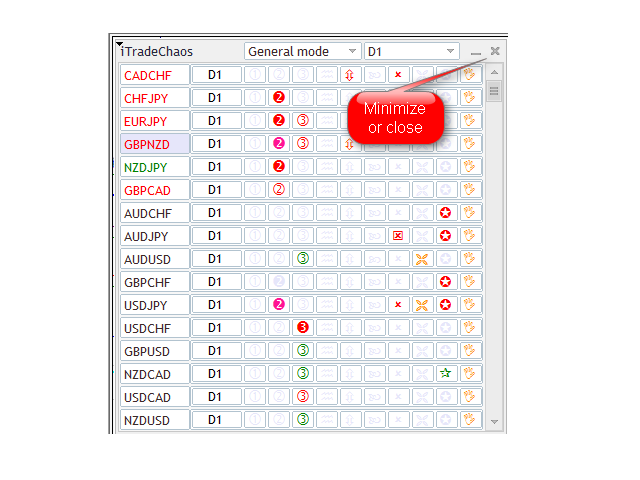
  • Opening (closing) of the "Trading panel".
  • Opening a chart for the required symbol and time frame in a single window.

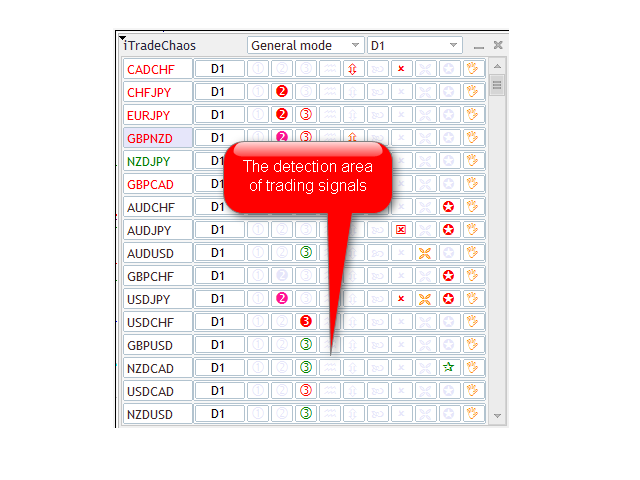
The Expert Advisor can recognize the following major trading signals by strategies and mark them in the signal panel as follows:

  1. "First Wise Man" signal, bullish (bearish) divergent bar (BDB) with angulation, including SQUAT bars. This is the first-ever formalization and implementation of the concept of angulation in MT5. The search for reversal bars is based on robust algorithms. You will always get a signal on the forming SQUAT bar with signs of reversal, as such bars can reverse the market in 85% of cases. However not every SQUAT bar is reversal. It has a measurement function. A particularly strong reversal signal appears in the AO indicator divergence zone, which you will also be able to see in the panel.
  2. "Second Wise Man" signal. “Blue Light Special” signal is an improved "Second Wise Man".
  3. "Third Wise Man" signal is a formation and breakout of the 'important' fractal. The Expert Advisor identifies important fractals lying outside the Alligator's jaws using three distinct reliable algorithms. A fractal breakout is considered to be the start of a directed impulse wave.
  4. 'Waves' is an Awesome Oscillator histogram divergence signal.
  5. 'Infinity' is represented by "Saucer" buy and sell signals. This signal indicates the transition of a currency pair in a directed motion after a period of correction presumably into the third wave or a wave C.
  6. 'Cross' is a signal of Awesome Oscillator histogram crossing the zero line. "Blue Light Special” is an improved signal of such crossing.
  7. Trend start signals (TSS) are marked in the signal table using yellow and gold crosses. The trend start signal appears upon opening of the Alligator's jaws, i.e. when the distance between the red and blue indicator lines increases after intertwining. The upper histogram of Gator Oscillator grows after a period of occurrence or a color change from red to green. This signal intensifies other trading signals in the strategy, both toward the main trend, and in the opposite direction.
  8. 'Star' is a breakout of a 20-period Donchian channel. The Expert Advisor uses the MultiRange_PCH indicator with the period of 20. This indicator is available free of charge. Download it, copy to the clipboard, then go to the MT5 terminal, click "File" - "Open Data Directory" - "MQL5" - "Indicators" and save the file to this folder. After restarting MT5, it will appear in the list of available indicators in the "Navigator" window. Add it to the chart. You will be able to see the breakout of the 20-period channel, which indicates a possible flat range breakout and the start of the directed movement - trend.
  9. By clicking on the 'Hand', a trader can manually place a pending virtual Stop order, set virtual Stop Loss and Take Profit, or open a position at market prices at any time without any signal. The Expert Advisor will then start trailing the profit. If the position is already open, you can click on the 'Hand' to modify Stop Loss, Take Profit, as well as the Trailing Stop method.
  10. Highlighting of the time frame is a special signal that determines the presence of directed impulse in the market, i.e. a formation of a special graphic zone whereby you should receive any trading signals for the given strategy to enter the market in the direction of the price movement on a particular time frame. Signal is set up as follows. The price breaks above the 20-period channel. The Awesome Oscillator crosses the zero line in the breakout direction. Fractal is formed outside the Alligator's jaws. After the fractal formation, the Time Frame button is highlighted in the relevant color. A click on the Time Frame button opens the trading panel that allows you to automate the market entry based on the first performed signal in the direction of the impulse. A trader only needs to click "Apply". "Saucer"-based market entries are especially good under such circumstances, i.e. presumable transition of the price into the third wave or a wave C. After pressing the "Apply" button, the time frame icon is outlined, indicating that the EA is ready to enter the market using trading signals.

Different colors of pointers marking signals allow you to see whether a signal has already been or is just being formed. Light tones of the icons suggest the future signal on active period. Dark tones indicate that there is a formed signal on closing. Filled icons mean that the breakout of the signal level is taking place. After entering the position, the name of the currency pair in the signal table changes its color. If the pair is sold, the name is displayed in red, if it is bought, it is shown in green.

The preliminary signal reflection function gives time to the trader to visually examine the signal for being in full accordance with the strategy, check how the signal fits into the market picture on a senior period, calculate the targets based on wavelengths and to place a pending virtual Stop order for entry, as well as a Stop Loss well in advance by means of the Expert Advisor, by clicking on the "Apply" button. If the preliminary signal does not come off on a closed period, the Expert Advisor will independently stop the signal monitoring and not enter the market.


Cancellation of Signal Monitoring

This function saves the trader from entering the market based on old, canceled or outdated trading signals.

Fractal signals located outside the Alligator's jaws will be canceled after a double closing of the price below (above) the red line of the Alligator. Channel breakout signals are canceled after the AO histogram crosses the zero line in the direction opposite to that of the breakout. "Saucer" signals are canceled after the change in the AO histogram color and the absence of a signal level breakout for a position entry. "Blue Light Special" signals get canceled after the AO histogram changes its color to the opposite upon closing without signal level breakout. Signals of "Divergent bars" and divergence signals are canceled if the bar following the formation does not break the signal level. This is justified by the fact that if the signal is strong, the market will surely detect it and will not wait for the breakout of the signal level over a few more periods.


Signal Panel Modes

Signal panel has nine main modes that are used to group trading signals. A user can sort "First Wise Man", "Second Wise Man" and "Blue Light Special" signals, as well as fractal signals, breakout signals of 20-period channels and TSS (opening of Alligator's jaws). The mode that shows all trading signals for all trading instruments from the "Market Watch" is called "All Symbols".

The "General mode" is selected by default. When attaching the Expert Advisor to the chart, this mode begins the analysis of trading signals for market entry points. In addition, it displays trading instruments with open positions at the very top of the signal table for easier management. After entering a position in this mode, apart from signals for the market entry, you will also be able to see auxiliary signals, including the ones that are opposite to the market movement. For example, you bought a currency pair at the breakout of the fractal level and the next day the Expert Advisor shows a bearish divergence signal, warning you about the possible market reversal against your position.

There is an additional hidden mode which is called the "Candidate". It allows you to single out currency pairs that have potential but lack the trading signal at this point across the entire list of currency pairs. To do this, you need to double-click on the name of the relevant trading instrument. The icon is then outlined in purple and the currency pair is moved on top of the symbol list in the signal panel, below the currency pairs with an open position. To remove the purple frame, you need to double click on it again.

The "Current Chart" mode is intended for trading a specific currency pair on the selected time frame in a separate window. In this mode, the Expert Advisor automatically adjusts to the relevant time frame and detects trading signals on it. To switch between the time frames, we use the MetaTrader 5 program interface instead of the icon in the signal panel.


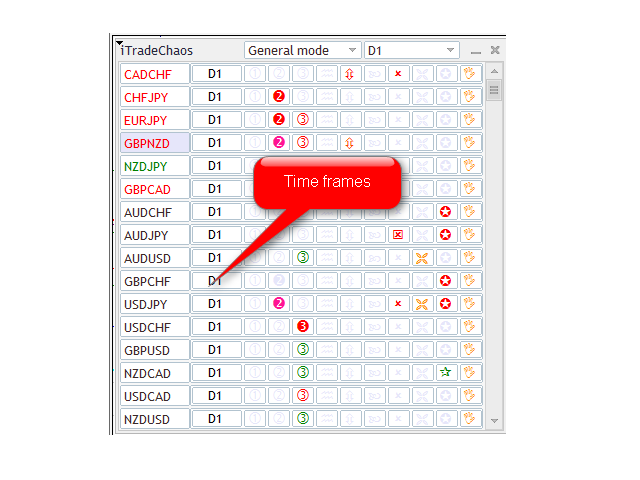
Time Frames

By default, the Expert Advisor can work on the following time frames:

D1, H4, H1, M30, M15, M5, W1, MN1

The first one on the list is the daily time frame. Upon attaching the Expert Advisor to the chart, the trader by default gets signals over that range as it is considered to be the main and less risky time frame. In addition, using AutoFormat indicator functions, the trader can expand the wave on the daily time frame into the waves on smaller time frames to be able to accurately calculate wave markings, provided that the chart has at least 140 bars. And in the Current Chart mode, you can attach the Expert Advisor to such chart in a separate window. The Expert Advisor has the function that allows it to adapt to signal search on any time frame. For example, if you switch to a 10-minute time frame and decide to continue trading on it and check the available signals, you will need to select the Current Chart mode in the signal panel.

The trader can specify any other required parameters in the Expert Advisor settings, specifying TF in the relevant field of the settings.


Trading Panel Features

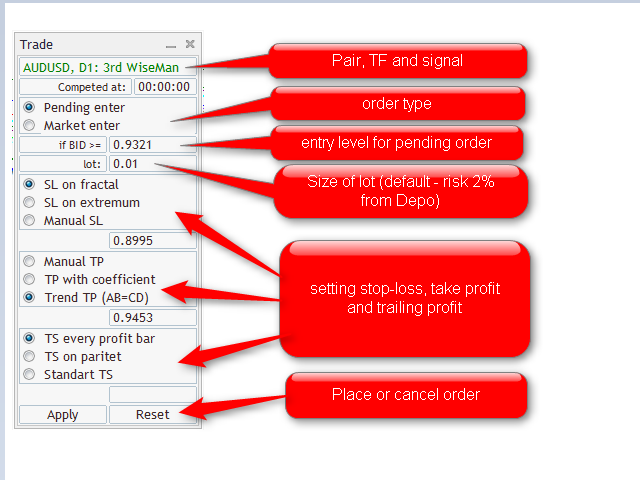
An additional "Trading panel" opens (closes) after clicking on the trading signal or time frame icon for the selected instrument.

Trading panel offers three position entry options:

  • Pending - entering at the breakout of the specified level by Bid price (by default, we use the signal bar High/Low +/- DefaultLuft = spread). Tracking of the level breakout starts after the signal is formed.
  • Market – market entry at the current price. It works for any signal, including unconfirmed ones.
  • Autoactivation - autoactivation of signals in the direction defined by the trader or automatically in the direction of the price momentum.

Lot size - calculated automatically as 2% of the trading account balance for daily, weekly and monthly periods and 0.2% of the account balance for periods lower than daily. The trader can set other necessary parameters in the settings.

Three Stop Loss setting options:

  • By the last opposite fractal (-/+ DefaultLuft points);
  • By the last extremum of 3 bars (-/+ DefaultLuft points);
  • At the specified level.

Three Take Profit setting options:

  • Manual;
  • Using a coefficient applied to the Stop Loss. For example, if the distance from the position entry to the Stop Loss is 100 and the coefficient of 2 is applied, the Expert Advisor will set a target for the Take Profit of 200 points.
  • AB=CD. This parameter is automatically used for entries based on fractal breakouts. It means that over the interval from the entry point the Take Profit will be equal to the length of the preceding wave.

Three Trailing Stop setting options:

  • By Low/High of each profitable bar (-/+ DefaultLuft spread points);
  • A one-time shift of the Stop Loss to breakeven below the closed bar (-/+ DefaultLuft spread points);
  • Profit protection below (above) the bar closed in the Alligator's jaws (-/+ DefaultLuft spread points);

Although the panel has several Stop Loss and Trailing Stop setting options, the Expert Advisor automatically selects the most suitable option for a particular transaction and begins to operate after clicking the "Apply" button. In order to cancel the operation of the Expert Advisor, you just need to click on "Reset". After clicking the "Apply" button, the lines indicating entry points, as well as the corresponding Stop Loss and Take Profit levels are displayed in the chart. You can move the Stop Loss and Take Profit levels to more appropriate ones for a given trade dragging them with the mouse.

There is also a possibility to manage these levels after entering the position. In that case, the Expert Advisor considers the moving of the level as switching to manual mode, whereby the Stop Loss triggers by hitting the level, rather than closing, thus protecting profits at the required level set by the trader.


Autoactivation of Signals in the Trading Panel

There is a possibility to enable automatic activation of signals in a certain direction (buy or sell) for every single chart. To do this, click the button for switching TF. A standard trading panel will appear, with "AutoActivation" displayed in the header instead of the signal name. Trading direction is selected by clicking on “AutoActivation”. It changes its color with every click: green is for buy signals, red is for sell ones, black is for disabled activation. After you have selected the direction, you should set the parameters, as they will be used when opening a position based on one of the activated signals. The following parameters should be left unchanged:

  • entry price (it will be calculated automatically as the set price will be outdated anyway);
  • Stop Loss level (unless "Manual SL" is selected).

All other parameters must be specified, as they will be used in activating the newly appeared signals. In addition to position parameters, you can also set the autoactivation function expiration time:

If you set the time which is less than the current time, it will be deemed the time of the following day (for example, if it is 14:20 now and the expiration time is set to 13:00, the autoactivation function will be disabled tomorrow at 13:00). The time specified is server time (which you can see in the chart and in the "Market Watch"). After clicking Apply, the relevant TF button is outlined in green or red and automatic activation begins. Upon appearing of a signal in the specified direction, it is immediately activated with the settings specified when enabling autoactivation. This is equivalent to cases where the signal with such settings is activated by the trader.

Simultaneous activation is possible for any number of signals in the same direction. Opposite signals are ignored (including, when activated manually). As soon as the expiration time value is reached, the autoactivation function is disabled. If there are signals activated by this function, they are not disabled and continue to wait to be triggered or canceled following the standard rules.

If any of the signals is triggered for a given symbol and TF in the direction which coincides with the direction of the autoactivation function, the function will be disabled immediately upon opening the position. And all co-directed activated signals for this symbol and TF will be disabled at the same time. In other words, if the buy wait is on and a buy position opens based on any of the signals, the autoactivation function stops its operation and any other buy signals (if any) are canceled. The position in this case remains active.


Autoactivation in Directed Price Momentum

This function is intended for a quick automation of position entry during price momentum in the direction of the price movement. The panel identifies momentum, highlights the time frame using the color of the price movement and automatically selects the direction of autoactivation in the trading panel. The trader only needs to click "Apply". The Expert Advisor will enter the marker based on the first performed signal in the momentum direction, setting the Stop Loss at the level of the opposite fractal and trailing profit using your selected option. The signal monitoring will stop when the histogram crosses the zero line, which suggests that momentum has been or is being lost.


Innovative Features of the Expert Advisor

The Expert Advisor has a number of additional innovative features.

  1. As mentioned earlier, pending orders and Stop Losses are virtual. This saves you from the troubles of a wrong market entry upon widening spread initiated by the broker. For example, the Expert Advisor will enter in the buy direction only if the Bid price is greater than the signal level by the spread value. The Stop Loss will not be affected by the mistake and only trigger after the price closes below (above) the set level plus (minus) the spread for a given symbol.
  2. "Non-random case" feature. The Expert Advisor continues tracking the signal with the wrong entry level over the set spread value.
  3. The possibility to move Stop Loss and Take Profit levels using the mouse. To be able to set the new Stop Loss level, all you need is to click on the rectangle displayed on the line and drag the line to the required place using the mouse. The Trailing Stop is in this case disabled automatically. The Expert Advisor takes these actions as a change to the manual trade management and disables the Trailing Stop. Stop trade is triggered by the contact instead of the closing, as set by default.
  4. The panel features a signal block. The trader can set the required methods of notification of the new trading signals.
  5. The Expert Advisor has an adjustable money management block. 2% of the deposit balance is set by default. Furthermore, the Expert Advisor will reject opening new positions if the free margin on the account will be less than 100%. The trader does not need to independently select the necessary position lots, taking into consideration the price risk of one point of the price movement in the deposit currency for a specific instrument.


Getting the МetaТrader 5 Platform Ready for Work

When connected for the first time, the Expert Advisor automatically loads the entire quotes history available on the server. It can take a few minutes if a lot of trading instruments are displayed in the "Market Watch". To speed up loading, you need to press Ctrl+O key combination and specify a reasonable value of "Max. bars in the window" in the "Charts" tab. Note that each applied instrument and time frame use RAM. Every indicator attached to the chart will use even more RAM.

When switching between charts, МetaТrader 5 does not release memory resources. This is done to be able to quickly return to recently used data. This can slow down the operation of the terminal when working with a great number of instruments, time frames and indicators. If you use D1 or a higher time frame, you will not need more than 5000 bars. Set the specified value in the settings and restart the terminal. In the "Expert Advisors" tab, you should enable the "Allow Auto Trading" option. In addition, it is recommended to set up an email in MetaTrader 5 to be able to get real-time trading signals to your email from the Expert Advisor working on a dedicated server. If you sign up for MQL5.community, you will be able to get free updates of software products right in the МetaТrader 5 terminal.


Preparing the Chart for EA

Before working with the Expert Advisor, you need to properly prepare the chart. Create a template under the name 'default'. Include and save to it the required indicators, as follows:

as well as the indicators provided in the МetaТrader 5 platform by default:

  • Gator Oscillator
  • Market Facilitation Index (MFI)

The graphical indicators are plotted in strict accordance with B. Williams recommendations. Trading signal markings are synchronized with signal panel readings. The indicators are not included in the Trading Chaos Expert package and should be purchased extra. To cut expenses, you can use indicators built-in МetaТrader 5, such as Alligator, Fractals and Awesome Oscillator, that do not have a function for marking trading signals. You should bear in mind that the trading signal quality in this case will be considerably lower. Furthermore, you should not save the panel to the template. It is more advisable to use hot keys for calling the Expert Advisor on the chart. For example, you can set CTRL+1.


How It Works

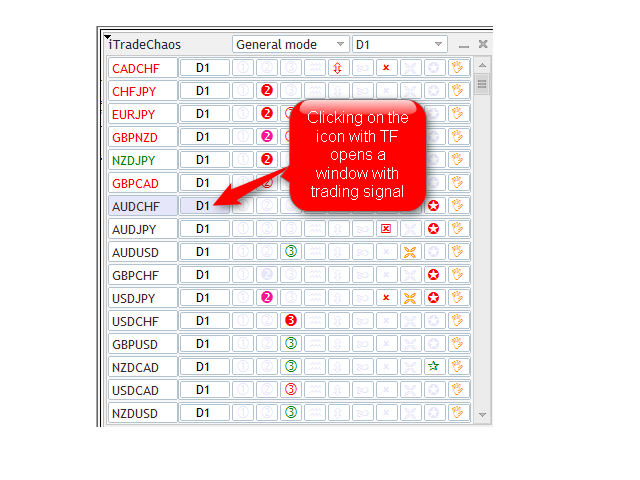
After successfully loading the history for all the specified instruments and time frames, you will see a table of signals on D1. The current symbol displayed in the chart and the chart time frame are highlighted in a darker color. A click on a TF name (next to any symbol) takes you to the corresponding chart in the current window. If you click on the icon of any of the signals, an additional trading panel will open for you to trade and manage positions. Specify the necessary parameters and click "Apply" - all the parameters will be saved and restored if the Expert Advisor, terminal or computer is restarted. The relevant signal will in this case be outlined. Entry and Stop Loss levels will be marked with lines.

After saving the parameters of a given signal by clicking on the "Apply" button, you can proceed to enabling the next one. If you click on "Reset", all settings will be reset to default values, whereby trading based on the given signal is disabled. To enable trading, you should again set the parameters and click "Apply". The signal will become outlined and monitored by the Expert Advisor. All other signals that you intend to use to enter the market are set in a similar way. Once this is done, you can hide the window by clicking on the cross or any inactive signal, in which case the signals continue to be monitored by the Expert Advisor that tracks all activated entries and responds to market changes.


Trading Using the Expert Advisor

The Expert Advisor identifies a trading signal in line with the strategy and displays it in the table. To view the signal, you should click on the icon of the time frame on which the signal is displayed. The chart will switch to the required time frame with the set of indicators you saved for the corresponding template. If you additionally bought a complete set of indicators for the strategy and saved them to the template, the modified indicators will show this signal in the chart.

There are preliminary signals on an uncompleted candlestick and formed signals confirmed by closing of the period. Preliminary signal function is provided to prepare the trader for a signal. If the trader likes a preliminary signal, he can immediately activate the Expert Advisor to trade on this signal. To do this, you need to click on the signal icon and then click "Apply" in the trading panel. The icon will get outlined. If the border is red, it means that sell signals are accepted, if the border is green - buy signals.

From that moment on, the Expert Advisor will track this signal. If the signal is formed, the Expert Advisor will set the virtual pending order, as well as the Stop Loss based on this signal. After setting pending orders, the chart will show dashed lines indicating entry levels, Stop Loss and Take Profit. The Expert Advisor will enter the market at the signal level breakout. After entering the market, the name of the instrument in the table will be highlighted with the relevant color: green indicates a buy position, whereas red suggests a sell position.

If the signal is canceled, the Expert Advisor will stop tracking the signal and will not enter the market. The frame of the signal icon will in this case disappear. The trader may cancel the market entry by clicking "Reset". Thus, the trader has the possibility to get all major signals in a single window and automate signal-based trading. Besides, it allows you to avoid the danger of entering the market using a canceled signal.

While trading, the trader can add positions based on trading signals in the direction of an open position or reverse based on the opposite signals, as well as use automated trading for multiple instruments at the same time, without opening additional chart windows. This offers significant risk hedging opportunities in trading.


Recommendations

To work with my software tools, it is advisable to have a high-performance computer for the market analysis. Trading operations will require a high-performance (at least 1 GB of RAM) dedicated VPS server with a good communication channel.


Warning

This is a complex software product which does not, however, need any additional settings. It is completely ready for use. To ensure efficient use of the Expert Advisor and positive trading results, you need to have a good knowledge and complete understanding of the trading strategies developed by Bill and Justin Williams - "Trading Chaos" and "New Trading Dimensions".


Possible Problems

No lags or any cases of abnormal behavior were detected over the course of panel use. However, after removing the Expert Advisor from the chart, its signals remain on the chart due to video memory properties. Old signals and symbols can be cleared using two methods:

  1. Load the 'Default' template that only enables indicators.
  2. Right-click on the chart, select "Object list", then "Full list", press CTRL+A (to select all objects) and click on the "Delete" button.

In case something is not clear in the operation of the Expert Advisor, you can check the "Experts" or "Journal" tabs of the Toolbox. Every day, the entire history of operation of the Expert Advisor is saved in files of Logs folder located at C:\Program Files\MetaTrader 5\MQL5\Logs

I will be happy to answer any questions you may have and will help you to install any purchased products on your computers remotely using TeamViewer, at no charge. But before asking questions or turning to me for help, I urge you to carefully read the product description, test the panel in a demo mode on a demo account, rather than in the Strategy Tester, and familiarize yourself with additional information provided on my website. The website offers a function for translation of the text into different languages.

Good luck!
Reviews 13
Paulina Andrea Madariaga Figueroa
4222
Paulina Andrea Madariaga Figueroa 2022.02.26 14:21 

Esto es justamente lo que estaba buscando. Herramienta invaluable, cada dolar lo vale, y no afecta el funcionamiento de la plataforma metatrader 5, mi plataforma sigue igualmente de rapida.

hallovelo
149
hallovelo 2021.06.04 09:36 

Everything works fine on windows. There are some problems (as with most others EA/Indicator) with official download of MT5 for Mac using OS10.15 Catalina, but with Parallels, everything works also on Mac fine. PlayOnMac is currently not compatible with Catalina, and neither is Wine.

Olga Snizhko
1057
Olga Snizhko 2020.10.15 11:52 

Good...

A huge minus of this EA is that it is not possible to run it in a tester with visualization on at least one pair in order to set up and test a certain strategy for yourself.

Recommended products
Magic EA MT5
Kyra Nickaline Watson-gordon
Magic EA is an Expert Advisor based on Scalping, Elliot Waves and with filters such as RSI, Stochastic and 3 other strategies managed and decided with the robot smartly. Large number of inputs and settings are tested and optimized and embedded in the program thus inputs are limited and very simple. Using EA doesn't need any professional information or Forex Trading Knowledge. EA can trade on all symbols and all time frames, using special and unique strategies developed by the author. The EA w
Viking Alpha DAX Ivar Edition
Valdeci Carlos Dos Passos Albuquerque
Viking Alpha DAX — Germany 40 Expert Advisor for MetaTrader 5 LAUNCH PROMO Only 10 copies at launch price. Price increases with each sale. Launch price: $297 Next price: $497 Final price: $997 Live Performance: FX Blue — Vikingtradingbots What Makes Viking Alpha DAX Different Most DAX robots fail for one simple reason: they treat the Germany 40 like a forex pair. It isn't. The DAX has a heartbeat — a specific rhythm tied to the Frankfurt Stock Exchange opening, the European session structure, an
HMA Scalper Pro EA
Vladimir Shumikhin
5 (2)
HMA Scalper Pro EA — Automated Trading Advisor Based on Hull Moving Average (HMA) for MetaTrader 5 OVERVIEW HMA Scalper Pro EA is a professional trading robot (Expert Advisor) for MetaTrader 5 that trades in the direction of the Hull Moving Average (HMA). The HMA indicator determines the current trend direction, and the EA opens trades in that direction, enhanced by Smart Risk capital management, adaptive grid trading, trailing stop, breakeven, and time filters. The EA supports both Netting a
Overview Impulsive OB Scalper Pro is a fully automated Expert Advisor for MetaTrader 5 that focuses on   institutional order blocks   and   impulsive price movements . The system identifies supply and demand zones formed after a strong impulsive candle (range ≥ ATR × multiplier) and executes trades when price retests those zones. This approach follows the footprints of large institutional players (banks, hedge funds) that create significant directional moves. Unlike traditional indicator‑based s
SARUJA ADAPTIVE RECOVERY  live acoutn signal: SARUJA ADAPTIVE RECOVERY SARUJA Adaptive Recovery is an automated Expert Advisor developed specifically for XAUUSD on MetaTrader 5. The system combines trend analysis, pullback logic, mean-reversion elements and adaptive recovery management. It uses EMA, ATR and RSI together with an H1 trend filter to evaluate market conditions and manage entries. MAIN FEATURES • Designed for XAUUSD • MetaTrader 5 Expert Advisor • Internal M15 signal engine with
Gold EA: Proven Power for 1-Minute Gold Trading Transform your trading with our Gold EA, meticulously crafted for 1-minute charts and delivering over 2000% growth in 5 years from just $100-$1000 . No Martingale, No AI Gimmicks : Pure, time-tested strategies with robust money management, stop loss, and take profit for reliable performance across multiple charts. Flexible Trading Modes : Choose Fixed Balance for safe profits, Mark IV for bold growth, or %Balance for high rewards—combine Mark IV an
| Fully-automated Smart Money Concept (ICT) inspired trading solution with multi-strategy capabilities | Built by a grid trader >> for grid traders.  This is MT5 version, click  here  for  Blue CARA MT4  (settings and logics are same in both versions)     Real monitoring signal  -->  Cara Gold Intro Blue CARA EA   ('CARA') - short for  C omprehensive  A lgorithmic   R esponsive   A dvisor is a next-gen  multi-currency    multi-timeframe  EA base on the widely known (and perhaps the most popul
Strong PScore Trader
Mohammadreza Jamaleddin Azhari
Strong PScore Trader Strong PScore Trader is an automated MetaTrader 5 Expert Advisor for XAUUSD on 5m timeframe only . It combines price-action support and resistance detection with PScore-based signal confirmation to identify structured BUY and SELL opportunities. The EA is designed to monitor price structure, evaluates bullish and bearish movement strength, and manages entries automatically when its signal conditions are satisfied. IMPORTANT: run the script on metaquotes demo account to get e
NextGen Premium is an automated Expert Advisor for MetaTrader 5 designed primarily for XAUUSD (Gold). The EA uses a two-sided pending order grid. It places Buy Stop orders above the current market price and Sell Stop orders below the current market price. The EA does not use indicators or trend prediction to determine the trading direction. Orders are activated when market price reaches the corresponding pending order level. The EA is designed to maintain a structured grid and includes position
Exclusive Black Pro Max MT5 — Automated Trading System Exclusive Black Pro Max MT5 is an Expert Advisor for MetaTrader 5, built on advanced market analysis algorithms and risk management strategies. The EA operates in a fully automated mode and requires minimal trader intervention. Attention! Contact me immediately after purchase to receive setup instructions! IMPORTANT: All examples, screenshots, and tests are provided for demonstration purposes only. If a specific currency pair shows good resu
ICT Structure Scalper
Nathan Muema Nthusi
QT Structure Scalper **Tick-speed entries locked to ICT market structure, with a CHoCH grid, a BOS exit and hard take-profits.** QT Structure Scalper trades in the direction of the market structure it detects, opens a basket with a fixed lot size, and manages it with fixed rules. It uses no martingale, and every trade uses the same lot size. ### How it works 1. **Market structure.** The EA finds swing highs and lows on the structure timeframe and tracks BOS (Break of Structure) and CHoCH (C
Santa Scalping is a fully automated Expert Advisor with no use of martingale. Night scalping strategy. The SMA indicator filter are used for entries. This EA can be run from very small accounts. As small as 50 EUR. General Recommendations The minimum deposit is 50 USD,  default settings reccomend for eurusd m5 gmt +2 . Please use max spread 10 if you will not have orders change it to -1. Use a broker with good execution and with a spread of 2-5 points. A very fast VPS is required, preferably wi
SolarTrade Suite Financial Robot: LaunchPad Market Expert - designed to open trades! This is a trading robot that uses special innovative and advanced algorithms to calculate its values, Your Assistant in the World of Financial Markets. Use our set of indicators from the SolarTrade Suite series to better choose the moment to launch this robot. Check out our other products from the SolarTrade Suite series at the bottom of the description. Do you want to confidently navigate the world of inves
Smart Trend Scalper AI Smart Trend Scalper EA is an advanced MetaTrader 5 Expert Advisor designed for traders who want to capture short-term market movements while keeping entries, position management and risk control synchronized with the prevailing market structure. The EA is built around a simple philosophy: Identify the dominant M15 direction → confirm the setup → enter quickly → manage winners intelligently → protect accumulated profit → react when market structure changes. Unlike a basic
To those who have already purchased, the team would like to express our sincere gratitude. Your support motivates the team and encourages us to continue developing and improving the quality of our products. Transform Your Gold Trading! Unleash Exponential & Sustainable Growth with the "Gold Martingale Robot EA" (MT5) Are you tired of constantly watching charts? Stressed out every time high-impact economic news is released? Or perhaps you've made profits only to watch them vanish due to ho
GU Liquidity Sniper
Wootthipong Chaiyaphum
Apex Reversal — M1 Precision Reversal Scalper Apex Reversal is a precision intraday scalper that trades reversals at Double Top and Double Bottom turning points on the 1-minute chart. Instead of chasing momentum, it waits for price to fail twice at the same level, confirms the rejection candle, and enters with a tight, structure-based stop and a fixed 2:1 reward target. Every trade is filtered by an event-based BOS / CHoCH market-structure engine on a higher timeframe, so the robot only takes re
Gyroscopes mt5
Nadiya Mirosh
5 (2)
Gyroscope        professional forex expert   (for EURUSD, GBPUSD, USDJPY, AUDUSD, USDCHF, EURGBP, EURJPY, NZDUSD, USDCAD, EURCHF, AUDJPY, CADJPY pairs)   alyzing the market using the Elliot Wave Index. Elliott wave theory is the interpretation of processes in financial markets through a system of visual models (waves) on price charts. The author of the theory, Ralph Elliott, identified eight variants of alternating waves (of which five are in the trend and three are against the trend). The mov
Gold Sovereign Strike AI Algorithmic Strike-Avoidance Protocol Gold Sovereign Strike AI represents a paradigm shift in automated Gold trading, built entirely upon the proprietary Algorithmic Strike-Avoidance Theory. Heavy drawdowns and extreme volatility spikes are treated as "Strikes" against your portfolio's longevity and platform compliance. This Expert Advisor is engineered for Monetization Safety (Prop-Firm and Funded Account friendly), prioritizing sustainable, compounded capital growth o
EMA256 Fourier Cycle Trader EMA256 Fourier Cycle Trader is an advanced MetaTrader 5 Expert Advisor combining a long-term EMA or TEMA trend model, causal Fourier cycle analysis, configurable averaging and a unified basket take-profit system. The Expert Advisor is designed primarily for CENT accounts and for traders who understand basket recovery strategies, geometric lot progression and the risks associated with trading without a mandatory Stop Loss. RECOMMENDED STARTING CONFIGURATION Recommended
Alpha Bullish Engine MT5 Overview Alpha Bullish Engine(No Martingale, no Grid) is a professional Expert Advisor for MetaTrader 5 designed to identify and trade high-quality market bullish opportunities while maintaining a strong focus on risk management and capital preservation. Built with a combination of trend analysis, momentum assessment, and intelligent trade management, the EA is designed to operate in favorable market conditions while avoiding unnecessary exposure during less suitable env
Gold Short-Only 15-Min, 30-Min, 60-Min Advanced Strategy Trading System. It employs the latest multi-modal trading strategy developed for short-only gold trading. To use it, first check the daily chart — if the macro trend is bearish, you can confidently deploy it. It can deliver monthly returns of up to around 70%. This trading system is the result of over 10 years of research by the author in computer systems, mathematical statistics, quantitative trading, and multiple mathematical models. Tra
Exclusive EA for FOREX HEDGE account The EA (FuzzyLogicTrendEA) is based on fuzzy logic strategies based on the analysis of a set of 5 indicators and filters. Each indicator and filter has a weight in the calculation and, when the fuzzy logic result reaches the value defined in the EA parameter, a negotiation is opened seeking a pre-defined gain. As additional functions it is possible to define maximum spread, stop loss and so on . Recommended Symbol: EURUSD, AUDUSD, GBPUSD, NZDUSD, USDCAD, AU
2-reihiger Hybrid-Grid-EA mit Ghost Scalper und Brokerside Breakout, automatischem und manuellem Panelboard, 2 x TSL, TP und SL, Spread-Schutz und vielem mehr… Er wurde für den Handel mit Metallen und Energie entwickelt, kann aber auch für andere Assets verwendet werden, sofern Ihr Broker dies zulässt. Ein Muss für jeden Trader. Testen Sie Ihre EA-Einstellungen mit dem Strategietester und/oder einem Demokonto, bevor Sie ihn auf Ihrem Live-Konto einsetzen! Wenn Sie die Demo-Datei herunterladen,
Product Name:   Tide Reaper EA Product Description: Tide Reaper EA is an automated Expert Advisor developed for the MetaTrader 5 platform. It is designed to identify and follow intraday trends, primarily optimized for XAUUSD (Gold). The EA does not employ grid trading, Martingale, counter‑trend averaging, or any risk‑compounding strategies. Core Strategy: Multiple timeframes are used to determine the dominant trend direction. Higher timeframes set the overall bias, while lower timeframes are use
Forex Diamond EA MT5
Lachezar Krastev
4.67 (3)
FOREX MEGA SALE! 50% OFF! Buy Forex Diamond EA with a huge –50% discount ! Promo Price: $267 (Regular Price: $547 — You Save $280! ) Act now before this deal ends! Live Results:   https://www.mql5.com/en/signals/2379493 Forex Diamond EA – Reliable Automated Trading Powered by Smart Algorithms Forex Diamond EA is a proven expert advisor designed to deliver consistent results using a combination of trend and counter-trend strategies. Trusted by thousands of traders since its launch, Forex Diamo
US500 Scalper
Sergey Batudayev
The S&P 500 Scalper Advisor is an innovative tool designed for traders who want to successfully trade the S&P 500 Index. The index is one of the most widely used and prestigious indicators of the American stock market, comprising the 500 largest companies in the United States. Peculiarities: Automated trading solutions:   The advisor is based on advanced algorithms and technical analysis to automatically adapt the strategy to changing market conditions. Versatile approach:   The advisor combine
Trend Of The Day
Jarmin Jamike Ugorji
5 (1)
Trend Of The Day Follow the trend. Control the risk. Protect the capital. ICMarkets Live Signal 1  https://www.mql5.com/en/signals/2387790   Blog Post  Trend Of The Day - Analytics & Forecasts - 1 September 2026 - Traders' Blogs No Martingale / No Grid /   No Recovery / No Hedging / one trade entry with hard stoploss Release price is $199.99 but price will increase to $299 after certain number of purchases. Trend Of The Day is a professional trend-following Expert Advisor designed to identify
King of Pullbacks
Reward Ndunga Mubita
King of Pullbacks — Expert Advisor King of Pullbacks is a proprietary Expert Advisor developed to exploit temporary price retracements within established bullish market structures . The trading logic is based on a multi-layer confirmation model that evaluates market conditions dynamically before any trade is executed. The internal methodology is non-disclosed and protected by design. General Trading Concept The EA focuses on: XAUUSD H4, H1 Recommended brokers: Exness, FBS, etc Trading with
Hamster Scalping mt5
Ramil Minniakhmetov
4.72 (244)
Hamster Scalping is a fully automated Expert Advisor. Night scalping strategy. The RSI indicator and an ATR-based filter are used for entries. The advisor needs a hedging account type Be careful i not sell EA or sets at telegram it scam. All settings free here at   blog .  IMPORTANT! Contact me immediately after the purchase to get instructions and a bonus! Real operation monitoring as well as my other products can be found here: https://www.mql5.com/en/users/mechanic/seller General Recommendati
Gold Zilla AI MT5
Christophe Trouillas
4.59 (34)
Generate controlled returns with an  AI-assisted , risk-diversified and Gold-optimized EA . GoldZILLA AI is a multi-strategy algorithm detecting market regimes to dynamically select from five distinct strategies, optimizing returns while minimizing drawdown on XAUUSD. [ Live Signal ] - [  Dedicated group | Version MT5 - MT4 ] After the purchase, please send me a private message to receive the user manual and the AI setup instructions. Why choose this EA? Dynamic multi-strategy approach Advanced
Buyers of this product also purchase
The Patch
Mian Rameez Ali
The Patch It never opens a trade. It walks behind the ones that did. Every open position, every pending order — checked twice a second for the one thing that's easy to forget: a stop, a target. Found bare, it doesn't ask. It writes the missing number in, measured in points from wherever the position began, and moves on to the next. No strategy, no opinion on direction. Just the quiet assumption that nothing should ever sit on the market unprotected — not because someone decided it shouldn't,
Floor Watch
Syed Tauqeer Hussain Shah
Floor Watch One number, watched every thirty seconds: how far equity has fallen since the day began — or since its highest point, if it's told to trail the peak instead of the open. Cross the line and it doesn't argue. Every open position closes, every pending order vanishes, and anything that slips through afterward gets shut the moment it appears. Not asked. Removed. The floor holds until the clock turns 5 AM Pakistan time — then, and only then, does the day start over. One rule. No except
Buy once. Get all my MT4 and MT5 indicators - available now and released in the future - at no extra cost. Contact me after purchase for instructions to receive them. The price is planned to rise by 50$ after every 10 purchases, up to 999$. The Market price at checkout applies. Keep the indicator you trust. Automate the work around it. Your signal. Your rules. Your execution. Already have an MT5 indicator you rely on, but still need to watch the chart, wait for a signal, calculate the lot, plac
FarmedHedge Pair Trading Dashboard
Tanapisit Tepawarapruek
5 (5)
Farmed Hedge Yield Farming | All Markets (Manual - Hybrid - Semi/Automated EA) VERIFIED TRADING RESULTS - Farmed Hedge Yield Axi Copy:  https://www.mql5.com/en/signals/2356376 - Farmed Hedge Yield Exn Copy:   https://www.mql5.com/en/signals/2356404 - Farmed Hedge Yield V Copy:  https://www.mql5.com/en/signals/2357156 IMPORTANT NOTICE: FarmedHedge is a MANUAL-FOCUSED TRADING UTILITY ,not a fully automated EA. Results shown on this Signal include manual trades and overall strategic management.
YuClusters
Yury Kulikov
4.93 (43)
Attention: You can view the program operation in the free version  YuClusters DEMO .  YuClusters is a professional market analysis system. The trader has unique opportunities to analyze the flow of orders, trade volumes, price movements using various charts, profiles, indicators, and graphical objects. YuClusters operates on data based on Time&Sales or ticks information, depending on what is available in the quotes of a financial instrument. YuClusters allows you to build graphs by combining da
AI Arbitron — an MT5 Spot vs Future Gold Arbitrage Bot designed to capture price discrepancies between correlated Spot and Future instruments through hedged, non-directional trading. Platform: MT5 Asset: Mainly Gold (XAUUSD) using Spot + Future/CFD price feeds. Core strategy: It monitors the price gap between Spot and Future. When the gap reaches your defined threshold, it opens hedged positions—typically Buy Spot + Sell Future (or the reverse depending on the gap). Exit: Positions are closed
Mentfx Mmanage mt5
Anton Jere Calmes
4.25 (8)
The added video will showcase all functionality, effectiveness, and uses of the trade manager. Drag and Drop Trade Manager. Draw your entry and have the tool calculate the rest. Advanced targeting and close portions of a trade directly available in tool (manage trades while you sleep). Market order or limit order on either side with factored spread. Just draw the entry, the tool does the rest. Hotkey setup to make it simple. Draw where you want to enter, and the stop loss, the tool calculates al
HINN Lazy Trader
ALGOFLOW OÜ
5 (1)
The core idea: using the user interface, you configure the parameters the chart must meet before entering a position (or positions), choose which entry models to use, and set the rules for when trading and planning should end. Lazy Trader  handles the rest: it  takes over all the routine chart watching and execution! full description  :: 3 key videos [1] ->  [2]   ->  [3] What can it do? - Understands Larry Williams market structure - Understands swing market structure by Michael Huddleston
Quant AI Agents
Ho Tuan Thang
5 (1)
Quant AI Agents are independent trading Expert Advisors. Instead of trading using a fixed strategy like other conventional EAs, Quant AI Agents   is a   multi-agent AI trading framework   that turns natural-language strategy prompts into live.  WANT THE SAME RESULTS AS MY LIVE SIGNAL?   Use the exact same brokers I do:   IC MARKETS , IC TRADING   .  Unlike the centralized stock market, Forex has no single, unified price feed.  Every broker sources liquidity from different providers, creating un
Unlimited Trade Copier Pro MT5 is a tool to copy trade remotely to multiple MT4, MT5 and cTrader accounts at different computers/locations over internet. This is an ideal solution for you if you are a signal provider and want to copy your trades to other receivers globally on your own rules. One provider can copy trades to multiple receivers and one receiver can get trade from multiple providers as well. The provider can even set the subscription expiry for each receiver, so that receiver will n
# If you have any other requirements or are interested in collaboration, please contact  dev.quantech.london@gmail.com . Flash Trade (FT) Most friendly manual trading tool. Easy operation to secure your funds. Features of FT Click the chart to trade fast FT supports market orders and pending orders Click twice to complete the order and set SL and TP Click trice to complete the pending order and set SL and TP Automatically set the stop-loss amount of each order to a fixed percentage of the bala
Adam FTMO MT5
Vyacheslav Izvarin
5 (2)
ADAM EA Special Version for FTMO Please use ShowInfo= false for backtesting ! Our 1st EA created using ChatGPT technology Trade only GOOD and checked PROP FIRMS  Default parameters for Challenge $100,000 Tested on EURUSD and GBPUSD only  Use 15MIN Time Frame Close all deals and Auto-trading  before Weekend at 12:00 GMT+3  Friday For Prop Firms MUST use special Protector  https://www.mql5.com/en/market/product/94362 --------------------------------------------------------------------------------
QCML Assistant
Maxime Turcotte-lafreniere
QCML Assistant MT5 Your Trading. Our Assistant. Your Edge. Looking for a tool that completely transforms your experience on MetaTrader 5? QCML Assistant is the all-in-one solution built by traders, for traders. Just one tool installed on your chart, and you get access to an ultra-complete, ultra-fast, and ultra-simple trading platform. No more hours wasted setting up your workspace. No more complicated trade entries. With QCML Assistant, everything becomes simple, smooth, and efficient right fro
TradePad
Ruslan Khasanov
5 (1)
TradePad is a tool for both manual and algorithmic trading. We present you a simple solution for fast trading operations and control of positions on several trading instruments. Attention, the application does not work in the strategy tester! Trial version of the application for a demo account and a description of all the tools The application interface is adapted for high-resolution monitors, simple and intuitive. For comfortable work, the trader is offered the following set of tools: A hot ke
FRATO Smart GEX Gamma Exposure 0DTE Dashboard
Francisco Felipe Alves Da Silva Rocha
Elevate your trading to the institutional level with   FRATO Smart GEX . This is not just another lagging technical indicator. It is a quantitative intelligence tool that reads the positioning of large Market Makers through real-time   GEX (Gamma Exposure)   and   Open Interest (OI)   analysis. Understand where big players are pushing the price and identify support and resistance zones that are invisible on a standard candle chart! KEY FEATURES: Real-Time GEX Analysis:   Visualize Call Wall
Gamma Edge Pro MT5
Xuan Nam Diep
1 (1)
Gamma Edge Pro MT5 — GexBot Classic API Integration Gamma Edge Pro brings institutional-grade Gamma Exposure (GEX) data directly onto your MetaTrader 5 chart — the same data used by professional options traders to anticipate price magnets, hedging flows, and dealer positioning. Powered by the GexBot Classic API, this indicator automatically maps options market data from US-listed instruments onto any MT5 CFD instrument — Forex pairs, Gold, indices, and more — with intelligent price conversion bu
News Trader Pro is a unique robot that allows you to trade the news by your predefined strategy. It loads every piece of news from several popular Forex websites. You can choose any news and preset the strategy to trade it, and then News Trader Pro will trade that news by selected strategy automatically when the news comes. News release gives opportunity to have pips since the price usually has big move at that time. Now, with this tool, trading news becomes easier, more flexible and more exciti
If you wish to draw Support and Resistance lines, view: daily market opening, classical pivot levels, Fibonacci pivot levels, trend lines, Fibonacci levels, the remaining time to candle closing, and current spread. If you seek to place your orders with the exact lot that meets your desired stop loss risk. If you wish to do all this and more with just one click, then this is the perfect tool to use. This tool will allow you to feel more relaxed when deciding to open orders, as well as predicting
The new version of  MirrorSoftware 2021  has been completely rewriten and optimized.  This version requires to be loaded only on a single chart because  it can detect all actions on every symbol and not only the actions of symbol where it is loaded. Even the  graphics and the configuration mode  have been completely redesigned. The MirrorSoftware is composed of two components (all components are required to work):  MirrorController  (free indicator): This component must be loaded into the MASTER
Easy Strategy Builder 5
Gheis Mohammadi
5 (4)
The  Easy Strategy Builder (ESB)  is a " Do It Yourself " solution that allows you to create a wide range of the automated trading strategies without any line of codes. This is the world’s easiest method to automate your strategies that can be used in STP, ECN and FIFO brokers. No drag and drop is needed. Just by set conditions of your trading strategy and change settings on desired values and let it work in your account. ESB has hundreds of modules to define unlimited possibilities of strategi
1. Record the price data for each Tick transaction. Data file contents: "Tick time", "ASK price", "BID price", "SPREAD SPREAD", "Tick quoted quantity". 2. Meanwhile, generate a quotation data file with a 1-minute period. Content of 1min data file: "ASK time", "ASK OPEN price", "ASK HIGH price", "ASK LOW price", "ASK CLOSE price", "BID time", "BID OPEN price", "BID HIGH price", "BID LOW price", "BID CLOSE price", "Tick quoted quantity". 3. Save all quotation data in one file every day, which is c
Mt5BridgeBinary
Leandro Sanchez Marino
I automated its commercial strategies for use of binary in MT5 and with our Mt5BridgeBinary I sent the orders to its Binary account and I list: begin to operate this way of easy! The expert advisers are easy to form, to optimize and to realize hardiness tests; also in the test we can project its long-term profitability, that's why we have created Mt5BridgeBinary to connect its best strategies to Binary. Characteristics: - It can use so many strategies as I wished. (Expert Advisor). - He does
FiboPlusWaves MT5
Sergey Malysh
5 (1)
FiboPlusWave Series products Ready-made trading system based on Elliott waves and Fibonacci retracement levels . It is simple and affordable. Display of the marking of Elliott waves (main or alternative option) on the chart. Construction of horizontal levels, support and resistance lines, a channel. Superposition of Fibonacci levels on waves 1, 3, 5, A Alert system (on-screen, E-Mail, Push notifications).    Features: without delving into the Elliott wave theory, you can immediately open one of
Xrade EA
Yao Maxime Kayi
Xrade EA is an expert advisor as technical indicator. For short period trade it's the best for next previsions of the trend of the market. +--------------------------------------------------------------------------------------- Very Important Our robot(data anylizer) does'nt take a trade procedure. If using only our robot you must take positions by yoursels +--------------------------------------------------------------------------------------- The technical indiator provide for a given sma
News: IDEA 2.0 is out with lot of features, like telegram bot notifications and Limits order! Check the changelog at bottom of page (*). Hi all, here you can find my Expert Advisor, called IDEA  (Intelligent Detection & managEr Algorithm) . In short, with this software you can: Have   a clear view of market status , with an indication of current trend. Simply add symbols you want to monitor to your market watch, and IDEA will notify you if some of them are in trend; Have an   automatic lots ca
Oracle
Denis Sotnikov
5 (2)
Эксперт - торговый помощник, созданный по одноимённой торговой стратегии Оракул в сотрудничестве с ее автором Нео. Определяет на графиках в автоматическом режиме разворотные импульсные модели и строит по ним Вилки Нео - авторский инструмент, позволяющий определять циклы движения цены и указывающий на ожидаемую цель TakeProfit . Поиск ведется на всех заданных периодах графиков одновременно с фильтрацией совпадений. Осуществляется фильтрация неверных Вилок с указанием кода ошибки. Утилита имеет
SystemLiveMxPips
Harold Alonso Hernandez
Automatice sus estrategias comerciales con nuestra sencilla herramienta de creación de estrategias "similar a un rompecabezas".   Cree fácilmente estrategias que operen por usted en modo de piloto automático.   También puede cargar estrategias creadas por otras personas, como la clásica   Estrategia Martingala,   para usarla como muestra para su propia estrategia. Características clave Cree su estrategia a través de funciones simples de arrastrar y soltar, sin necesidad de conocimientos de pro
Binance Full Trader
Arash Rezaeian
2 (1)
Binance Full Trader is developed for connection to your Binance account and get data, draw price charts and trade easily with any strategy by an indicator. A user-friendly interface has developed for it and has tried to give access to the necessary information such as open orders and wallet balances. ·        There are two sample indicators (one for trade signal and another for price) that you can download it from these links: https://drive.google.com/file/d/1w2CGuu3rArWKMhS9LkepT9zhVkGR1AO7/vie
PROMOTION!! $499 until 1 Mar. After that, EA will be $1,050 Developed and tested for over 3 years, this is one of the safest EAs on the planet for trading the New York Open. Trading could never be easier.  Trade On NASDAQ US30 (Dow Jones Industrial Average) S&P 500  What Does The EA do? The EA will open a Buy Stop Order and a Sell Stop Order(With SL and TP) on either side of the market just a few seconds before the NY Open.  As soon as 1 of the 2 trades is triggered, the EA automatically delete
Market book saver
Aliaksandr Hryshyn
Saving data from the order book. Data replay utility: https://www.mql5.com/en/market/product/71640 Library for use in the strategy tester: https://www.mql5.com/en/market/product/81409 Perhaps, then a library will appear for using the saved data in the strategy tester, depending on the interest in this development. Now there are developments of this kind using shared memory, when only one copy of the data is in RAM. This not only solves the memory issue, but gives faster initialization on each
More from author
Recognizer 1 2 3 Patterns
Hennadii Stanilevych
4.67 (36)
The indicator is intended for recognition and marking 1-2-3 buy and sell patterns on a chart. The indicator will help a trade to determine the starting and signal fractals, and to specify the possible entry points on all timeframes in МetaTrader 5. Fibonacci lines are drawn on the chart to indicate supposed targets of moving on the basis of the wave theory. The 1-2-3 formations appear to be especially important as divergences (convergences) are formed on price tops and bottoms. The indicator has
FREE
Trading Chaos Chart
Hennadii Stanilevych
5 (1)
The main purpose of the indicator is to detect and mark on a chart the following trade signals described in "Trading Chaos (2-nd edition)": Bullish and bearish divergence bars with angulation (including squat). Bars in the red and in the green zones according to the color of the Awesome Oscillator histogram. Squat bars on the chart independent of the color of the Awesome Oscillator histogram. Levels of "important" fractals relative to the "Teeth line" of the Alligator indicator. Drawing angulati
Alligator modified
Hennadii Stanilevych
5 (6)
Alligator Modified is a modification of the classic Alligator indicator designed to help traders visually identify market direction and coordinated line expansion. In addition to displaying the Jaw, Teeth, and Lips, the indicator marks situations when the lines cross and become correctly aligned. This helps distinguish directional Alligator expansion from periods when the lines are intertwined and do not indicate a consistent market direction. A Buy signal appears when the Lips and Teeth cross t
Short term extremum
Hennadii Stanilevych
5 (2)
The indicator determines and marks the short-term lows and highs of the market on the chart according to Larry Williams` book "Long-term secrets to short-term trading". "Any time there is a daily low with higher lows on both sides of it, that low will be a short-term low. We know this because a study of market action will show that prices descended in the low day, then failed to make a new low, and thus turned up, marking that ultimate low as a short-term point. A short-term market high is just
FREE
The main purpose of the indicator is to determine and mark trade signals on the histogram of the Accelerator Oscillator, which were described by Bill Williams in his book "New Trading Dimensions". The list of signals: The buy signal when the indicator histogram is below the zero line. The sell signal when the indicator histogram is below the zero line. The sell signal when the indicator histogram is above the zero line. The buy signal when the indicator histogram is above the zero line.  The buy
FREE
Modified Awesome Oscillator
Hennadii Stanilevych
5 (2)
The main purpose of the indicator is to detect and mark trade signals on the histogram of the Awesome Oscillator according to the strategies "Trading Chaos, second edition" and "New Trading Dimensions". The indicator detects and marks the following trade signals: "Two peaks" - Divergence. The signal "Second wise-man" - third consequent bar of the Awesome Oscillator after its color is changed. The histogram crosses the zero line. The signal "Saucer". The indicator includes a signal block that inf
Spread and Swap monitor
Hennadii Stanilevych
5 (1)
The indicator is intended for determining the spread and swap size, the distance for setting stop orders and stop losses from the current price allowed and the risk per 1 point in the deposit currency. The indicator informs a trader about possible additional expenses and profits connected with transferring a position to the next trade session of the financial instrument. It also informs about the spread size and the distance of pending orders, stop loss and trailing from the current price. In ad
Stairway
Hennadii Stanilevych
4.75 (4)
The multi-timeframe indicator of the levels of the Pivot Points. Every closed daily period has its own so-called reference point - Pivot Point, which sets the levels for smaller intraday timeframes for the following day. The Pivot Points indicators existing in the codes have no method of showing the dynamics of the pivot point changes on the historical data of the price chart. Pivot Point calculation formula. Pivot=(High + Low + Close) /3 High — the maximum of the previous day; Low — the minimum
FREE
Fifth dimension
Hennadii Stanilevych
5 (3)
The indicator looks for the "Fifth dimension" trade signals and marks them on the chart. A detailed description of the chart patterns that generate the trade signals can be found in Chapter 8 "The Balance Line Trades" in the book Williams' "New Trading Dimensions". Signal levels with indication of the position entry or stop loss placement price are indicated directly on the chart. This feature creates additional convenience for the trader when placing pending orders. A solid horizontal line is d
FREE
The standard Bollinger Bands indicator has been improved by integrating additional indications from the Standard Deviation indicator (StdDev), which gives an additional filter for confirming trading signals. In addition, the color of the indicator's lines shows the beginning of a trend, its development and exhaustion. This indicator has a signal block that notifies the trader of the beginning of the trend on any time frame to which it is attached. Settings Type of messages - select the type of
FREE
Slider profy
Hennadii Stanilevych
The idea of ​​enhancing the free Slider utility appeared after the release of a lite version of the EA trade panel Trading Chaos Expert Lite , which operates in the Current Chart mode without the possibility to maintain trades of several symbols in a single window. The purpose of Slider profy Ease search for trading signals by automatic display of charts of currency pairs from the "Market Watch" one by one at a specified interval of time in seconds. Automation of one-click placing of pending ord
FREE
Slider
Hennadii Stanilevych
This is a utility created to ease charts watching on tablet PCs. The indicator allows you automatically alternately display "slide show" of all currency charts from "MarketWatch". The user can set the display time interval (in seconds) between charts in indicator settings. In addition, there is an option of selecting the angle of Start/Stop button which starts and stops the display of charts. This function is very useful if a trader noticed a trading signal and would like to study it in more det
FREE
Iranger
Hennadii Stanilevych
Description The indicator based on Average True Range (ATR) is designed to accurately determine the possible range of price fluctuations on a selected timeframe. This tool is ideal for both beginner traders and experienced professionals looking to effectively plan their trades. Key Features: Displays possible price fluctuation levels on the chart, simplifying visual analysis. Utilizes the power of the ATR algorithm to calculate precise volatility values. Adapts to any timeframe, providing releva
FREE
Stop close only
Hennadii Stanilevych
The script in the form of an expert is created for the possibility of automatic installation of pending orders of the Stop Close Only type, which are not in MT5 by default. This type of order implies entering a long position in case the price closes above a given price level and opening a short position if the price closes below the price set by the trader. At the same time, level breakouts are not taken into account. The expert indicates the levels on the chart with lines, overcoming which will
FREE
Lifebuoy
Hennadii Stanilevych
The script analyzes all trading instruments listed in the Market Watch of the MT5 platform to assess their suitability for trading on the timeframes specified in the settings. Based on the analysis, the script displays a table, where trading instruments deemed suitable and recommended for trading are marked in green, based on their compliance with the risk-to-reward ratio coefficient, including the spread (default 1:3). Instruments not recommended for trading are marked in red.
FREE
Auto Format
Hennadii Stanilevych
This is an utility for automatic scaling of a chart and making at least 140 bars visible in it. This is necessary for a correct wave analysis according to the Bill Williams' strategy "Trading Chaos". The utility can be used on any timeframe available in МetaТrader 5. It draws a vertical line through the first bar the calculation starts from. This line allows you to see the probable starting point of the wave sequence along with a sufficient number of bars displayed in the chart. It also makes th
Purpose and functions of the indicator The indicator determines and marks the moments of trend change on the chart based on the theory of fractal levels breakout on any of the analyzed timeframes. If a breakout based on all rules is valid, a horizontal line with corresponding color will appear on the chart. If there is an uptrend, the line will be blue. In the descending trend, the line will be red. The blue line is a strong support level, the trader should look for buying opportunities above th
VolumeProfile CtrlDrag — Interactive Volume Profile Version 3.20  |  MQL5  |  MT5  |  Indicator for Main Chart Window VolumeProfile CtrlDrag   — a professional tool for building a volume profile on any selected bar range. Simply hold Ctrl and drag the left mouse button  across the desired chart area — the profile is built instantly. How to Use •   Hold Ctrl  + press and hold the left mouse button at the start of the desired range •   Drag the cursor to the end of the range •   Release the mouse
Filter:
Paulina Andrea Madariaga Figueroa
4222
Paulina Andrea Madariaga Figueroa 2022.02.26 14:21 

Esto es justamente lo que estaba buscando. Herramienta invaluable, cada dolar lo vale, y no afecta el funcionamiento de la plataforma metatrader 5, mi plataforma sigue igualmente de rapida.

hallovelo
149
hallovelo 2021.06.04 09:36 

Everything works fine on windows. There are some problems (as with most others EA/Indicator) with official download of MT5 for Mac using OS10.15 Catalina, but with Parallels, everything works also on Mac fine. PlayOnMac is currently not compatible with Catalina, and neither is Wine.

Olga Snizhko
1057
Olga Snizhko 2020.10.15 11:52 

Good...

A huge minus of this EA is that it is not possible to run it in a tester with visualization on at least one pair in order to set up and test a certain strategy for yourself.

Lance Douglass
95
Lance Douglass 2019.05.22 08:53 

Я редко пишу отзывы, но этот продукт и весь набор программного обеспечения Станилевича принадлежат к уникальному классу. Этот советник является абсолютным шедевром. Я никогда не видел ни одного торгового программного обеспечения, столь хорошо спроектированного и выполненного.

Мое путешествие: я начал свой опыт работы с программным обеспечением г-на Геннадия Станилевича постепенно, сначала купив несколько индикаторов. Сначала я купил График Торгового Хаоса, затем индикаторы Аллигатор Модифицированный и Фрактальный уровень прорыва. На этом этапе я был убежден, что показатели г-на Станилевича были первоклассными, поэтому я сделал следующий шаг и приобрел Trading Chaos Expert Lite. Я опробовал версию Trading Chaos Expert Lite, а также добавил Spread and Swap Monitor и Modified Awesome Oscillator. Мне было ясно, что программное обеспечение Станилевича имеет высочайшее качество, поэтому я сделал последний шаг к полноценному эксперту по торговому хаосу и индикатору автоформатирования. Теперь на моем торговом терминале установлена ​​премия. Лучшие индикаторы и советник работают вместе как одна продуманная система.

Советник: эксперт Trading Chaos Expert поражает своей мощью, но его работа настолько проста. Это похоже на ведение торгового бизнеса с двумя отделами, отделом сканирования возможностей и отделом управления торговлей, где все сотрудники работают для вас 24 часа в сутки. Отдел сканирования возможностей сканирует все выбранные инструменты во все выбранные периоды времени, а затем предупреждает вас, когда есть стоящие возможности для рассмотрения. Вы принимаете исполнительные решения, какие возможности принять, затем ваш отдел управления торговлей управляет заказом от размера риска / лота и правильного размещения до управления убытками и прибылью. Оповещение и обратная связь настраиваются.

Техническая поддержка была очень быстрой и полезной, и Геннадий, и Алекс помогали установить мой терминал. Геннадий также оперативно предоставит учебные материалы и предложение кэшбэка.

В целом, это программное обеспечение стоит каждого доллара. Он делает всю работу за вас. Вы просто принимаете исполнительные решения. Просто убедитесь, что вы нашли время, чтобы тщательно изучить метод торговли Билла Вильямса / Profitunity Chaos, и у вас будет успех с этим программным обеспечением.

ОБНОВЛЕНИЕ: Три года спустя я более чем впечатлен этим советником. Я получал стабильную прибыль в большинстве месяцев за последние 3 года.

Я рекомендую этот советник, но настоятельно рекомендую вам изучить и понять книги и методологию Билла Вильямса, чтобы получить максимальную отдачу от этого программного обеспечения.

Nindsya_80
102
Nindsya_80 2016.11.17 14:50 

Вещь!!! Показывает все сигналы учения Б. Вильямса. Делает это за доли секунды. Нам лишь остается отсеять лишние. Я ее начал боле менее понимать буквально через сутки. Геннадий (автор), любезно помог с ее настройкой и установкой. Сам зашел через тим вивер и все сделал. Сам бы я там в этих настройках немного бы заблудился. Во время наблюдения за настройкой сразу видишь что, зачем и куда. Думаю цена занижена сильно по сравнению с функциональностью более дорогих конкурентов Геннадия. Так же Геннадий отвечал любезно на все вопросы с моей стороны. Можно сказать эталонный сервис. То есть человек не тупо вдул вам дорогую прогу и забыл про вас, а после продажи интересуется как дела?, как торговля идет?, разобрался ли я с программой?, есть ли вопросы, пожелания, дополнения?. В общем я доволен и прогой, и собственно виртуальным знакомством с Геннадием. Трейдинг Хаос Эксперт - это один единственный инструмент, который нужен, повторяю, нужен каждому трейдеру, кто решил все таки зарабатывать, а не оставаться "при своих". Стоимость программы быстро окупается.

Marsel Kolesnikov
368
Marsel Kolesnikov 2015.12.20 21:26 

После прочтения трилогии Б.Вильямса, торговал с применением стандартных индикаторов в MT. Много времени уходило на анализ и фильтрование потенциальных сделок. Поняв, что пора этот процесс автоматизировать, обратился к MQL Market. Дополнительный мониторинг просторов всемирной паутины подтвердил мой выбор. Я нашел то, что искал - Уникальный(!) комплекс продуктов для торговли по стратегии «Торговый Хаос». В процессе предварительного ознакомления с принципами работы, крепла уверенность в необходимости его приобретения. С данными продуктами, подход к торговле меняется кардинально. Все упрощается в разы. Потрясающе! Моментальный доступ как общей картине рынка, так и к отдельным его фрагментам, со всей необходимой информацией. Особенно порадовала возможность получения сигналов торговой панели на e-mail. Можно настроить любой сигнал, и не отвлекаться до извещения на электронку).

Учитывая сколько времени было потрачено на торговлю с экспертом, за последние 3 недели, с момента его покупки, прирост депозита на 12% - это невероятно.

Геннадий, огромное Вам спасибо за создание, и развитие этого продукта! Также спасибо за помощь в настройке эксперта, и оперативные ответы на вопросы в процессе освоения.

Joao Henriques
2582
Joao Henriques 2014.12.17 21:19 

Following the advices and support from the Developer, this software is simply astonishing! Very well done and crafted. The Developer, for sure, masters the guidance and principles of BW´s. Congratulations, Mr Gennadiy!

Sergey Portianyk
820
Sergey Portianyk 2014.11.26 14:22 

Это именно та система по которой человек совмещает несколько систем для набора позиции и получения большей прибыли. Для меня эта система стала просто открытием в новое видение рынка + совмещение с подсчетом волн Эллиота это действительно гралль, просто в некоторых руках это выглядит как простое программное обеспечение.

По мне Геннадий и его программисты проделали огромную работу что бы совместить все сигналы и новые технологии в одной панели.

До этого я как и все новички прыгал от стратегии к стратегии искал минутный гралль и 100500% в день, но главное это чёткость сигналов и контроль позиций. Отличная функция автоактивация помогает заглядывать в панель только вечером, что бы проверить как успехи и перевести в ручную на БУ сделки и работать дальше. Также стоит учитывать рекомендуемый ТФ, это Д1 Н4. А подсчет волн облегчает работу в выборе сигналов. Если у кого то не получается успешно торговать по этой стратегии это не означает, что стратегия не работает, просто кто то не умеет чётко оценивать ситуацию и видеть рынок. Эта панель это не КНОПКА БАБЛО, она только помогает, а думать должен каждый своей головой.

Геннадий желаю процветания Вашим продуктам и частого обновления. с Уважением Sergey!!!

Ivan Shvyrov
283
Ivan Shvyrov 2014.06.25 07:10 

Торгую по Вильямсу 6 месяцев. Зачастую до приобретения полного комплекса уходило до часа времени на анализ ежедневно. После освоения полного комплекса время сократилось до 15 мин в день. Очень удобно, все предельно понятно. Геннадий гениальный человек!!! Для работы на данном программном продукте перешел с МТ4 на МТ5. За 4 недели торговли увеличил сумму депозита на 28.5%... Большое спасибо создателю, всегда оперативно отвечает на вопросы, помог с установкой и началом работы. Успехов в развитии!!!

leon132
51
leon132 2014.06.20 17:12 

1,5 недели назад я приобрёл этот продукт. Геннадий Витальевич лично мне его установил - очень было приятно. Сегодня у меня на депозите прирост 20%. Я такой результат вижу впервые "вживую" на торговом счёте!!! Огромное Вас спасибо. Искренне надеюсь, что и дальше так же будет :)

lbolchanine
140
lbolchanine 2014.06.09 10:34 

User didn't leave any comment to the rating

Evgeniy Ozhiganov
3854
Evgeniy Ozhiganov 2013.12.20 17:14 

Спасибо Геннадию за разработку этой уникальной торговой панели. Благодаря ей я освоил стратегию Торгового Хаоса за два месяца, на что ушли бы годы.

Два года после приобретения успешно занимался ручной торговлей с помощью панели. Но ей не хватало полного автоматизма, но знания и умения полученные за два года и сама торговая система вдохновили меня на создание собственной автоматической торговой системы на которой я успешно торгую по сегодняшний день.

ВЫВОД: Отличный тренажер для освоения торговых систем Билла Вильямса, а так же удобный инструмент для ручной торговли по нескольким валютным парам и тайм фреймам одновременно.

teneishvili
171
teneishvili 2013.06.20 16:49 

Лучшая работа, которую видел. Считаю, что поддержка такого профессионала стоит гораздо дороже самого советника. Прекрасная альтернатива обучению в школе Билла. Очень доволен!

P.S. Кстати, автор дал мне "наводку" на сделку, которая полностью компенсировала все мои затраты.

Reply to review