Tüm siparişler
 Kurallar
Şartname
You define the cost of this bug fixing project: in case if you would be willing to help me but don't exactly agree with the cost range how much I pay then let me know.
Hi,
I'm looking for MT4 EA developer who would have long-term expertise in studying and understanding of complex, big size development codes of the MT4 EA tools that were developed by someone else. Having said that, I'm looking for expert who would be able to work with the development code that he/she/they has/have NOT created. Someone else's work.
Out of collection of my tools, relevant for this project are two MT4 EAs but only one of them (i think so: you would decide that) is having massive bug with very large severity.
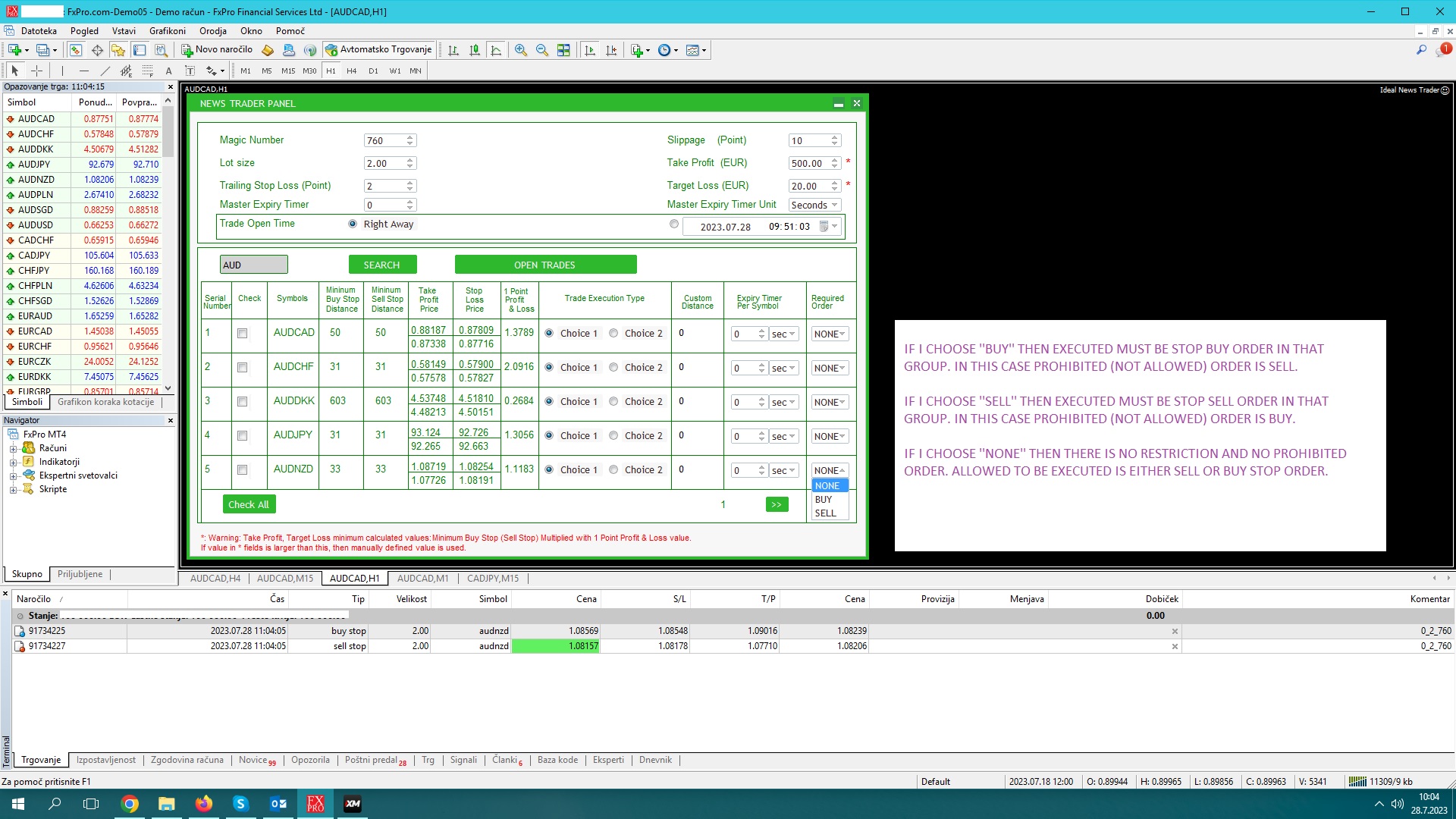
One tool (lets call it Tool1) is as one, out of many, features, placing two opposite Stop orders: one buy, one sell with perfectly well recognized ''group'' of being linked to each other so the tool always knows which stop buy belongs to which stop sell and vice versa. This is because when one stop gets executed, another one gets automatically closed with closure reattempts until it is closed successfully. Also in case if there are multiple groups (one stop buy one stop sell) of the same symbol on the same mt4 terminal at the same time (e.g. two groups would mean four orders: each group one stop buy, one stop sell) then the tool has to know which exact order to close once one is executed: the one belonging to the same group of two orders from where one was executed. Such grouping feature works good. Settings like investment size, SL, TP, timing of adding the stop orders (e.g. at defined time in either broker's time zone, or my chosen timezone, etc) and a lot more are all defined on the dashboard of the Tool1. I can even use a restriction and define which exact stop order must be executed in the group: stop buy or stop sell. In case if opposite stop order is executed and not required one then the entire group, so both stop orders, executed one (against required type buy or sell) and the one that remained pending, will be automatically and immediately closed with closure reattempts if both are not closed successfully on the first attempt. Previous sentence is of CRUCIAL IMPORTANCE for you to understand the case so I'm asking you to please read it again. There are many other features in Tool1. I can even have entire group (one stop buy, one stop sell) automatically closed while being Pending if one stop position, within a group, doesn't execute in particular maximum set time. So far what I said is important for you to move forward on this bug fixing project. I have a strong belief that everything works perfectly in Tool1 so nothing needs to be done here. I only have to describe it because it works in connection with Tool2.
Second tool (lets call it Tool2) is separated on two parts: two different EX4 files. One part is working on the source terminal and another part of the same Tool2 is working on target terminal(s) where target ones can be in unlimited quantity on the same computer where source terminal is operating. On source terminal is used Demo trading account to test the trades first. On target terminal(s) is/are used real accounts. As one, out of many, features, the Tool2 is transmitting the orders from source terminal to target terminal(s) after required chosen Condition happens. Transmission happens immediately when condition happens. I have four conditions that I can choose but only one is operating on source terminal at the same time. I repeat: the condition must happen and only when it does (if it does). the transmission of order will be done from one source terminal to either one or multiple target terminals. I'm defining the target terminals in settings of EX4 used on source terminal. Everything is done within defined Channel Communication. One channel ONLY per one source terminal and unlimited target terminals. If I would use multiple source terminals then this means multiple Channel Communication IDs because only one Channel can be used for one direction (from one source terminal to one or multiple target terminals). Conditions to define when transmission of order from source to target terminals can happen are (I can pick whichever I want from Source EX4 but only one on one Channel ID at the same time) defined on the following link: https://justpaste.it/ajv4t
There are many features integrated in Tool2. One out of many is that Tool2 is modifying SL/TP values according to very strictly defined complex rules that have nothing to do with this bug fixing project. There are other features, many of them, that I won't describe because they have nothing to do with this.
BUG DESCRIPTION:
Based on what I said above, so you have some background, I'm describing the bug that occurs very rarely but it does and it should NEVER occur again. The problem I'm very rarely having is the following:
Sometimes it happens that Tool1 is not closing prohibited type of executed order (the one against set restriction in Tool1: SEE ATTACHED IMAGE FILE), although it must, because Tool2 does the transmission of order from source to target terminal so fast, after order (prohibited one) gets executed, that Tool1 doesn't have enough time to react with instant closure of this prohibited order which got executed while opposite was was set to be required (restricted). I hope you understood this. I will say it again: Sometimes, very rarely but it does, it happens that Tool2 does the transmission of order from one source terminal to one or multiple target terminals (according to Channel ID) so fast that Tool1 doesn't even complete the process of automated closure regardless if closure reattempt is needed or not. This must NEVER happen because prohibited type of executed orders must ALWAYS be successfully automatically closed by Tool1 (i repeat: Tool1 and not Tool2) but the problem is that Tool2 is doing the transmission too quickly and I don't even know if chosen condition has successfully happened. In the settings of Tool2 on Source EX4 side is a field ''transmitter_autoclose_enabled'' (true/false) but this field has nothing to do with the bug because it only means that after allowed (required) stop order is executed and after it is successfully correctly transmitted to target terminal(s) then it is auto closed on source terminal. This is completely different subject comparing to the bug I'm describing. The bug is that Tool2 is very rarely (but should never happen) transmitting prohibited executed orders from source to target. I think the reason is that Condition (whichever is active) is recognized as being Matched (Happened) so quickly after execution happens that Tool1 can't even complete the instant closure. See image file. This gives me a doubt if Condition even really happened. We are talking about microseconds. I'm looking to have this bug fixed so Tool1 will be able to complete what it intends to do. The logs are showing that everything is OK on the side of Tool1: it really attempted to auto close prohibited executed order in the group immediately when it was executed but Tool2 did the transmission (recognized Condition to happen) to target terminal(s) so fast that it had been done even before ''immediate closure'' by Tool1 happened. Therefore the bug is in Tool2 and not Tool1. This bug has to be solved because if prohibited order gets executed then Tool1 should always be able to auto close this executed order, together with pending order from the same group to where prohibited order was belonging to.
I will send presentation material on your request. I only have audio (speech) description because when I was recording the presentation I somehow missed that I'm recording audio only and not doing screen recording so I had to create additional files to show what I'm talking about on audio (mp3) file. I will send you this on request. For now I'm only attaching a file to clarify word phrase ''prohibited executed order''
I NEED 100% ATTENTION AND GUARANTEE FROM YOU THAT YOU WILL NOT MODIFY OR ANYHOW TOUCH, NOT EVEN BY ACCIDENT, WHAT IS NOT NEEDED TO SOLVE THE BUG. Please be 100% sure that you will leave everything in the code 100% untouched as it is with exception whatever is needed to be done to solve this bug.