NorthSlope EA
- Experts
- Version: 1.30
- Activations: 10

A live trading signal running NorthSlope is currently available for users who want to monitor the EA's real-time trading activity and ongoing performance.
The signal can be used to observe actual trades, equity development, drawdown and strategy behaviour under live market conditions.
NorthSlope — AAPL H1 Trend-Following Expert Advisor
NorthSlope is a focused, long-only Expert Advisor built specifically for trading Apple Inc. (AAPL) on the H1 timeframe.
It is designed for traders who prefer patience, controlled exposure and clear rules over constant activity, aggressive recovery systems or excessive position accumulation.
NorthSlope does not attempt to trade every market movement. It waits for favourable bullish conditions, opens one controlled position and allows established trends room to develop.
Built for disciplined AAPL trend participation
NorthSlope follows a selective trend-following approach designed around one objective:
Participate in sustained bullish AAPL movements while keeping unsuccessful trades controlled.
The EA combines trend direction, momentum confirmation, volatility-aware protection and risk-based position sizing before opening a trade.
It does not use:
- Grid trading
- Martingale
- Averaging down
- Recovery baskets
- Loss-based lot multiplication
- Short positions
- Multiple overlapping NorthSlope entries
Every trade is treated independently. A losing position is closed according to the strategy rules rather than being followed by additional exposure.
Why NorthSlope is different
Many automated systems attempt to create smooth historical results by adding more positions when the market moves against them.
NorthSlope takes the opposite approach.
It is built around:
- One directional strategy
- One managed position at a time
- Predefined exposure
- Volatility-based protection
- Selective H1 entries
- No recovery mechanics
- No fixed trade duration
- No forced profit target by default
The objective is not to achieve a high win rate.
NorthSlope is designed to accept controlled losing trades while allowing successful AAPL trends to generate larger movements when market conditions remain favourable.
This means the strategy may lose more trades than it wins and can experience consecutive losses. Its performance depends on the relationship between controlled losses and larger profitable trends.
Designed exclusively for Apple
NorthSlope is not a generic multi-asset robot.
It has been developed and tested primarily for:
Asset: Apple Inc.
Recommended symbol: AAPL or the broker’s equivalent
Timeframe: H1
Direction: Long only
Platform: MetaTrader 5
Depending on the broker, Apple may appear under names such as:
- AAPL
- AAPL.NAS
- AAPL.OQ
- AAPL.US
- APPLE
The user must confirm that the selected MetaTrader 5 broker offers Apple with suitable contract specifications and historical data.
Using NorthSlope on unrelated assets or untested timeframes is not recommended.
How NorthSlope operates
NorthSlope evaluates completed H1 market data and waits for bullish trend conditions to become sufficiently aligned.
When a valid setup appears, the EA:
- Confirms the broader bullish structure.
- Checks that trend momentum remains favourable.
- Calculates the initial protective level using current volatility.
- Determines the position size according to the selected risk.
- Opens one long position.
- Manages the trade until the protective stop or strategy exit condition is reached.
NorthSlope does not close a trade simply because a fixed number of candles or hours has passed.
A position may remain open for an extended period while the bullish trend remains valid.
The exact internal entry logic and calibrated settings form part of the EA’s proprietary strategy.
Risk-based position sizing
NorthSlope calculates trading volume dynamically using:
- Account equity
- Selected risk percentage
- Distance to the initial protective stop
- Broker contract specifications
- Minimum and maximum trading volume
- Available margin
The standard configuration targets a nominal risk of approximately 0.5% of account equity per trade under normal execution conditions.
This is a target, not a guaranteed maximum loss.
Actual results may be affected by:
- Overnight gaps
- Slippage
- Spread changes
- Commissions
- Swaps
- Liquidity
- Contract size
- Broker execution
- Minimum lot restrictions
Users should always verify the expected monetary exposure in Strategy Tester and on a demo account before enabling live trading.
Recommended account size: $10,000 or more
NorthSlope is designed primarily for accounts with sufficient capital to support stock contract specifications and risk-based position sizing.
Recommended minimum account size:
$10,000 USD or equivalent
Using NorthSlope with less capital is not recommended.
On smaller accounts, the broker’s minimum volume may prevent the EA from sizing positions accurately according to the selected risk. This can result in:
- Exposure higher than intended
- Rejected entries
- Limited risk granularity
- Greater impact from commissions and minimum contract sizes
- Reduced ability to absorb consecutive losses
The exact capital requirement depends on the broker, leverage, Apple contract specification and minimum tradable volume.
A larger account does not eliminate risk, but it generally provides more flexibility for controlled position sizing.
Tested across multiple trading environments
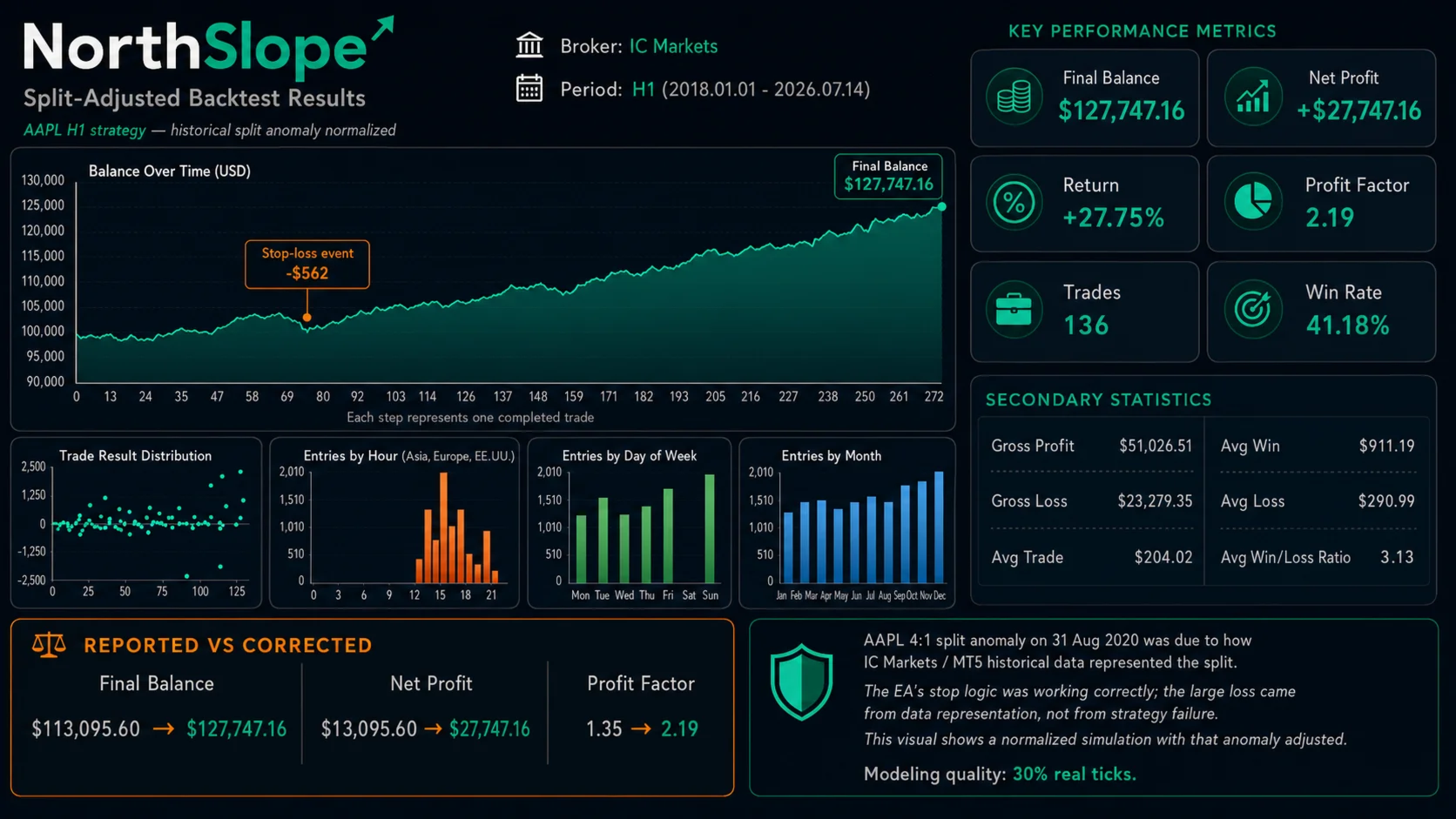
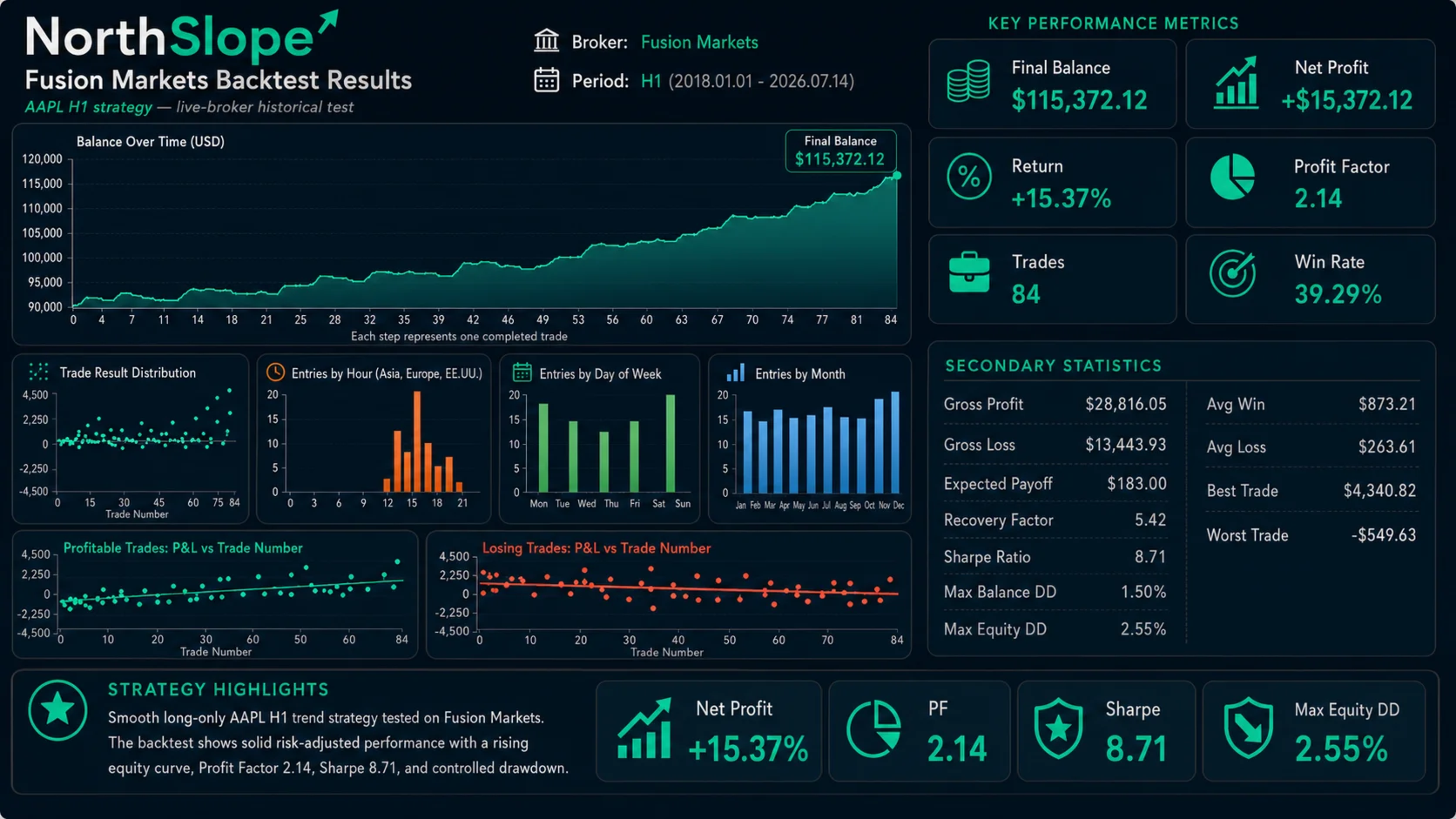
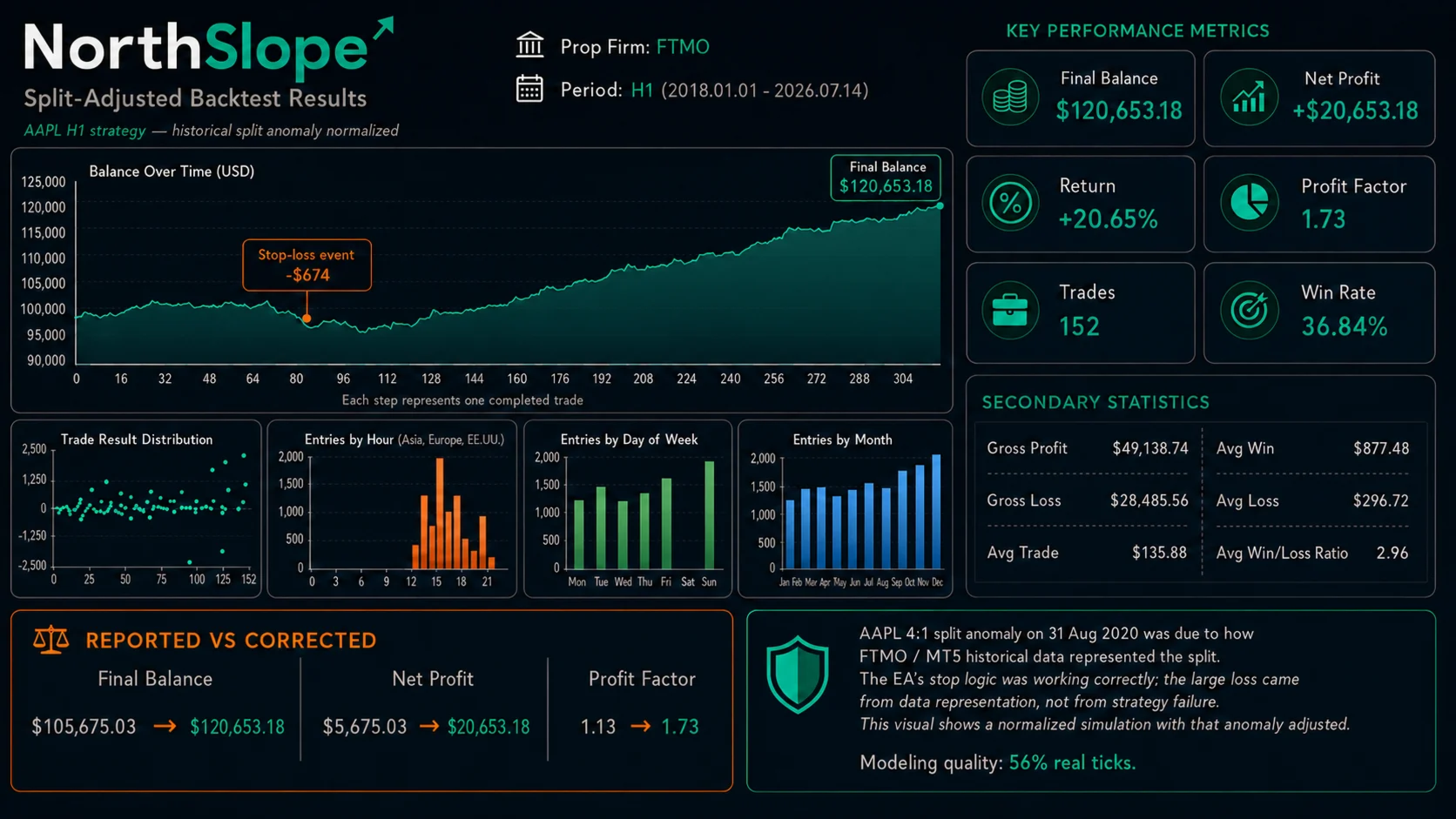
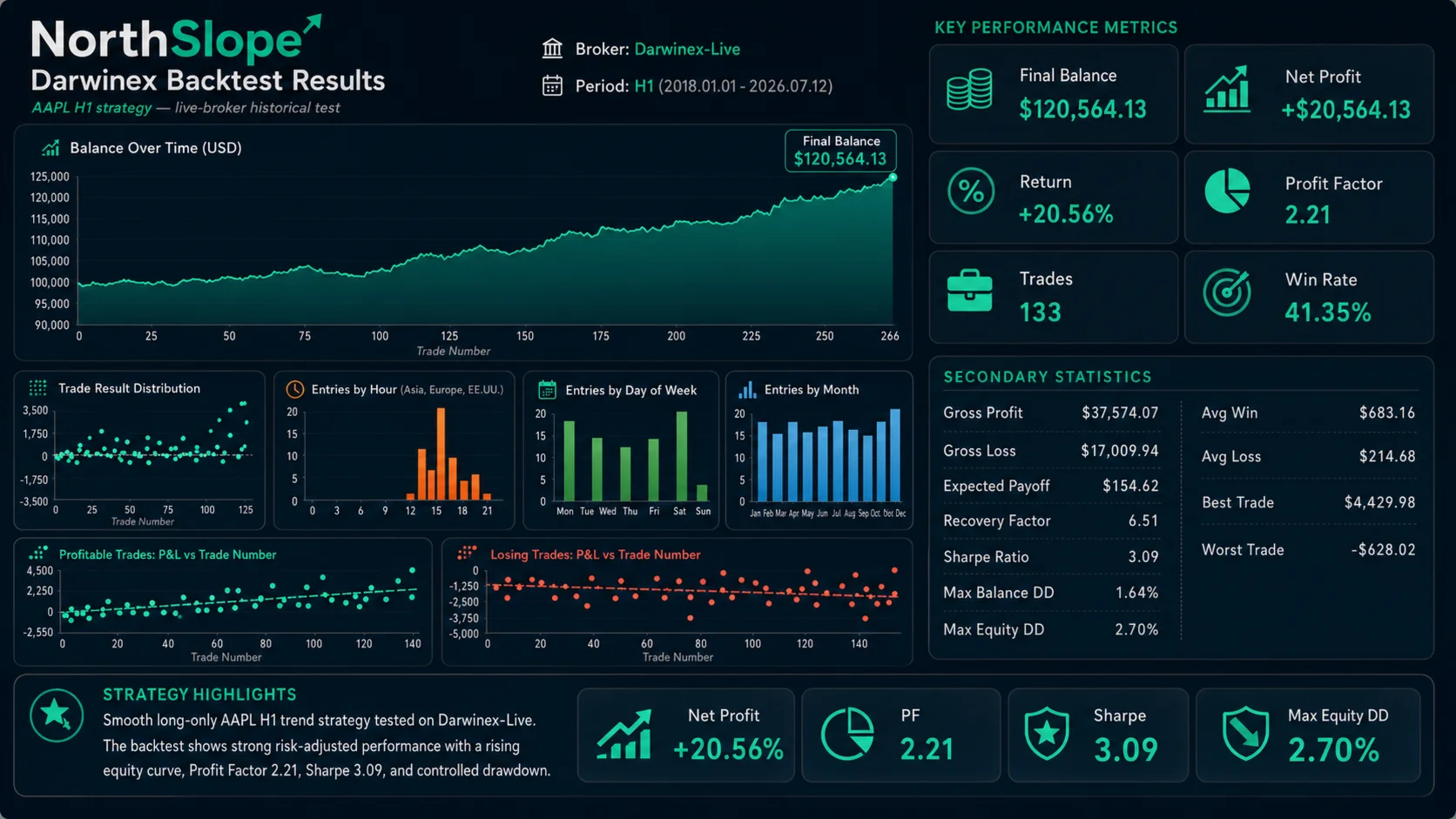
NorthSlope has been evaluated using historical AAPL data from several MetaTrader 5 environments, including:
- Darwinex
- BlackBull Markets
- Fusion Markets
- IC Markets
- FTMO demo infrastructure
The purpose of these tests was not to obtain identical figures on every platform.
Different brokers and trading environments may provide different:
- Historical prices
- H1 candle formation
- Spreads
- Commissions
- Swaps
- Contract sizes
- Market sessions
- Tick quality
- Execution assumptions
- Corporate-action handling
Despite these differences, the tested environments generally preserved the same core strategy behaviour:
- Long-only AAPL trend participation
- Rising historical balance curves
- Controlled position exposure
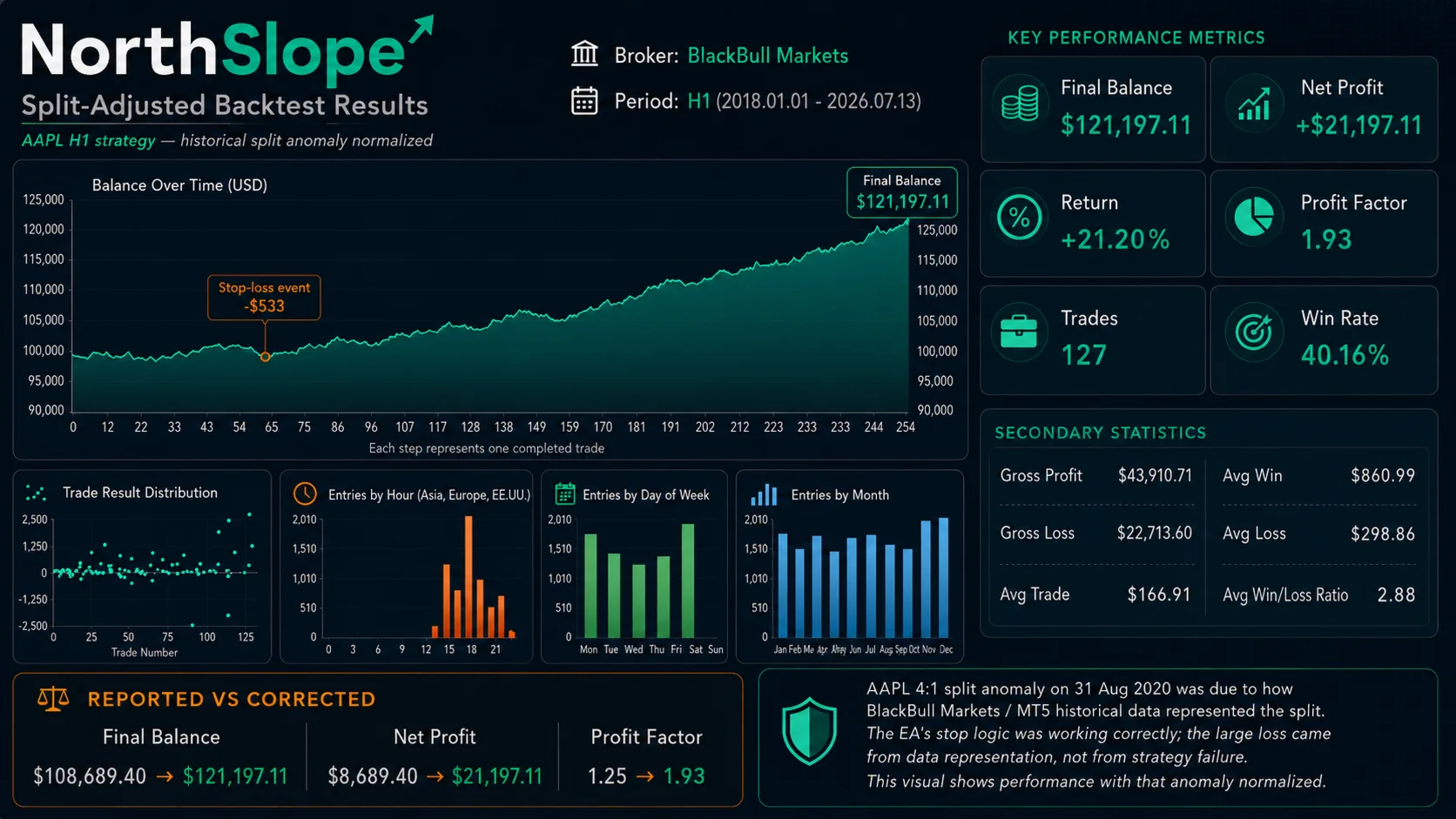
- Lower win rates combined with larger average winning trades
- No grid, martingale or averaging down
- Positive historical outcomes across the tested periods
These results do not guarantee that every broker, period or future market environment will be profitable.
Users should reproduce the test using their own broker data before making a decision.
Apple stock splits and historical data
Apple has completed several stock splits, including the 4-for-1 split in August 2020.
Some MetaTrader 5 brokers may represent these corporate actions incorrectly in historical data. A position opened using pre-split prices and closed using post-split prices may produce an artificial loss that does not reflect the real market event.
This is a data-representation issue rather than necessarily a strategy failure.
For more reliable testing:
- Use split-adjusted historical data.
- Review positions that remain open across corporate actions.
- Begin the test after the relevant split when suitable data are unavailable.
- Compare results across more than one broker.
- Inspect individual trades rather than relying only on the final balance.
Backtest results may change substantially depending on how the broker handles historical stock adjustments.
Main features
- Automated AAPL trading
- H1 trend-following strategy
- Long positions only
- Selective momentum confirmation
- Volatility-based initial protection
- Equity-based position sizing
- Strategy-based exits
- One managed position at a time
- No grid
- No martingale
- No averaging down
- No recovery baskets
- No short selling
- No fixed trade duration
- No fixed Take Profit by default
- Compatible with MetaTrader 5
Who NorthSlope is designed for
NorthSlope may be suitable for traders who:
- Want automated exposure to AAPL trends
- Prefer fewer, more selective trades
- Understand that losing streaks are normal
- Can tolerate inactive periods
- Prefer controlled risk over recovery systems
- Have an account of approximately $10,000 or more
- Are willing to test the EA carefully before live use
- Understand that backtest and live results may differ
NorthSlope may not be suitable for traders who expect:
- Guaranteed returns
- Profits every month
- Constant trading activity
- A very high win rate
- No drawdown
- Recovery after every losing trade
- Identical results across every broker
- Suitable position sizing on very small accounts
Recommended setup
For the intended operation:
- Use MetaTrader 5.
- Select the broker’s Apple symbol.
- Use the H1 timeframe.
- Confirm that automated trading is enabled.
- Download sufficient historical data.
- Review the contract size and minimum volume.
- Test the EA in Strategy Tester.
- Run it on a demo account before live deployment.
- Use conservative risk.
- Avoid changing multiple parameters without testing the new configuration.
A free demo can be evaluated in MetaTrader 5 Strategy Tester before renting or purchasing NorthSlope.
Important notice
NorthSlope is an automated trading tool, not a guarantee of profitability.
Historical tests, simulated results, screenshots and monitored performance do not guarantee future outcomes.
The EA can experience:
- Losing trades
- Consecutive losses
- Drawdowns
- Negative periods
- Long periods without entries
- Different results between brokers
- Differences between demo and live execution
Trading financial instruments involves risk and may result in the loss of capital.
Before using NorthSlope on a live account, test it thoroughly using the same broker, symbol, account conditions and settings intended for live trading.